


"Thunderbird can't connect to the server"

I'm getting "Thunderbird can't connect to the server" message, so I can't download messages. However, a message or two will finally download 1-2 hours later.
Same problem on 2 laptops, both running Windows 11. But I know my emails are coming in as I can view them via Spectrum webmail. So the problem isn't the Spectrum servers.
I've logged out and back into Thunderbird, and have re-booted my laptops. No luck. What to do?
Also, is there a place to report problems directly to Thunderbird?
Thanks for any help.
All Replies (12)
Connections via PC email clients is not the same route as via the web browser. All thunderbird can do is send a request through network for a connection. It is then on the spectrum server to respond. You might try reducing number of connections to the server. This is a network issue, not a thunderbird one. And, that it is happening on two laptops, plus a desktop confirms that the issue is separate.
David, thanks for your reply and explanation. I was just on the phone with Spectrum tech support and they can't figure it out either. The rep said, though, that she thinks there was some discussion at her shop earlier today about problems with Thunderbird and Outlook. She created a ticket for their engineers and I'm hoping they can figure this out.
I am going to disact this as the bits sort of need to be addressed in context.
Andrew said
I'm getting "Thunderbird can't connect to the server" message, so I can't download messages. However, a message or two will finally download 1-2 hours later.
My ears just pricked up and asked what is causing things tobog down to the point it takes a couple of hours to clear the logjam.
Same problem on 2 laptops, both running Windows 11. But I know my emails are coming in as I can view them via Spectrum webmail.
That is almost like saying you can view Ebay or Google. Spectrum webmail is by definition a web page. You never get anywhere near the mail protocols that a mail client used to download mail. So like when you go to your sink and turn on the hot water, then the cold. Both cause the water meter to tick over, but most of the plumbing the water goes through is separated from that point to where it actually comes out of the tap. It is the same water but how you get it is entirely different. In this circumstance, both things get email
So the problem isn't the Spectrum servers.
Not necessarily correct. Unfortunately Spectrum have had a fairly long history now of changing things for their legacy roadrunner customers that causes mail client failure and they appear to be largely oblivious.
I've logged out and back into Thunderbird, and have re-booted my laptops. No luck. What to do?
More on that later
Also, is there a place to report problems directly to Thunderbird?
This is the Thunderbird user support forum, it is what is offered by Mozilla for support and it is volunteer based by Thunderbird users. There is no ring the script reading monkey and doing the mindless things the script suggests. Generally the requirement for user support lines is more about clarity of speach than any knowledge of the subject matter. Corporates have a script for that, or a policy that lets them say they bow out.
I've logged out and back into Thunderbird, and have re-booted my laptops. No luck. What to do?
What is needed is to determine exactly what the root cause of the issue is. YOu having what probably amounts to two identical laptops exhibiting the same issue is not really germane. It is a data point, but not all that relevant as the software will be your same chosen software, and most of the setup will be identical because we rarely like to have to change mental gears when we change devices.
So the first and really the most crucial question is what form of antivirus do you use? I have a feeling that this is a very likely cause of your issue. Antivirus product are unfortunately slow, buggy and prone to failure. The same thing has been crashing Norton's now for about 10 years. Have they fixed it. I don't think so, or this forum would not still be receiving questions from folk about the same old collection of mail downloading all the time and no new mail. The clues can be subtly. Antivirus does not pop up a window and say I have crashed, you are one your own. They are fast to point the finger at email and downloads, but never do they announce their own failure to do their job.
You could check in account settings and make sure the accounts are only polled for new messages at startup and again every 15 minutes, that by itself can alleviate a lot of issues as race conditions begin to occur when mail is fetched to frequently. There is just not enough time between for everything to settle down. 15 minute is the time originally set by Hotmail as the most frequent login they would honour. I do not know if that is still their policy but with IMAP account and immediate server notofications a genral check every 15 minutes should be more than adequate.
The next issue is the actual antivirus, I have complained a lot but said little. First disable any email scanning and SCAM and SPAM detection tools. Those latter two are more problematic that the general scanning but all three are unnecessary, or Microsoft's defender would have them as features and it does not.
Try disabling your antivirus entirely. Having a third party products locking up the storage files every few minutes (every-time they change) to undertake a scan can in itself be a problem. Thunderbird defaults to huge files, especially for the inbox where 4 or more gigabytes is common. This is not compatible with most antivirus scanners scanning multiple times a minute. File contention is a real thing.
Now what is the error message in its entirety, verbatim, not your interpretation of what is says. ( a screen shot would be good)
You also need to check the activity manager in Thunderbird to see what Thunderbird "thinks" it is doing. Double clicking the status bar at the bottom of the page will open the dialog listing activities. Not failed connections may block the first part of the window with their yellow triangles. What do any messages of this nature say?
Scroll down to the other icons and have a look there. Are there "no messages to download" and other notifications shown?
NOw the next step.
Open the error console. (ctrl+Shift+J) Use the trash icon on its toolbar to clear it. Attempt top get you mail by pressing shift+F5 What error messages appear in the console? Right click and select copy all message, come to this forum and in a reply on this topic paste in what you copied.
That will do for now I think. I have probably said more than enough.

Matt,
I really appreciate your detailed and helpful reply. The good news is that Spectrum must've come up with a fix overnight because this morning (halleluja!) my email seems (so far at least) to be working. If this happens again, I will have the benefit of your analysis to help guide me---and I will no doubt be posting here again.
Also, you asked about my anti-virus: it's Microsoft Defender, supplemented by weekly (or more) manual scans by Malwarebytes (free version).
Let me ask something related to all this. You mention the problems of Spectrum customers (like me) who have the old rr.com (Roadrunner) email addresses. I've read about this on the web as well. I dread having to change my rr.com email addresses as I've had the same ones for decades and they're on file with a huge number of vendors, accounts, etc., with whom I interact. That said, if I continue to have this kind of problem, I'd have to consider it.
So 2-part question: Should I consider trying to change my Spectrum email address to something more current? I think maybe they're now using @spectrum.net?
Or, if I finally motivate myself to cut the cord with Spectrum altogether, which other email providers work best with Thunderbird? And if I go that route, will the 1000s of messages I have stored in my Thunderbird folders survive the transition?
Many thanks for your help,
Andrew
I will jump in with a suggestion, one that I have frequently offered... - avoid long-term commitment to the 'free' email account that is provided by an ISP, whether spectrum or version or other. the day may come when you want to switch ISPs and that would lock you in. I have been active here for four years, and daily see posts from users who are not getting assistance or information from their ISPs regarding email. It's not their focus. - instead, there are several free services that work well (gmail, outlook, gmx) and many fee-paid ones, such as fastmail.com and mail.com - and others. - verify that spectrum offers a solid forwarding service and autoreply to senders. - if you make the switch, plan to keep spectrum for a minimum of a year to allow time for transition - messages on spectrum can be safely downloaded to PC and then uploaded to the new account (there are several steps in that and I don't go into that here).
Matt has more in-depth knowledge on the various providers. My preference of the free ones is gmx.com, followed by outlook, since a strength of outlook is a decent web interface when thunerbird is not available. I shudder everytime I need to log onto gmail. To me, it's a zoo. Just my thoughts.... :)
David, thanks for your reply. I share your dislike of gmail. I actually have a gmail account but never use it because I just don't like the interface and have trouble finding simple things. But if I used gmail---or any other email provider along with Thunderbird, wouldn't I always be using the Thunderbird interface?
Also, would the countless messages I have in my Thunderbird folders survive the transition from Spectrum to a new provider? They're stored on my hard drive so I'm thinking yes?
The good news is that thunderbird uses standard setup. Thunderbird hand'es all accounts that use IMAP or POP. The setup for thunderbird works the same in thebat, mailbird, emclient, and any other email client that supports IMAP or POP. Also, gmx and outlook have workable interfaces with any browser. And all fee-paid providers provide good interfaces and more. For example, I have a paid service with netaddress and that gives me the ability to send messages for the future, a controlled spam filter, and automatic retention of deleted messages for several months (a feature I use regularly). Fee-paid services also provide direct to user support. Yes, the fact that your messages are already on your PC ensures they would surive. BUT, ask for help prior to a switch. I routinely see users closing IMAP accounts and losing al they messages.
David, thanks for your reply. As for preserving my stored messages, does the fact that I use POP make a difference?
Both IMAP and POP can be preservied, but POP is easier. All you need to do with POP message folders is to exit thunderbird, locate the POP message folders in profile (located normally at Mail\<POP account> folder) and then copy the message files (such as inbox, sent) to the Mail\Local Folders folder. It's that simple, Again, if/when you do this, go slowly.
Thanks, David. POP still has some advantages, I guess.
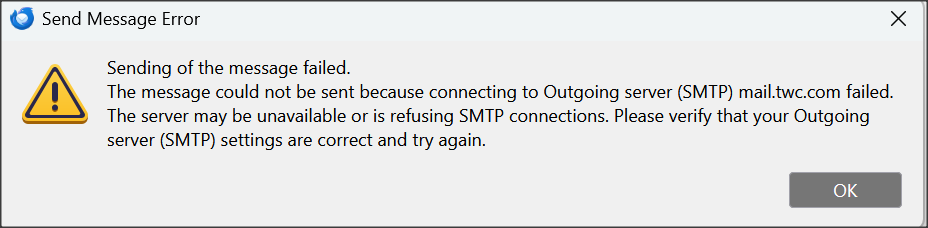
Matt, to answer your question about the exact error message I was getting yesterday, I've attached a screenshot of what I got when trying to send a message.
As I mentioned, as of this AM, the issue (fingers crossed) seems to be resolved.

Ok so after an update a few days ago, I was getting the 'can't connect to server' message.
I tried uninstalling/reinstalling Thunderbird; no help.
Eventually, I deleted and re-established my accounts: success! All good again.
What was the cause? No idea, but as a complete non-tech person, I suspect the update.
Cheers-
Malcolm