


Where can I find documentation how this works?
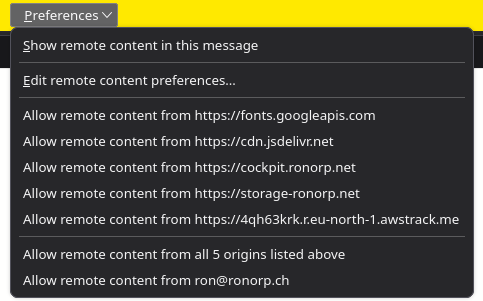
Is there documentation how the different sections of this Perferences screeen work? I find it confusing.
All Replies (8)

Normally I do not allow remote contents. They are not embedded in the email, and they need to be downloaded from a remote server. So if you allow, the server will know something about you.
If you select allow, Thunderbird will remember your selection for future emails - that's the preference.
Thanks. yes I see you are guessing to. I believe the first sections are more or less clear but apparently there is a difference between in this case
"...remote content from all 5 origins listed" and "...remote content for ron@ronor.ch"
The diference could be anything. It is not clear from the message but the developer/system designer had something on the whiteboards making this distinction. As it is not documented, as far as I know hence my question the user has to guess.
If nobody is able to point to a document describing this I will file a request at bugzilla.

I wonder if deepseek is right here: https://chat.deepseek.com/share/74jmkvszzkr2jo3ntd
- Individual origins → fine-grained control, one URL at a time.
- All 5 origins → batch approval of those 5 only.
- Sender-based rule → blanket approval for everything that specific sender includes now or in the future.
Which would mean in the last case whenever ron@ronorp.com decides to add insta/tiktok/amazon-tracking to future emails they will be silently accepted. Is that a right assumption?
christ1 said
https://support.mozilla.org/en-US/kb/remote-content-in-messages
Thanks! Deepseek had it right. I hope I can find this in the future.
It would be great to have thunderbird just stop trackers like forinstance FairEmail does.
Muudetud johannes poolt
Still
- * Show remote content in this message to show remote content just for this particular message.
- * Edit remote content preferences… to display remote content by default (see next section).
- * Allow remote content from <website> to show the remote content stored on this site.
- * Allow remote content from all <n> origins listed above adds all the n websites listed above to the remote content exception list.
- * Allow remote content from <email address> adds the sender email address to the remote content exceptions list.
Mixes the words "Show" and "Add". Are both 3 _and_ 4 store to the global exception list?
johannes said
christ1 said
https://support.mozilla.org/en-US/kb/remote-content-in-messagesIt would be great to have thunderbird just stop trackers like forinstance FairEmail does.
It does block them - Thunderbird auto blocks all remote content.
If you choose to allow remote content from a particular source then that is a risk you are willing to allow. You could do it for just one email or emails from that email address which is also risky because what happens if some nefarious person pretends they are from that email address and they include a load of stuff you do not want - maybe with links to places you would not expect with dire consequences.
You will note that 'Options' drop down also lists all the various remote content in that particular email, so you can block some, all or none. Everything you do not block gets added to an exceptions list unless you only do it for the one email instance. Otherwise how would Thunderbird know what you choose to allow.
Some people like seeing all the images etc - so they choose to allow remote content. It comes with some risks. It's not advisable.
re :* Edit remote content preferences… to display remote content by default.
that link takes you to Settings > Privacy & Security, where you can choose to 'allow all remote content' or click on 'Exceptions' and add or remove saved links.
You can always remove anything you previously selected.
The others 3,4,5 are all auto adding various selected option to that exceptions list. You might allow always from the email address but choose to not allow one remote content section.
My advise, is to not allow anything. But it's your choice.