


move the panel to the right

Hello,
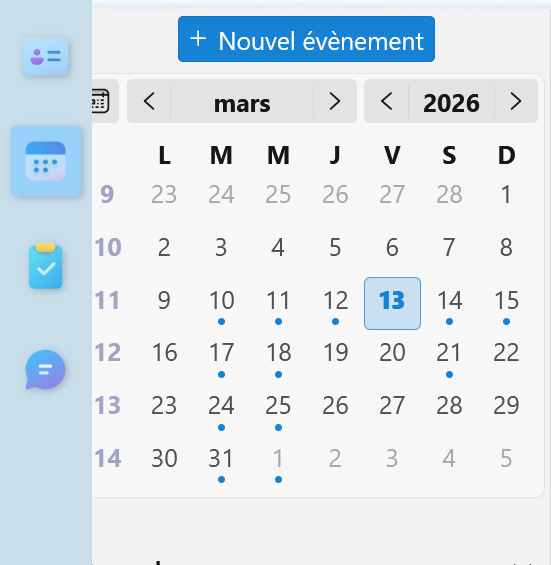
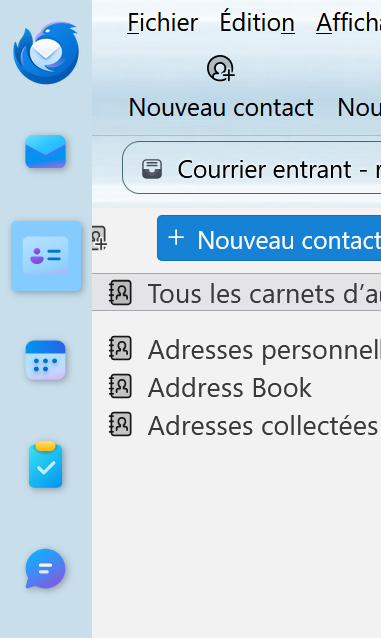
I'm new to thunderbird and i'd like to customize the layouts. I increased the width of the spacesbar by messing with the userChrome.css. however now it is overlapping on the other panels... I managed to fix it on the mail panel, but not the others. (see attached) can you help me find the proper CSS property?
thanks you.
Hello,
I'm new to thunderbird and i'd like to customize the layouts.
I increased the width of the spacesbar by messing with the userChrome.css.
however now it is overlapping on the other panels...
I managed to fix it on the mail panel, but not the others. (see attached)
can you help me find the proper CSS property?
thanks you.
Valitud lahendus
Hi found a solution by chance.
I used :
- messengerBody {
margin-left :50px !important; }
it worked !
Loe vastust kontekstis 👍 0All Replies (1)
Valitud lahendus
Hi found a solution by chance.
I used :
- messengerBody {
margin-left :50px !important; }
it worked !