


How do we make left column show everything below last Account name?

Preamble:
- There are 34 email Accounts listed in left column.
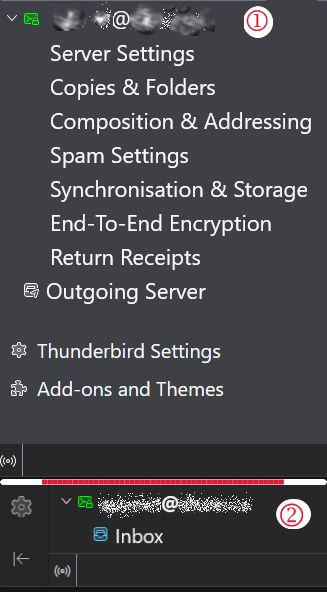
- (Image 1) When in "Mail" column I can see down to only the Account Name (address). There is only the Account Name and Inbox.. nothing else below that can be seen - no Drafts, Sent, Archives, Spam, or Deleted. Anything below is missing too.
- When choosing "Account Setting", everything for last account shows up, plus Outgoing, Add-ons (Image 2). Too, we can see the Offline/Online Icon.
QUESTION: How may I fix it so that the last account shows all sub-sections of the account - i.e., Server Settings, Copies & Folders etcetera right on down to Online/Offline or at best, down to "Return Receipts" for the last account?
Thanks for volunteering, ~r
Preamble:
# There are 34 email Accounts listed in left column.
# (Image 1) When in "Mail" column I can see down to only the Account Name (address). There is only the Account Name and Inbox.. nothing else below that can be seen - no Drafts, Sent, Archives, Spam, or Deleted. Anything below is missing too.
# When choosing "Account Setting", everything for last account shows up, plus Outgoing, Add-ons (Image 2). Too, we can see the Offline/Online Icon.
'''QUESTION:'''
How may I fix it so that the last account shows all sub-sections of the account - i.e., Server Settings, Copies & Folders etcetera right on down to Online/Offline or at best, down to "Return Receipts" for the last account?
Thanks for volunteering,
~r
Muudetud redacted poolt
All Replies (1)
I am confused. that is not the pane that shows folders. That pane is for the account information, such as server settings and passwords, not message folders. Am I misunderstanding? If so, please clarify. thanks.