Junk Section is missing from Settings\Privacy & Security page

My Outlook account moves what it thinks are spam/marketing messages into a "Junk" folder. Sometimes there are important messages here that I must mark as "Not Junk" so that I can continue to receive new messages from this sender in my InBox. I cannot map this Junk folder into Thunderbird even after I go through the steps and checkbox this folder to be synchronized. It does not appear in the left-side "All Folders" section.
Many solutions suggest that I make changes in "Settings\Privacy & Security\Junk" section. This does not exist. There, however, is a "Spam" section. Is this the same functionality?
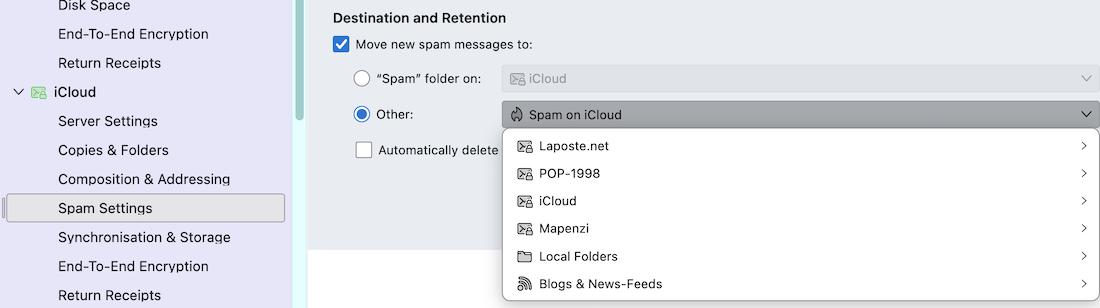
Further, under "Accounts\Spam Settings\" there is a "Destination and Retention" section. There is no "Junk" folder available under "Other".
Does anyone else have problems linking server-side Junk folders into Thunderbird?
Thank you in advance for taking the time if you replied, Tim
ps. I've googled this extensively, and all the presented "solutions" are not accurate as the Thunderbird "junk" options they refer no longer exist. Has there been recent UX changes, and this is now a lingering bug?
All Replies (1)

The term "Junk" has been replaced with "Spam" in recent Thunderbird versions