


Thunderbird slow startup on MacOS

I use Thunderbird on Windows and on Mac. I'm wondering why the startup time on Mac is significantly longer on MacOS. I'm currently on Tahoe 26.0.1 but Thunderbird has always been a slow starter. Can I change any setting to remedy this. At the moment I have two mail accounts configured both Gmail.
All Replies (17)
What versions of Thunderbird?
Define "slow" please in terms of numbers.
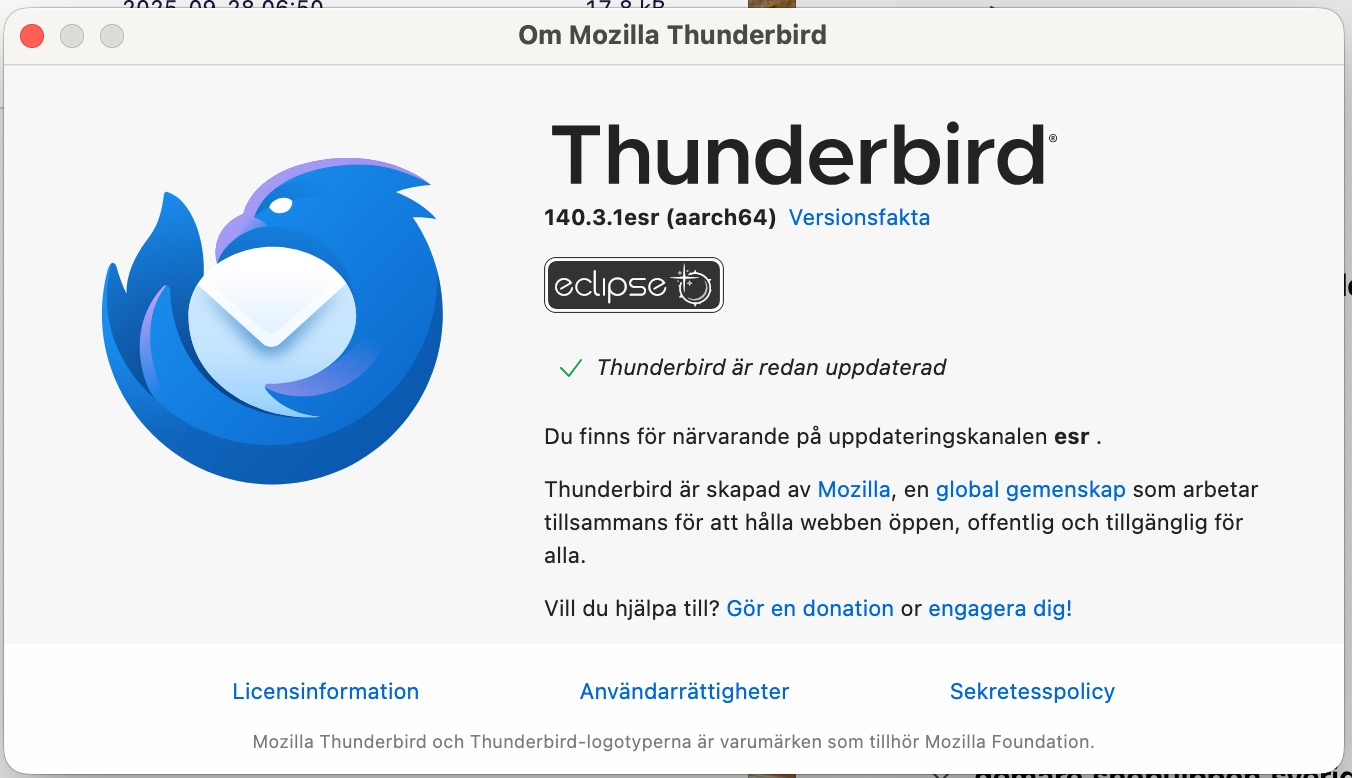
Version, see screen shot.
Startup time 12,96 seconds.
As comparison Mac mail starts in 3,26 seconds and MS Outlook starts in 5,05 seconds on the same Mac.
In a virtual win 11 machine on the same Mac I get a startup time of 4 seconds with the same version of Thunderbird.

Does the same happen when you start Thunderbird in "troubleshoot mode"? Hold down the Alt (Option) key and launch Thunderbird ...
> In a virtual win 11 machine on the same Mac I get a startup time of 4 seconds with the same version of Thunderbird.
Tried disabling Thunderbird's access to the Mac address book?
"troubleshoot mode" did not do it, maybe one second faster.
"Disabling Thunderbird's access to the Mac address book?" I'm not sure where one does that but I removed it from the Thunderbird address book and "PANG" I got a startup time around 3 seconds 😊 One could say it solved the problem but it created a new one. It's not a showstopper for me but it would be nice to have continued access to the Mac address book.
IIRC, the current workaround for this situation is set up the Mac AB so it syncs to the cloud, and then set up Thunderbird AB as carddav to the cloud. Haven't tried it myself yet.
After activating iCloud start TB and open the Address Book tab. Click on the "Create a new address book" symbol and select "New CardDav Address Book" (image) Fill in your username (your Apple identifier) and as location type https://contacts.icloud.com/contacts/ (image)
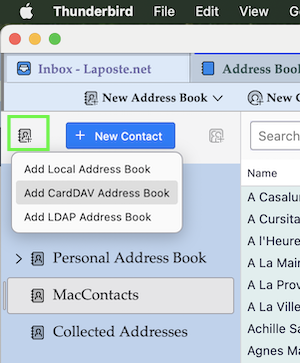
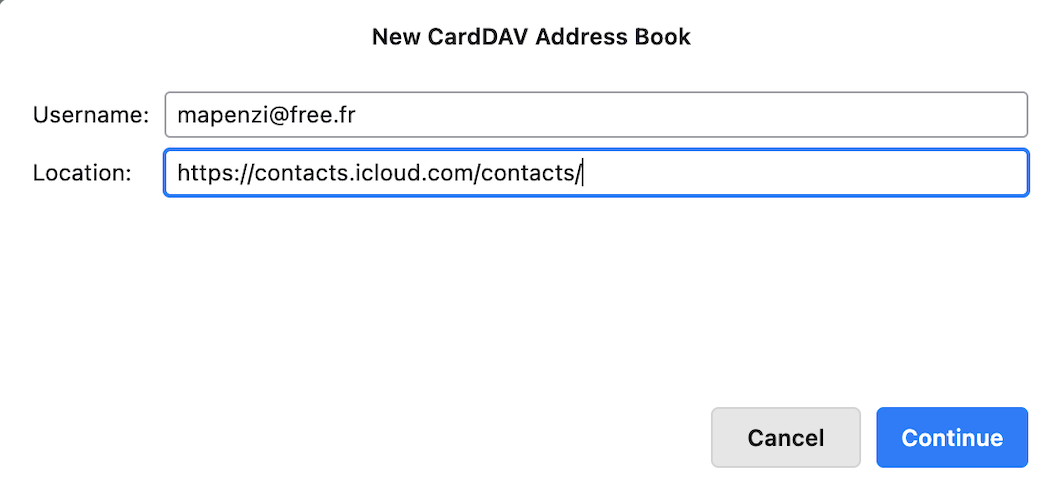
Unfortunately I can't get it to connect. Via the web browser I can go to https://www.icloud.com/contacts/ but I can't make Thunderbird to connect!
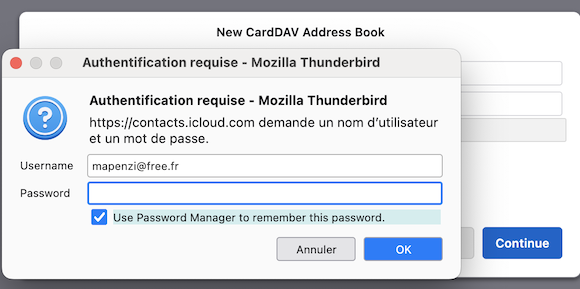
After clicking on "Continue" in the second image you should see a new window asking for your password.... Did you activate iCloud and the two factor identification for your Apple account ? https://support.apple.com/en-us/102660
Muudetud Mapenzi poolt
Hi Yes, Two factor identification is activated.
I also get the second window but I get a yellow line "unable to connect"
Accessing my contacts via web browser(Safari) works as it should.
I don't know if I need to ad my AppleID mail account as a mail account in Thunderbird?
At the moment I only have to work email addresses, both gmail, configured.
I tried to ad the mail account in TB, using my credentials that works in a web browser, but I get an authentication error!
I understand that it might be Apple security that creates my problem but I could use information from TB on what I need to do in order to be able to access my AppleID mail account.
A side note: I haven't checked it before but apparently TB does not remove outgoing SMPT server from an account when the account is deleted! I found six old server entries that I removed manually.
Thanks.
It's a few years ago that I activated iCloud and created my y.xxxxxx@icloud.com account in Thunderbird. You first have to générate an app-specific password https://support.apple.com/en-us/102654 Probably you also have to activate the "Two-factor authentication for Apple Account" https://support.apple.com/en-us/102660

I solved this is issue managing my contacts with CardDAV instead of direct access to the Mac Contacts. In my PC it loaded instantly but in my Mac took 60 seconds.
Now in my Mac also loads instantly after doing that. Settings > Privacy & Sec> Contacts > Thunderbird > Disable
If you want to re-add and manage your contacts in Thunderbird, now it is not necessary any addon since current versions support CardDAV natively : Add a New Address Book > Add CardDAV Address Book
(remember that the address is like https://pXXX-contacts.icloud.com and the password is a app-specific password, not your regular Apple ID password)
Gustavo 140.6.0esr (64-bit)
I can't get it to log on iCloud! I'm using Thunderbird for two other accounts than the one where I have my Mac/iCloud address book. Is it maybe so that I have to configure the iCloud mail account in Thunderbird in order to get it to work?
LesJen said
I can't get it to log on iCloud!
What do you want to say with this statement ? You can't login to https://www.icloud.com/ or you can't configure your iCloud account in Thunderbird?
I'm sorry to be not clear. I can't get Thunderbird to log in following the instructions given above, and I was speculating if I had to configure the email account where I want to connect to the address book first? I only need the address book. I'm reading the mail from the MacOS mail client. Thanks!
I still don't understand your new problem. You have two accounts in Thunderbird but you are reading the mail from Apple Mail? If the" instructions given above" are those of sbrbl2003 in his message from 1/8/26, 6:20 AM I don't want to interpret them. Maybe he will come back...
No new problem, still the same. Description: Thunderbird has two Gmail accounts configured and working. Goal: I would like to connect to my MacOS Contacts via CardDAV. Configuring is not a problem but I have had problems with authentication. I now realised that when one writes https://contacts.icloud.com/ as URL the authentication window comes back once more and asks for a password for https://pxxx-contacts.icloud.com/ and then one has to write in the pxxx number in the URL for it to work. I was not observant on the last step to manually fill in the pxxx number.
Consider this problem solved. :-)