

Teema arhiveeriti.
Please ask a new question if you need help.

Solved
Archived
Changing the # of days to retain messages in account settings/disk space

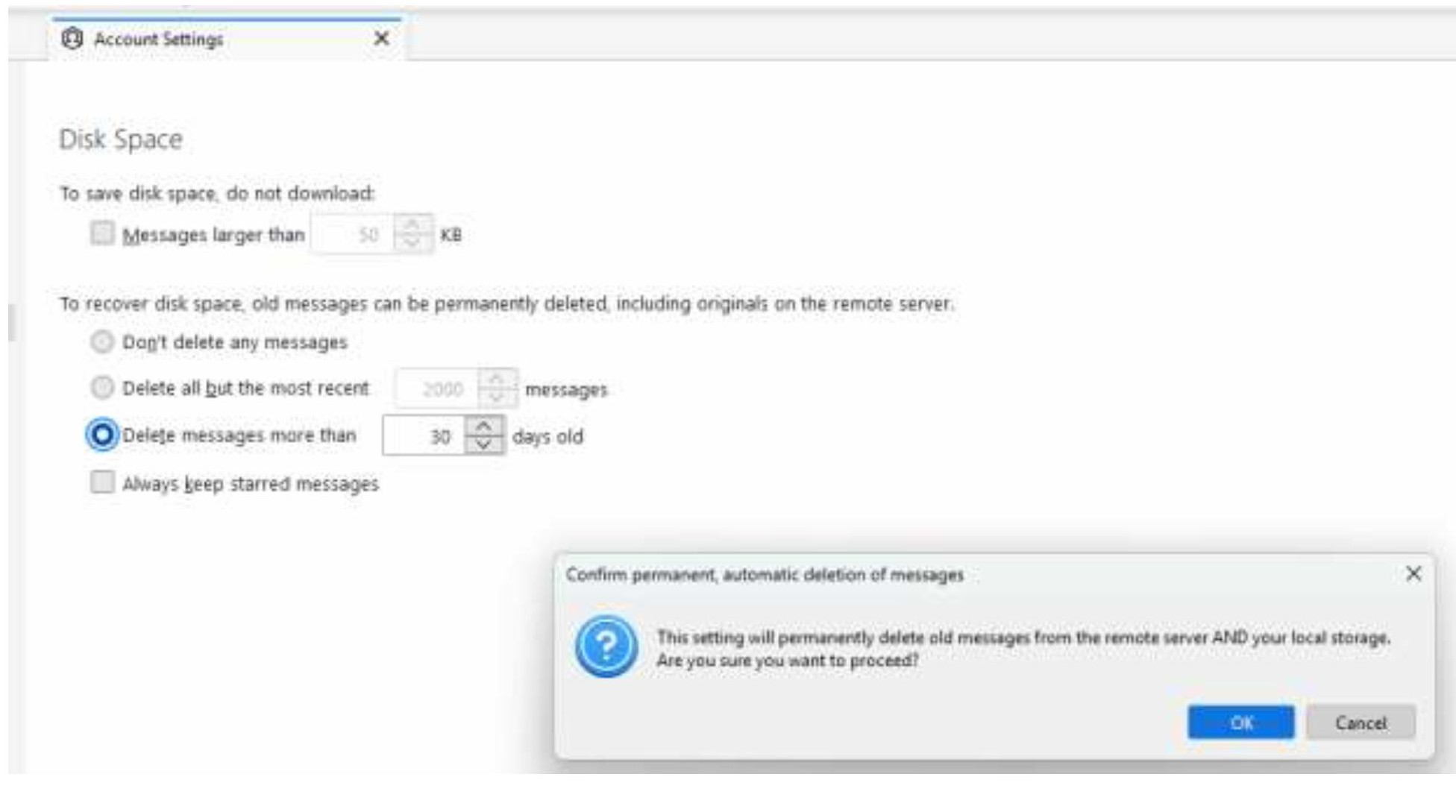
When I try to change the number of days messages are kept in my inbox (from the default of 30), I get a pop-up window warning me that this will permanently delete the messages and do I want to proceed (see screenshot).
While that pop-up window is up, I can't increase the # of days to retain messages. May I press "OK" and then adjust the number of days messages are retained? Or, if I press "OK" will that immediately delete all messages older than 30 days?
Thanks!
When I try to change the number of days messages are kept in my inbox (from the default of 30), I get a pop-up window warning me that this will permanently delete the messages and do I want to proceed (see screenshot).
While that pop-up window is up, I can't increase the # of days to retain messages. May I press "OK" and then adjust the number of days messages are retained? Or, if I press "OK" will that immediately delete all messages older than 30 days?
Thanks!
All Replies (3)
Valitud lahendus
Press ok and then change the number of days. That message is just a warning.
Thank you so much for the speedy response, David! My inbox is also sending its appreciation for pointing the way to a successful crash diet!
You're welcome. And thanks for the smile. :)