


How to get Thunderbird working with Bluehost ???

So I had the darndest time getting Thunderbird working as my domain email client through Bluehost. I got past the initial configuration of username/password/mailbox setting. But, I still can't send/receive email. When I attempt to email myself from Gmail, here's the problem I get:
550 Please turn on SMTP Authentication in your mail client. mail-wm0-f53.google.com [74.125.82.53]:42771 is not permitted to relay through this server without authentication.
Bluehost gave me some additional mailbox settings so I can figure this out.
Where do I start? What do I do? Help! I'm lost.
Thanks,
Dan
Muudetud Wayne Mery poolt
All Replies (14)
In order for us to better investigate this issue you need to add a little more non-personal information.
Please add the troubleshooting information to your post To find the Troubleshooting information:
- Open Help (or click on three-line-icon and select Help)
- Choose Troubleshooting Information
- Use the button Copy to clipboard to select all. Do not check box "Include account names"!
- Paste this in your post.
Please also add the result of these troubleshooting steps to your post
- Does Thunderbird work in TB Safe mode (see Thunderbird Safe Mode)?
Thanks for your prompt help Matt,
I have the Safe Mode Results at the end of this post (nothing unusual).
Here's the Troubleshooting info:
Application Basics
   Name: Thunderbird
   Version: 52.5.2
   User Agent: Mozilla/5.0 (Windows NT 10.0; WOW64; rv:52.0) Gecko/20100101 Thunderbird/52.5.2
   Profile Folder: Open Folder
             (Local drive)
   Application Build ID: 20171221110448
   Enabled Plugins: about:plugins
   Build Configuration: about:buildconfig
   Memory Use: about:memory
   Profiles: about:profiles
 Mail and News Accounts
   account1:
     INCOMING: account1, , (imap) secure.emailsrvr.com:993, SSL, passwordCleartext
     OUTGOING: , secure.emailsrvr.com:465, SSL, passwordCleartext, true
   account2:
     INCOMING: account2, , (none) Local Folders, plain, passwordCleartext
   account3:
     INCOMING: account3, , (imap) box544.bluehost.com:143, alwaysSTARTTLS, passwordCleartext
     OUTGOING: , box544.bluehost.com:26, alwaysSTARTTLS, passwordCleartext, true
   account9:
     INCOMING: account9, , (imap) mail.easyamazonprofits.com:143, alwaysSTARTTLS, passwordCleartext
     OUTGOING: , mail.easyamazonprofits.com:465, SSL, OAuth2, true
Crash Reports
 Extensions
   Lightning, 5.4.5.2, true, {e2fda1a4-762b-4020-b5ad-a41df1933103}
   Send Later, 6.3.3, true, sendlater3@kamens.us
   Thunderbird Conversations, 2.13.4, true, gconversation@xulforum.org
Important Modified Preferences
Name: Value
     accessibility.lastLoadDate: 1491357776
     accessibility.typeaheadfind.flashBar: 0
     browser.cache.disk.capacity: 358400
     browser.cache.disk.filesystem_reported: 1
     browser.cache.disk.smart_size_cached_value: 358400
     browser.cache.disk.smart_size.first_run: false
     browser.cache.disk.smart_size.use_old_max: false
     dom.apps.reset-permissions: true
     extensions.lastAppVersion: 52.5.2
     font.internaluseonly.changed: true
     font.name.monospace.el: Consolas
     font.name.monospace.x-cyrillic: Consolas
     font.name.monospace.x-unicode: Consolas
     font.name.monospace.x-western: Consolas
     font.name.sans-serif.el: Calibri
     font.name.sans-serif.x-cyrillic: Calibri
     font.name.sans-serif.x-unicode: Calibri
     font.name.sans-serif.x-western: Calibri
     font.name.serif.el: Cambria
     font.name.serif.x-cyrillic: Cambria
     font.name.serif.x-unicode: Cambria
     font.name.serif.x-western: Cambria
     font.size.fixed.el: 14
     font.size.fixed.x-cyrillic: 14
     font.size.fixed.x-unicode: 14
     font.size.fixed.x-western: 14
     font.size.variable.el: 17
     font.size.variable.x-cyrillic: 17
     font.size.variable.x-unicode: 17
     font.size.variable.x-western: 17
     mail.openMessageBehavior.version: 1
     mail.winsearch.firstRunDone: true
     mailnews.database.global.datastore.id: 81625058-ff9d-4b7a-90e3-591164edeb0
     mailnews.database.global.views.conversation.columns: {"threadCol":{"visible":true,"ordinal":"1"},"flaggedCol":{"visible":true,"ordinal":"3"},"attachmentCol":{"visible":false…
     mailnews.database.global.views.global.columns: {"threadCol":{"visible":true,"ordinal":"1"},"flaggedCol":{"visible":true,"ordinal":"3"},"attachmentCol":{"visible":false…
     media.gmp.storage.version.observed: 1
     network.cookie.prefsMigrated: true
     network.predictor.cleaned-up: true
     places.database.lastMaintenance: 1515453646
     places.history.expiration.transient_current_max_pages: 122334
     plugin.importedState: true
     print.printer_Canon_MG5700_series_Printer.print_bgcolor: false
     print.printer_Canon_MG5700_series_Printer.print_bgimages: false
     print.printer_Canon_MG5700_series_Printer.print_duplex: -437918235
     print.printer_Canon_MG5700_series_Printer.print_edge_bottom: 0
     print.printer_Canon_MG5700_series_Printer.print_edge_left: 0
     print.printer_Canon_MG5700_series_Printer.print_edge_right: 0
     print.printer_Canon_MG5700_series_Printer.print_edge_top: 0
     print.printer_Canon_MG5700_series_Printer.print_evenpages: true
     print.printer_Canon_MG5700_series_Printer.print_footercenter:
     print.printer_Canon_MG5700_series_Printer.print_footerleft: &PT
     print.printer_Canon_MG5700_series_Printer.print_footerright: &D
     print.printer_Canon_MG5700_series_Printer.print_headercenter:
     print.printer_Canon_MG5700_series_Printer.print_headerleft: &T
     print.printer_Canon_MG5700_series_Printer.print_headerright: &U
     print.printer_Canon_MG5700_series_Printer.print_in_color: true
     print.printer_Canon_MG5700_series_Printer.print_margin_bottom: 0.5
     print.printer_Canon_MG5700_series_Printer.print_margin_left: 0.5
     print.printer_Canon_MG5700_series_Printer.print_margin_right: 0.5
     print.printer_Canon_MG5700_series_Printer.print_margin_top: 0.5
     print.printer_Canon_MG5700_series_Printer.print_oddpages: true
     print.printer_Canon_MG5700_series_Printer.print_orientation: 0
     print.printer_Canon_MG5700_series_Printer.print_page_delay: 50
     print.printer_Canon_MG5700_series_Printer.print_paper_data: 1
     print.printer_Canon_MG5700_series_Printer.print_paper_height: -1.00
     print.printer_Canon_MG5700_series_Printer.print_paper_name:
     print.printer_Canon_MG5700_series_Printer.print_paper_size_unit: 0
     print.printer_Canon_MG5700_series_Printer.print_paper_width: -1.00
     print.printer_Canon_MG5700_series_Printer.print_resolution: 600
     print.printer_Canon_MG5700_series_Printer.print_reversed: false
     print.printer_Canon_MG5700_series_Printer.print_scaling: 1.00
     print.printer_Canon_MG5700_series_Printer.print_shrink_to_fit: true
     print.printer_Canon_MG5700_series_Printer.print_to_file: false
     print.printer_Canon_MG5700_series_Printer.print_unwriteable_margin_bottom: 0
     print.printer_Canon_MG5700_series_Printer.print_unwriteable_margin_left: 0
     print.printer_Canon_MG5700_series_Printer.print_unwriteable_margin_right: 0
     print.printer_Canon_MG5700_series_Printer.print_unwriteable_margin_top: 0
     security.sandbox.content.tempDirSuffix: {53b1f1ca-46eb-430a-ba7d-1091439a6bb8}
Graphics
     GPU #1
     Description: Intel(R) HD Graphics 5500
     Vendor ID: 0x8086
     Device ID: 0x1616
     RAM: Unknown
     Drivers: igdumdim64 igd10iumd64 igd10iumd64 igd12umd64 igdumdim32 igd10iumd32 igd10iumd32 igd12umd32
     Driver Version: 20.19.15.4549
     Driver Date: 11-10-2016
     Features
     Direct2D: false
     DirectWrite: true (10.0.16299.15)
     WebGL Renderer: Google Inc. -- ANGLE (Intel(R) HD Graphics 5500 Direct3D9Ex vs_3_0 ps_3_0) -- OpenGL ES 2.0 (ANGLE 2.1.0.2a250c8a0e15)
     AzureCanvasBackend: skia
     AzureCanvasAccelerated: 0
     AzureFallbackCanvasBackend: cairo
     AzureContentBackend: skia
JavaScript
Incremental GC: 1
Accessibility
   Activated: 0
   Prevent Accessibility: 0
Library Versions
     Expected minimum version
     Version in use
     NSPR
     4.13.1
     4.13.1
     NSS
     3.28.6
     3.28.6
     NSS Util
     3.28.6
     3.28.6
     NSS SSL
     3.28.6
     3.28.6
     NSS S/MIME
     3.28.6
     3.28.6
SAFE MODE:
When I restart Thunderbird in safe mode, I do not have any problems at all that I notice.
The error I get when trying to email myself from Gmail is:
550 Please turn on SMTP Authentication in your mail client. mail-wr0-f169.google.com [209.85.128.169]:38001 is not permitted to relay through this server without authentication.
...And that's the same error I get whether starting Thunderbird in Safe Mode or not.
Thanks again for your help Matt,
Dan
Your bluehost settings do not conform to the info given out by bluehost. Try using what they recommend. https://my.bluehost.com/hosting/help/email-application-setup
Note: Replace the part that says example.com with your domain name.
IMAP: Incoming Server mail.example.com Port: 993 Connection Security: SSL/TLS Authentication method: Normal Password
User Name = full email address Password is the same password you would use to access webmail account via browser.
Outgoing server (SMTP): mail.example.com Port: 465 Connection Security: SSL/TLS Authentication method: Normal Password
Strange...I followed this link from them: https://my.bluehost.com/hosting/help/thunderbird
And did it live with customer support. It's worked in the past, but not this time.
I'll give your steps a run-through and let you know what happens.
Ok, so this is really interesting. When I follow the instructions I found from Bluehost (from the link posted above), I end up using START/TTLS:143 for IMAP and START/TTLS:587 for SMTP.
Something confusing's going on here.
Anyway, I folled your instructions, toad-hall. I ended up having to do FIle --> Existing Mail Account because I couldn't find where to change some of the settings that needed to be change.
Anyway, after entering those settings from Bluehost, I get the error shown below in the screenshot.
What do I need to do to fix this? I feel sooooooooo close!
Dan
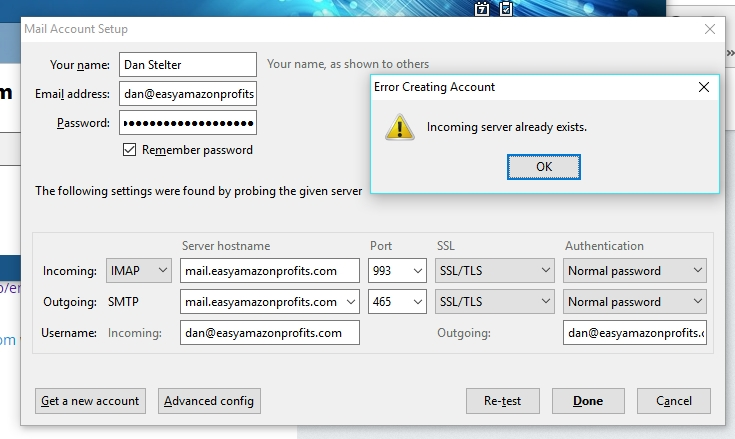
That error message is a little misleading.
I think it means you have two (or more) accounts with the same name. And since Thunderbird doesn't explicitly ask you to set the name of an account when setting it up (it automatically creates the account's name from the email address), this can happen all too easily.
Go to Tools|Options|Advanced|General
Click on Config Editor.
If challenged, tell it you'll be careful.
Enter mail.server.server*.name into the search box.
Ignoring the entries that say "nameserver", check the remaining items and see if any of them have the same name as another. If so, double click one to edit it to make them all unique.
When done, close this dialogue, close and re-start Thunderbird.
These changes may break some things like filters, but it gets you back in charge.
Muudetud Zenos poolt
Soooooooooooooooooooooooo close.
I tried it. I can now send outbound. However, sending email to myself from gmail results in this error:
50 Please turn on SMTP Authentication in your mail client. mail-wr0-f178.google.com [209.85.128.178]:44825 is not permitted to relay through this server without authentication.
...Even though I just followed all the above steps to a T.
What's next?
Any thoughts why I can't send outbound email? What could the problem be?
So, I keep getting this error:
550 Please turn on SMTP Authentication in your mail client.
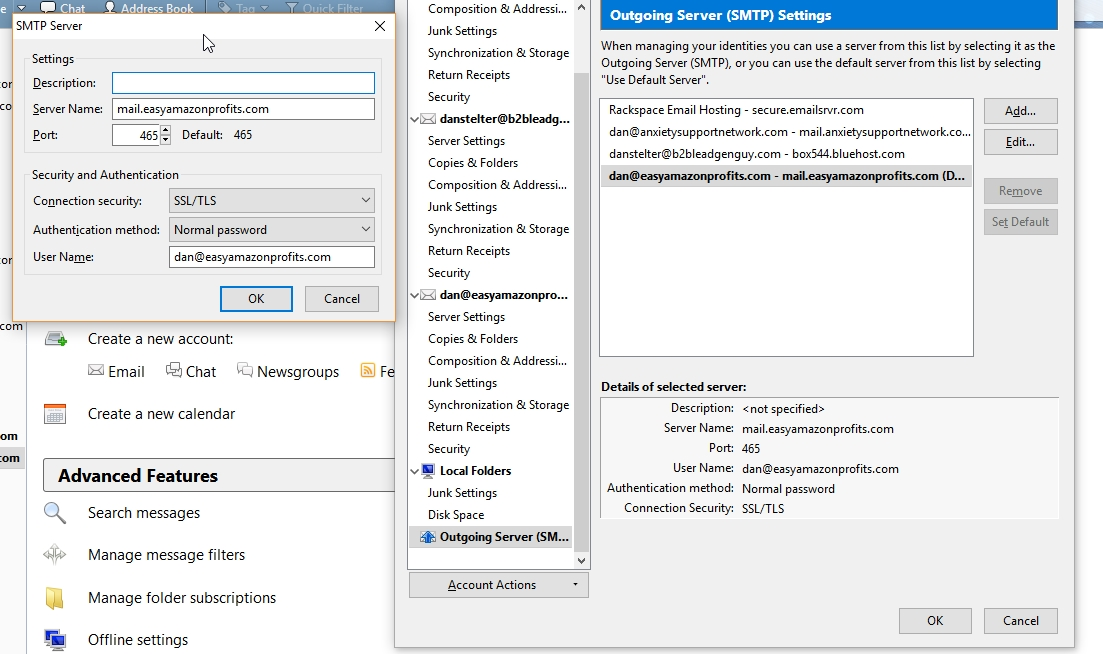
Despite the fact I have SMTP turned on for outgoing email. See the attached screenshot.
What am I missing?
Thanks,
Dan
danstelter said
…sending email to myself from gmail…
But there is no explicit sign of a gmail account in your settings.
Are one or more of your accounts actually hosted by gmail?
And now you're giving us examples from your amazon-linked email account. Is this one actually hosted by gmail?
Please add the troubleshooting information to your post To find the Troubleshooting information:
- Open Help (or click on three-line-icon and select Help)
- Choose Troubleshooting Information
- Use the button Copy to clipboard to select all. Do not check box "Include account names"!
- Paste this in your post.
Zenos said
danstelter said…sending email to myself from gmail…But there is no explicit sign of a gmail account in your settings.
Are one or more of your accounts actually hosted by gmail?
And now you're giving us examples from your amazon-linked email account. Is this one actually hosted by gmail?
I tried at first to have this account hosted at gmail through Bluehost. But the last I talked to them, they're not even sure you can set up your domain mail to work with them. I had them clear out MX records or double-check, just to make sure they don't cause any issues.
So no, I no longer have Gmail-related settings anywhere at Bluehost. Or, at least I shouldn't.
Bluehost's service has tanked and I'd like to move. But honestly don't know where to go at the moment.
Matt said
Please add the troubleshooting information to your post To find the Troubleshooting information:
- Open Help (or click on three-line-icon and select Help)
- Choose Troubleshooting Information
- Use the button Copy to clipboard to select all. Do not check box "Include account names"!
- Paste this in your post.
Here's the updated troubleshooting info:
Application Basics
   Name: Thunderbird
   Version: 52.5.2
   User Agent: Mozilla/5.0 (Windows NT 10.0; WOW64; rv:52.0) Gecko/20100101 Thunderbird/52.5.2
   Profile Folder: Open Folder
             (Local drive)
   Application Build ID: 20171221110448
   Enabled Plugins: about:plugins
   Build Configuration: about:buildconfig
   Memory Use: about:memory
   Profiles: about:profiles
 Mail and News Accounts
   account1:
     INCOMING: account1, , (imap) secure.emailsrvr.com:993, SSL, passwordCleartext
     OUTGOING: , secure.emailsrvr.com:465, SSL, passwordCleartext, true
   account2:
     INCOMING: account2, , (none) Local Folders, plain, passwordCleartext
   account3:
     INCOMING: account3, , (imap) box544.bluehost.com:143, alwaysSTARTTLS, passwordCleartext
     OUTGOING: , box544.bluehost.com:26, alwaysSTARTTLS, passwordCleartext, true
   account11:
     INCOMING: account11, , (imap) mail.easyamazonprofits.com:993, SSL, passwordCleartext
     OUTGOING: , mail.easyamazonprofits.com:465, SSL, passwordCleartext, true
Crash Reports
 Extensions
   Lightning, 5.4.5.2, true, {e2fda1a4-762b-4020-b5ad-a41df1933103}
   Send Later, 6.3.3, true, sendlater3@kamens.us
   Thunderbird Conversations, 2.13.4, true, gconversation@xulforum.org
Important Modified Preferences
Name: Value
     accessibility.lastLoadDate: 1491357776
     accessibility.typeaheadfind.flashBar: 0
     browser.cache.disk.capacity: 358400
     browser.cache.disk.filesystem_reported: 1
     browser.cache.disk.smart_size_cached_value: 358400
     browser.cache.disk.smart_size.first_run: false
     browser.cache.disk.smart_size.use_old_max: false
     dom.apps.reset-permissions: true
     extensions.lastAppVersion: 52.5.2
     font.internaluseonly.changed: true
     font.name.monospace.el: Consolas
     font.name.monospace.x-cyrillic: Consolas
     font.name.monospace.x-unicode: Consolas
     font.name.monospace.x-western: Consolas
     font.name.sans-serif.el: Calibri
     font.name.sans-serif.x-cyrillic: Calibri
     font.name.sans-serif.x-unicode: Calibri
     font.name.sans-serif.x-western: Calibri
     font.name.serif.el: Cambria
     font.name.serif.x-cyrillic: Cambria
     font.name.serif.x-unicode: Cambria
     font.name.serif.x-western: Cambria
     font.size.fixed.el: 14
     font.size.fixed.x-cyrillic: 14
     font.size.fixed.x-unicode: 14
     font.size.fixed.x-western: 14
     font.size.variable.el: 17
     font.size.variable.x-cyrillic: 17
     font.size.variable.x-unicode: 17
     font.size.variable.x-western: 17
     mail.openMessageBehavior.version: 1
     mail.winsearch.firstRunDone: true
     mailnews.database.global.datastore.id: 81625058-ff9d-4b7a-90e3-591164edeb0
     mailnews.database.global.views.conversation.columns: {"threadCol":{"visible":true,"ordinal":"1"},"flaggedCol":{"visible":true,"ordinal":"3"},"attachmentCol":{"visible":false…
     mailnews.database.global.views.global.columns: {"threadCol":{"visible":true,"ordinal":"1"},"flaggedCol":{"visible":true,"ordinal":"3"},"attachmentCol":{"visible":false…
     media.gmp.storage.version.observed: 1
     network.cookie.prefsMigrated: true
     network.predictor.cleaned-up: true
     places.database.lastMaintenance: 1515453646
     places.history.expiration.transient_current_max_pages: 122334
     plugin.importedState: true
     print.printer_Canon_MG5700_series_Printer.print_bgcolor: false
     print.printer_Canon_MG5700_series_Printer.print_bgimages: false
     print.printer_Canon_MG5700_series_Printer.print_duplex: -437918235
     print.printer_Canon_MG5700_series_Printer.print_edge_bottom: 0
     print.printer_Canon_MG5700_series_Printer.print_edge_left: 0
     print.printer_Canon_MG5700_series_Printer.print_edge_right: 0
     print.printer_Canon_MG5700_series_Printer.print_edge_top: 0
     print.printer_Canon_MG5700_series_Printer.print_evenpages: true
     print.printer_Canon_MG5700_series_Printer.print_footercenter:
     print.printer_Canon_MG5700_series_Printer.print_footerleft: &PT
     print.printer_Canon_MG5700_series_Printer.print_footerright: &D
     print.printer_Canon_MG5700_series_Printer.print_headercenter:
     print.printer_Canon_MG5700_series_Printer.print_headerleft: &T
     print.printer_Canon_MG5700_series_Printer.print_headerright: &U
     print.printer_Canon_MG5700_series_Printer.print_in_color: true
     print.printer_Canon_MG5700_series_Printer.print_margin_bottom: 0.5
     print.printer_Canon_MG5700_series_Printer.print_margin_left: 0.5
     print.printer_Canon_MG5700_series_Printer.print_margin_right: 0.5
     print.printer_Canon_MG5700_series_Printer.print_margin_top: 0.5
     print.printer_Canon_MG5700_series_Printer.print_oddpages: true
     print.printer_Canon_MG5700_series_Printer.print_orientation: 0
     print.printer_Canon_MG5700_series_Printer.print_page_delay: 50
     print.printer_Canon_MG5700_series_Printer.print_paper_data: 1
     print.printer_Canon_MG5700_series_Printer.print_paper_height: -1.00
     print.printer_Canon_MG5700_series_Printer.print_paper_name:
     print.printer_Canon_MG5700_series_Printer.print_paper_size_unit: 0
     print.printer_Canon_MG5700_series_Printer.print_paper_width: -1.00
     print.printer_Canon_MG5700_series_Printer.print_resolution: 600
     print.printer_Canon_MG5700_series_Printer.print_reversed: false
     print.printer_Canon_MG5700_series_Printer.print_scaling: 1.00
     print.printer_Canon_MG5700_series_Printer.print_shrink_to_fit: true
     print.printer_Canon_MG5700_series_Printer.print_to_file: false
     print.printer_Canon_MG5700_series_Printer.print_unwriteable_margin_bottom: 0
     print.printer_Canon_MG5700_series_Printer.print_unwriteable_margin_left: 0
     print.printer_Canon_MG5700_series_Printer.print_unwriteable_margin_right: 0
     print.printer_Canon_MG5700_series_Printer.print_unwriteable_margin_top: 0
     security.sandbox.content.tempDirSuffix: {53b1f1ca-46eb-430a-ba7d-1091439a6bb8}
Graphics
     GPU #1
     Description: Intel(R) HD Graphics 5500
     Vendor ID: 0x8086
     Device ID: 0x1616
     RAM: Unknown
     Drivers: igdumdim64 igd10iumd64 igd10iumd64 igd12umd64 igdumdim32 igd10iumd32 igd10iumd32 igd12umd32
     Driver Version: 20.19.15.4549
     Driver Date: 11-10-2016
     Features
     Direct2D: false
     DirectWrite: true (10.0.16299.15)
     WebGL Renderer: Google Inc. -- ANGLE (Intel(R) HD Graphics 5500 Direct3D9Ex vs_3_0 ps_3_0) -- OpenGL ES 2.0 (ANGLE 2.1.0.2a250c8a0e15)
     AzureCanvasBackend: skia
     AzureCanvasAccelerated: 0
     AzureFallbackCanvasBackend: cairo
     AzureContentBackend: skia
JavaScript
Incremental GC: 1
Accessibility
   Activated: 0
   Prevent Accessibility: 0
Library Versions
     Expected minimum version
     Version in use
     NSPR
     4.13.1
     4.13.1
     NSS
     3.28.6
     3.28.6
     NSS Util
     3.28.6
     3.28.6
     NSS SSL
     3.28.6
     3.28.6
     NSS S/MIME
     3.28.6
     3.28.6
Any further thoughts as to what could be going on here?
I'm dying to get this email account working so I can start scaling my business!