


How do I delete an old email account?

I would also like to remove an old account, but the solution as posted doesn't work for me i.e. :
"open account settings mark the account you want to delete at bottom account actions click on 'remove account' "
When I "open account settings" and "mark the account I want to delete" I see NO "account actions", only "manage accounts", and this displays "default" ticked but greyed out, and likewise "delete". CAN ANYONE HELP ME ON THIS?
Valitud lahendus
Hi, Toad Hall. Many thanks for your easy to follow instructions - they worked! I was confused by Zeno's comment that I couldn't delete a "default" account - when BOTH my accounts were marked as default. But lo! when I followed your instructions the old account was instantly removed. I'm not a a newbie - been using Linux exclusively for the past eight years - but I just couldn't get my head around this problem with TWO default accounts. Thanks again!
Loe vastust kontekstis 👍 0All Replies (15)
Select the account in the folder pane, right click it open the account settings.
Now follow the directions your trying to follow.
I'm not sure I understand what you're looking at given that you don't see "account actions".
But the greying out usually means that the selected account is the default, and you're not allowed to remove that. So select another account and set it as the default, then the old one should become available.
You are aware that the account and all its contents will disappear? Users have been known to delete an account then express surprise that it vanishes. I'm not sure what else they thought should happen.
@Zenos I have not seen it in years as I use the Mail Summaries add-on to give some useful information on an otherwise useless space, but I think the O/P is on the account central page you get when you click the account name in the folder pane. I think I remember there being a manage account entry there.
"Account Central" has "View settings for this account". I can't find "Manage accounts" anywhere in Thunderbird. I'm starting to wonder if the OP has us confused with another mail client.
I was using Mail Summaries myself up to about a year ago when it stopped working for me; maybe a Linux thing. But the current version is all OK, so that's back in and running nicely now.
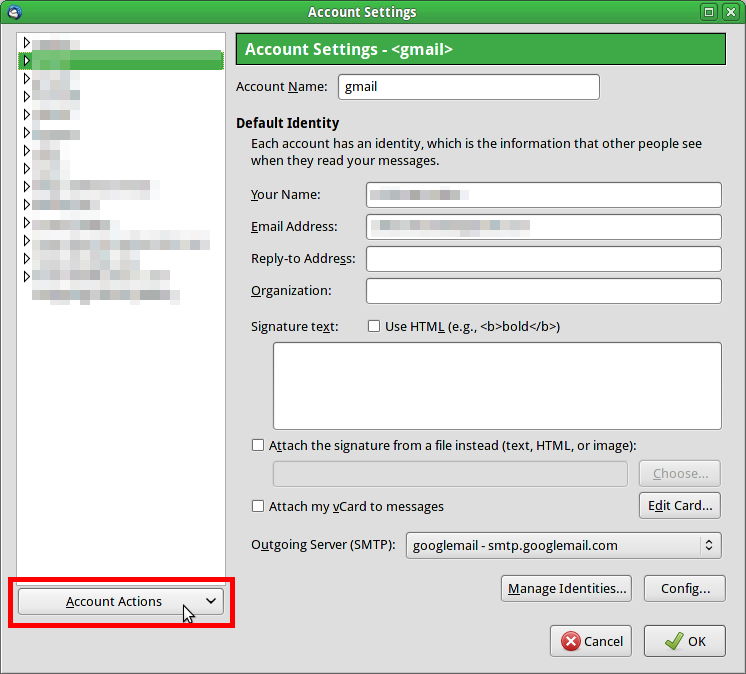
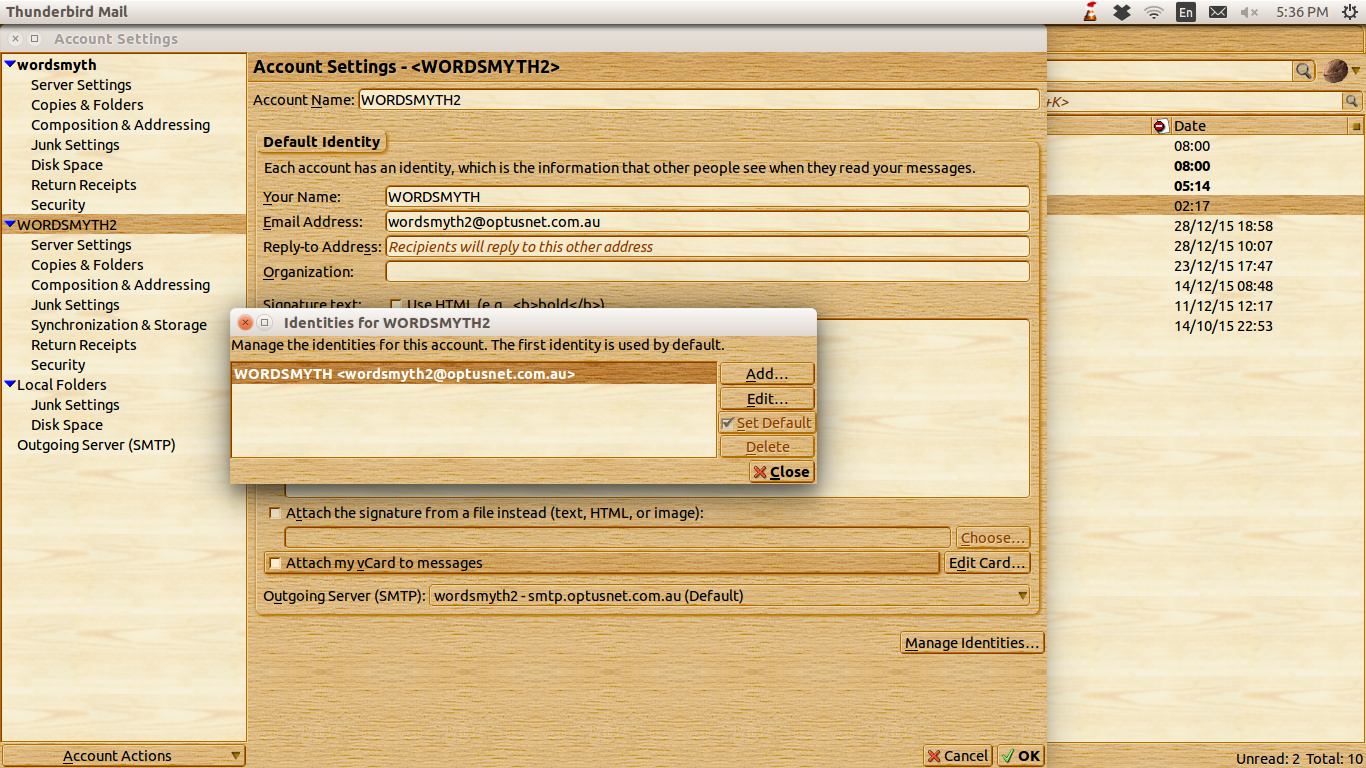
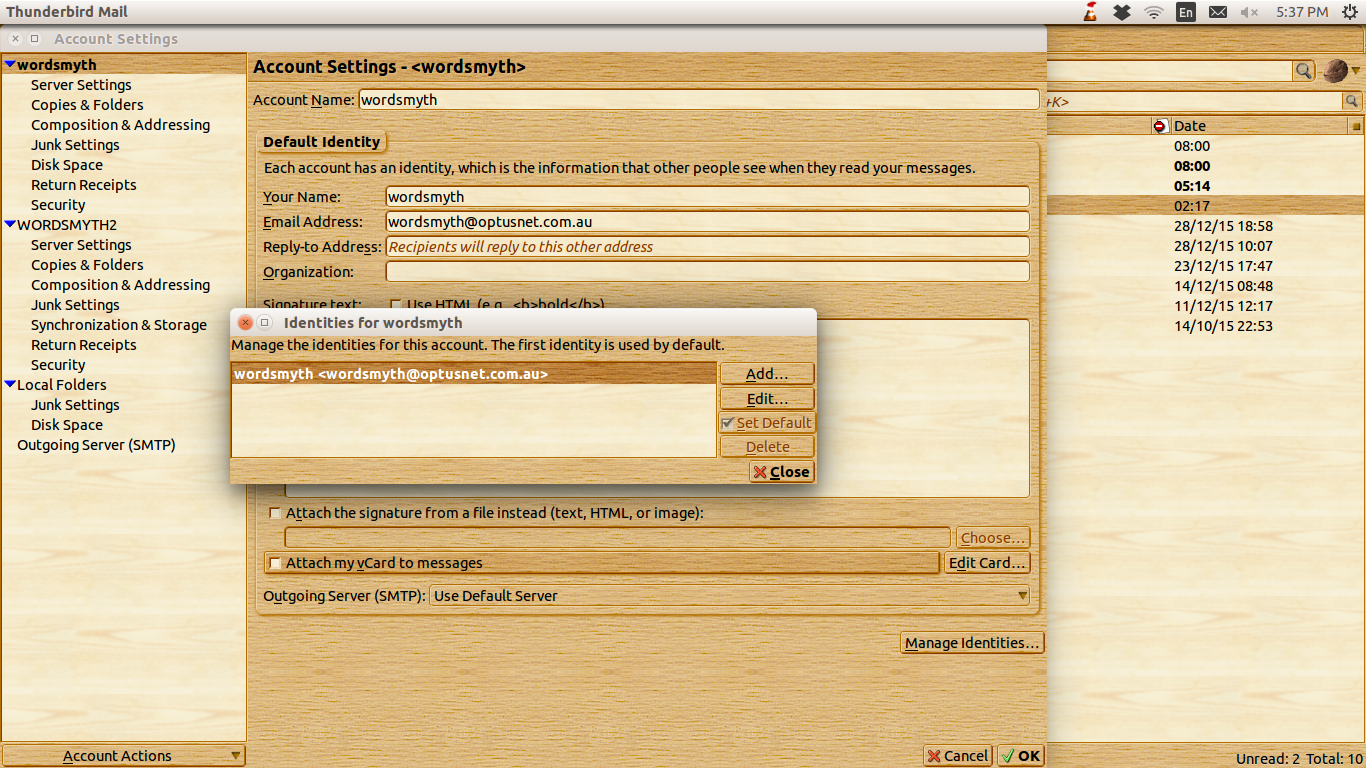
Thanks for your advice, Zeno. But BOTH my old account and my current one are marked DEFAULT. Yet I'm not receiving any email on my old account, just my new one - so no problem with duplication. Still annoying though, to have the old one still in the pane ...
Muudetud wordsmyth2 poolt
Can you provide screenshots of
- the display where it shows two accounts as default, and
- the display where it says "manage accounts"
please?
https://support.mozilla.org/en-US/kb/how-do-i-create-screenshot-my-problem


I've given you a picture of what to click. Where did it say to go to manage identities?
You've "given me a picture"? Sorry, Zeno: no picture received. But I have sent you the screenshots you requested.
Your screen shots show exactly what zenos has told you to do. but you seem to be ignoring the information. You have selected the account in the left pane - this is correct. Then, according to the image, you clicked on 'Manage Identities' button to show that small pop up window. At no point was this suggested.
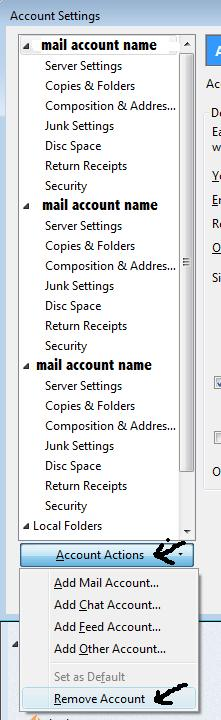
In Account Settings window - see your screen shot or the one shown below. select the account name in left pane Slick on 'Account Actions' - located bottom left on your screen shot. A drop down of options will appear. click on 'Remove account' click on 'OK'
Please note - if that account has any emails stored in it, you will not be able to see those emails, so make sure you have moved any emails you want to keep into a suitable folder in 'Local Folders' mail account before removing the account.
Muudetud Toad-Hall poolt
@Zenos, well that explains why you could not find "Manage Accounts". It does not exist. It is incredibly difficult to locate where someone is going wrong when they simply tell you the wrong thing.
Valitud lahendus
Hi, Toad Hall. Many thanks for your easy to follow instructions - they worked! I was confused by Zeno's comment that I couldn't delete a "default" account - when BOTH my accounts were marked as default. But lo! when I followed your instructions the old account was instantly removed. I'm not a a newbie - been using Linux exclusively for the past eight years - but I just couldn't get my head around this problem with TWO default accounts. Thanks again!
Zeno, I checked back through these messages and now suspect the 'picture' you refer to was an earlier one you sent. But when I click on the attachment the text is shown as a series of grey and black squares - I should have remarked on this at the time, but I've only just checked this out, following a nagging doubt. My apologies for not reporting this sooner - and thanks for your help that started the ball rolling for me!
wordsmyth2 said
Zeno, I checked back through these messages and now suspect the 'picture' you refer to was an earlier one you sent. But when I click on the attachment the text is shown as a series of grey and black squares - I should have remarked on this at the time, but I've only just checked this out, following a nagging doubt. My apologies for not reporting this sooner - and thanks for your help that started the ball rolling for me!