


Can´t connect Alcatel one touch Fire E and a WIn 7 PC /FOS 1.3

Hi There,
besides some other odd things, most blöd thing is, that I can´t use the phone via USB.
When I connect it to the Pc the USB sign shows on the phone and i managed to get the following devices:
Modem: ALCATEL HS-USB Android Modem 9062
YunOS Phone YunOS ADB Interface
But there is still one Fire E under "other devices" left. This ment to be the mass storage device.
Anyone here that can help me out?
Valitud lahendus
does it work with the driver from this external site: http://www.magicdriver.com/driver103347-ver_1.0.6.5.html
it should match to the hardware id you have mentioned...
Loe vastust kontekstis 👍 2All Replies (8)
hello Schrulli, do you have USB-storage enabled in the settings app > storage?
Hi Philipp,
thank you for the help!
I already done this, for all storage I have on this phone. I also changed the standard storage place, but nothing happend.
I used drives from alcatel designed for the Fire Phone, because there are none for the Fire E.
As you can see, there is one last device, not known. :(
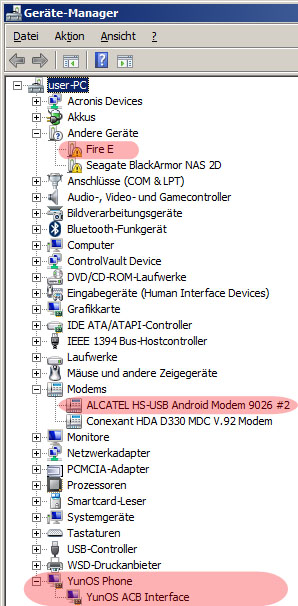
Muudetud Schrulli poolt
does the qualcomm driver from http://www.alcatelonetouch.com/global-en/support/faq/usbdriver.html work?
edit: and if that doesn't work, can you right-click the unknow device in the device manager & go to eigenschaften > details > eigenschaft: hardware-ids and copy/paste its value here....
Muudetud philipp poolt
No it does not work for me :(
Hardware ID´s are:
USB\VID_05C6&PID_9026&REV_0228&MI_03 USB\VID_05C6&PID_9026&MI_03
thank you for the help!
Valitud lahendus
does it work with the driver from this external site: http://www.magicdriver.com/driver103347-ver_1.0.6.5.html
it should match to the hardware id you have mentioned...
Hey philipp,
thanks again, that worked for me! But unfortunately there is still no USB Drive for the Phone. I just rebooted the PC and the Phone, but nothing happend, there i no drive listed. Any other idea for that? As you can see USB is enabled for all storages.
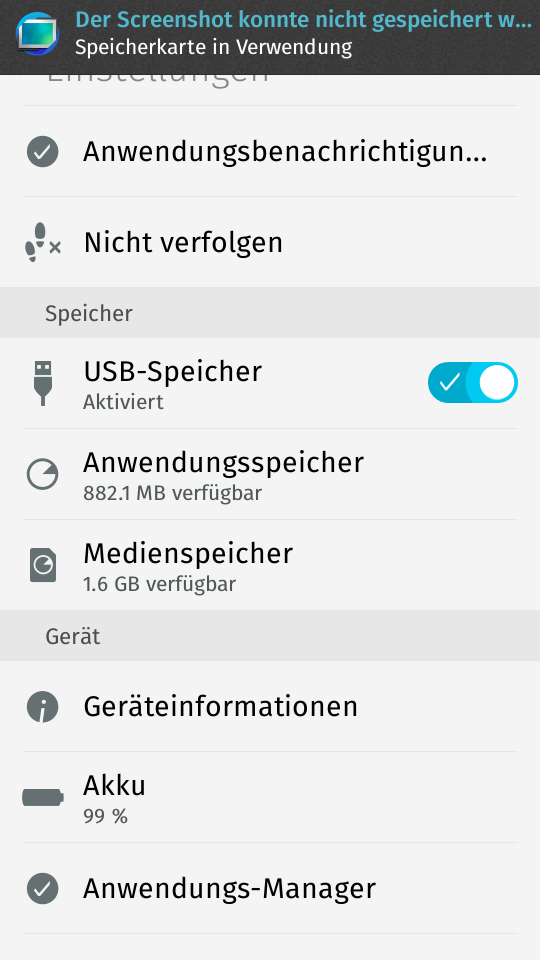
Muudetud Schrulli poolt
Hey there.
I didn´t do anything, but now it works. :)
Thanks a lot philipp, you are my hero!
ok great, you're very welcome :))