

I lost everything?!

I had to reinstall my personal computer, I made SYNC with e-mail and password, but there wasn't key. It's my first time, it says "complete", I thought everything is ok. I did the install and now I see I need some key?!?! Did I lost all my information? HELP!!!
Todas las respuestas (10)
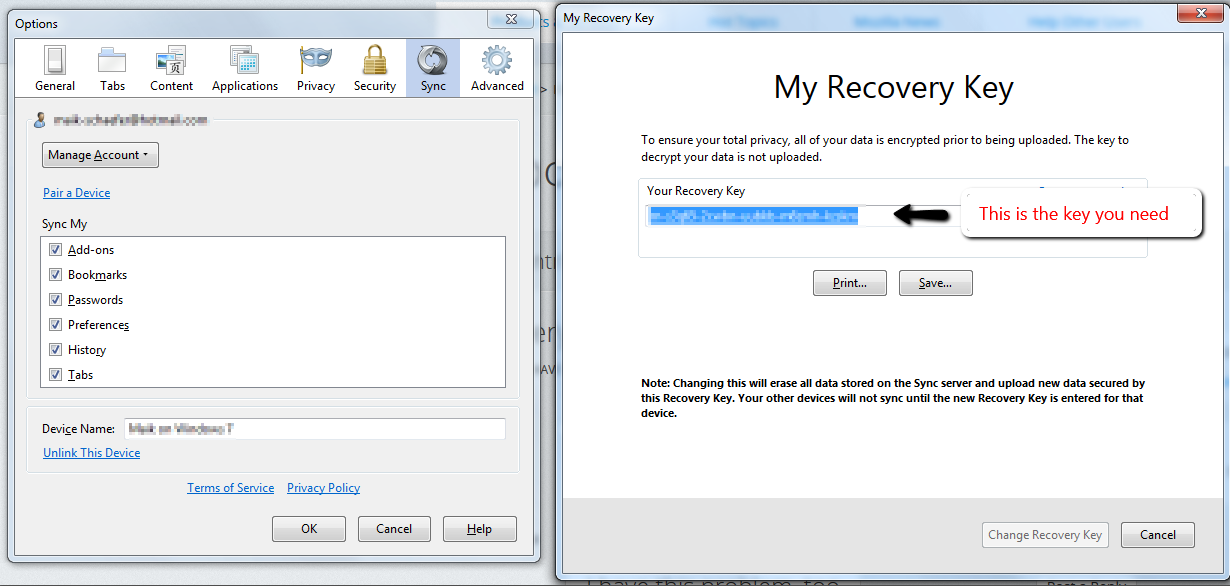
I'm sorry, but if you have lost your decrypt key, you have just lost your data. You can find your decrypt key under
"Options -> Sync -> Manage Account -> My Recovery Key"
I have attached a Screen Shot. Here is it again:

When you reinstalled, did Windows create this folder:
C:\Windows.old\
If so, your old Firefox settings might be in there and we can help you drill down and see what you can recover.
Thanks for the answers, didn't helped me :(
It's strange for me, somewhere in the virtual space I have the info, but I can't go there because of some stupid key :@ "Great"
Well, if you already created a new Decrypt Key the data is lost. Firefox uses such a key to save your data from others.
I have my Mozilla forum sign in data but lost my Firefox forum sign in data. It says your email address is being used. How can I get my FF sign in data back?
See:
Reset Lost or Forgotten Password or delete sync account:
- https://services.mozilla.com/ Firefox Sync » Home
- https://account.services.mozilla.com/
If you do not have a backup copy of the sync key then all data stored on the sync server can be considered as lost. This is because the sync key is used locally to encrypt all data before sending it to the sync server.
Actually I do have the sign in data for Mozilla. I though there was a Firefox forum that I lost the data for but must have been mistaken. I am getting good Firefox support at the Mozilla forum.
hi...i have the same problem, and like jscher2000 said, i have previous automatic backup in C:\Windows.old\
can you please help me to recover my bookmarks and passwords?
i have synced my stuff with firefox sync before sYstem meltdown, but i cant reach it now...i know my user name and password, but dont know recovery key...
Hi 11Iceman11, you can rescue your entire earlier Firefox profile (personal settings folder) from the old path, which is roughly:
C:\Windows.old\Users\yourusername\AppData\Roaming\Mozilla\Firefox\Profiles
The trick is how you transfer it over so your new installation of Firefox can use it. One options is to copy individual files with important data, such as bookmarks and passwords. Another option is to try a complete transplant of the old folder contents into a new one. Here are some resources for those different approaches:
ok thank you, i will try that and get back to you...
edit: Thank you very much, everything worked like a charm, i recovered it all
Modificadas por 11Iceman11 el