


Recipient autocomplete: Show name of address book for suggested contacts

Hello, I just installed a clean version of Thunderbird (version 146.0.1) and set up my email accounts and CardDAV address books.
I do have multiple address books and I tried to find a setting to show the name of the address book for each contact shown in the suggestion list for recipients when composing a new email. However, I could only find a general setting to get suggestions for recipients from local address books, nothing more specific.
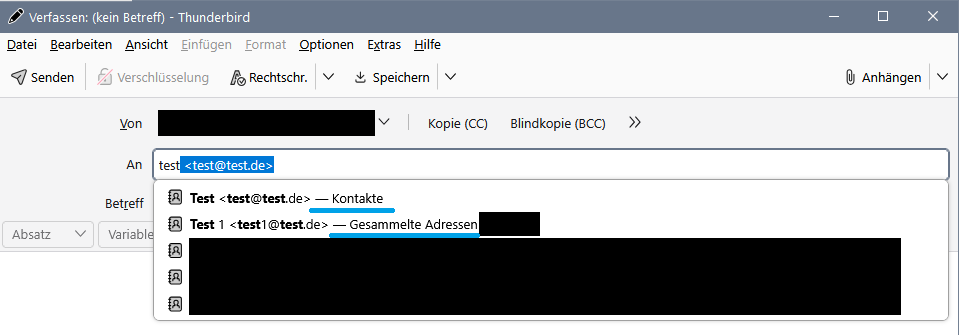
On a different device I still have Thunderbird 140.6.0esr installed. There, the suggestion list does indeed show the name of the address book next to the suggested contact: "name of contact <email@address> - name of addressbook"
I tried to find a corresponding setting for this in version 140.6.0esr, but without success.
So I'm wondering:
- Did the style/layout of the suggestion list change in recent versions?
- Does a setting exist to show the name of the address book in the suggestion list?
Additional info: The only extension that is installed and enabled on both devices is ImportExportTools NG.
Todas las respuestas (5)
Not sure where you're looking. if you are in compose window, press F9. that shows addressbook on left. One of the entries near top is a dropdown for addressbooks. If you set it to 'all address books', the listing will show the addressbook for each entry
Thanks. I'm aware of the contact/address book sidebar. However, I'm talking about the inline auto-suggest in the recipient fields (to, cc, bcc) of the compose window.
Attached is a screenshot of what it looks like in version 140.6.0esr. The parts underlined in blue show the name of the address book in which the suggested contact is stored. This is missing in version 146.0.1.
The only addon which is enabled on both devices is ImportExportTools NG.
I used to have CardBook installed on the device running Thunderbird 140.6.0esr, but I switched to the internal address book a few months ago and uninstalled the CardBook addon.
CardBook has a setting to show the name of the address book for suggested contacts. Maybe some changes / settings from CardBook remained after removing it which is why the name of the address book is still visible in the auto-suggest list on that device.
On my setup, 140ESR and 146, Cardbook is enabled and shows the email address where it should show the address book, but it also colours the background according to the address book, if that option is enabled. So, half of it is working.