


Thunderbird mis-identification of incoming email sender in the "Correspondances" field of the message list.

Thunderbird 140.6.0esr (64-bit) "On Linux LMDE 6" 64 bit, on an Intel platform. An HP small format desktop, using two screens.
I see this issue (below) when receiving digest mail from groups.io See the hopefully attached image. If that didnt come through, I can send you a whole screenshot if needed.
The issue is that the first line is correct. The "sender" is the group "linuxham" and is a mail digest message. The second line "Thunderbird 2025: A Year in Review" is correct.
However.. The third line from the UKMicrowaves group, another groups.io group configured to use "Digest Delivery" mode, is shown as coming from "[edited] @groups.io" Misleading at best! (It is always the linuxham group details that is used, regardless of which group has sent the digest.)
The last two lines are correct.
I see this on all groups.io group mail where what comes to me is in the form of a "Digest" (so as not to flood my inbox.) Does T'Bird handle "Digest" mails differently to one-to-one mails?
This odd labeling of the "Correspondents" started some time ago as a result of a past T'Bird update, but prior to that update, was not an issue. I have "Many" groups.io groups I'm a member of.
Sorry but it's taken me this long to find out how to submit this info and ask the question.
I'd love for this to be fixed, and am willing to test any trial version(s) that may be needed, and/or to provide any other needed system info that would help. I am contactable on [edited from public] @googlemail.com
Oh... I made "Many" attempts over the last year or three to setup a "Mozilla" account to report this, but I now know "Mozilla" has renamed to just "Moz". Sadly, "Moz account creds" are not accepted! to login here.
By accident I found that a Google ID works. Pity that was not sorted some time ago, else I could have reported this sooner. (Better presentation on the T'bird support initial web page would help with such confusion, or is this intentional to filter out lame questions? And lower support costs! I know of others who implement such! ;-)
Anyway, thanks for seemingly letting me in at last. Much appreciated from a long time Thunderbird user of "Many years".
Even with the above wrinkle, it's far the best mail client out there I find. True "Cross Platform" too. (Though I found the Android offering rather "clunky" at best.)
Thanks Again.
Yours...
Dave or G8KBV, yes a "Ham"...

Modificadas por James el
Todas las respuestas (3)
my guess is you have garbage in your address book so deselect it in the settings and see if things change.
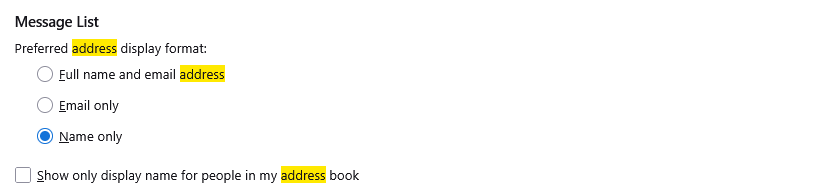
Hello Matt. Thanks for the reply, and yes that seems to be the issue.
However... It's not "Garbage" in that list, it is valid addresses I have corresponded with, there were no "duff" ones in there.
Indeed, deleting them, and the "problem" went away. But...
After replying to a message in a different (groups.io) group, that new address then inappropriately pollutes the "correspondents" column in the mail inbox, but only for other groups.io group messages.
Interestingly, it was again the "last" address in the list that was causing the issue, and only after a program (T'Bird) restart after a system cold start later in the day.
I also do not see the settings/menu selection dialogue you illustrate, so as yet I can't stop it "collecting" addresses.
At present, I've set the inbox message display to show the "From" address, instead of the "Correspondent" address, and will report back how that works out.
This issue was not present before the change to the "New whiz-bang" reworked version a few updates ago, just that it has taken me so long to find a way to successfully get back in here to report it.
I'll be back to report what happens next, with the "From" address column.
Best Regards Matt.
Dave.
Yes it is garbage, and it is added again every time you send an email to the groups.io address. The group address which will be in the message headers as a Reply-To: address will be something like the following which I have taken from one of my groups,io groups. sbs2k.groups.io. Groups.io mails have a non valid from address that includes the list members actual email address but edited to remove the @ and replace it with = and to add @groups.io on the end. So they can not be simply added to the address book or mail will bounce. Despite the persons name being added to te address book the address is not valid.
So when you click reply, regardless of what is shown in the message the reply to is used. That also is not the individuals address, but the groups address.
So regardless there is garbage involved. The way groups.io works is such that Thunderbird automatic adds do not work as they should because the address is not a personal one and if you use the user interface to add the from to the address book, it will be added with an invalid address.
Just disable the option so use the display names from your address book that will cure it without fixing the address book. Or disable the setting to save addresses to the collected address book if they are not in your address book that will also prevent recurrence.