


Windows 10 reached EOS (end of support) on October 14, 2025. For more information, see this article.

Buscar en Ayuda

Avoid support scams. We will never ask you to call or text a phone number or share personal information. Please report suspicious activity using the “Report Abuse” option.

Learn More

I can't access to Firefox Accounts, Firefox Addons and even Mozilla Support (this webpage) without VPN.

  • Sin respuestas
  • 1 tiene este problema
  • 5 visitas
more options

Hi, my location is Venezuela, and seems that I'm being blocked somewhere... I just want to confirm whether this is something on Mozilla's end (considering that their headquarters are in the US), or something on my government's end (since the ISP often blocks websites on orders from the state).

I can't sync my account or log in because of this, and generally, wherever the block comes from, they rarely give any warning. The main page loads normally; it's only the subdomains that are blocked, as far as I can see. For the record, this happens in Firefox for Desktop, and for Android too, wherever I'm on my home, using mobile data or using my office WiFi. This is not a browser error, in the capture u can see that the domains are solved correctly (even using the ISP's DNS), but u can't ping on the IP unless u turn on the VPN.

All Google services work fine for me, and I can't use a VPN all the time, so I'll have to switch to some chromium browser if this goes on too long (even if I don't want to).
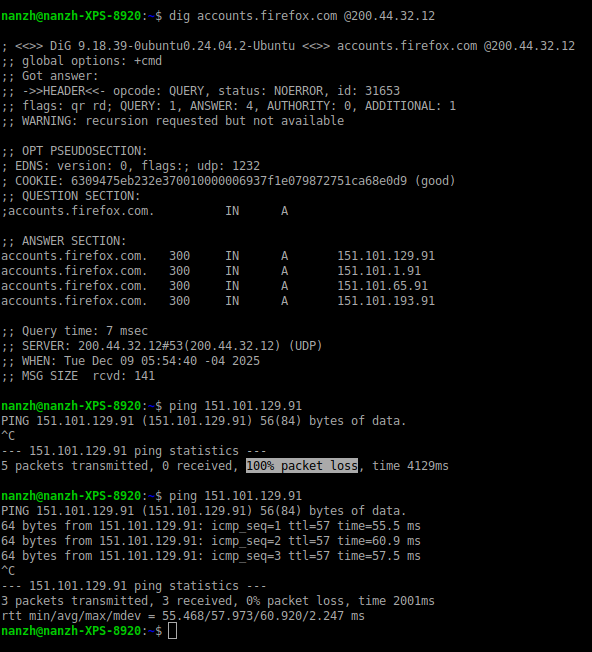
Hi, my location is Venezuela, and seems that I'm being blocked somewhere... I just want to confirm whether this is something on Mozilla's end (considering that their headquarters are in the US), or something on my government's end (since the ISP often blocks websites on orders from the state). I can't sync my account or log in because of this, and generally, wherever the block comes from, they rarely give any warning. The main page loads normally; it's only the subdomains that are blocked, as far as I can see. For the record, this happens in Firefox for Desktop, and for Android too, wherever I'm on my home, using mobile data or using my office WiFi. This is not a browser error, in the capture u can see that the domains are solved correctly (even using the ISP's DNS), but u can't ping on the IP unless u turn on the VPN. All Google services work fine for me, and I can't use a VPN all the time, so I'll have to switch to some chromium browser if this goes on too long (even if I don't want to).
Capturas de pantalla adjuntas

You must log in to your account to reply to posts. Please start a new question, if you do not have an account yet.