


Profile files are different when navigated to via Library/Thunderbird vs about:profiles "show in finder"

Explain this please.
Using Mac OSX, I can navigate via Finder: Library / Thunderbird / various Profile folders.
Or within Thunderbird via Help / Troubleshooting / about:profiles / profile data "show in finder"
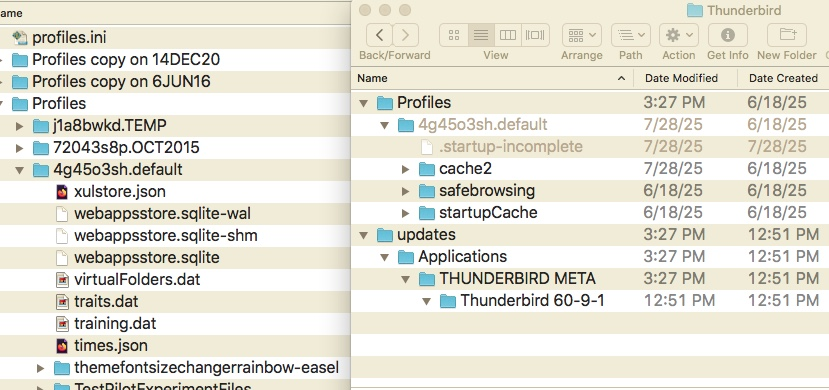
The left is via Finder, the right via about:profiles. The xxx.default folder contains different contents in each Finder Window.
Explain this please.
Using Mac OSX, I can navigate via Finder: Library / Thunderbird / various Profile folders.
Or within Thunderbird via Help / Troubleshooting / about:profiles / profile data "show in finder"
https://support.mozilla.org/en-US/kb/profile-manager-create-and-remove-thunderbird-profiles#thunderbird:mac:tb128
The left is via Finder, the right via about:profiles. The xxx.default folder contains different contents in each Finder Window.
Todas las respuestas (1)
The xxx.default also shows different File Created dates. Finder shows 9/5/15. Other one says 6/18/25. Both show Modified Date as being today, within a few minutes of each other. I presume the Finder window does not refresh -- except I backed out of the window and went back to it, and the time did not change.