


Can't Use Gmail In Thunderbird

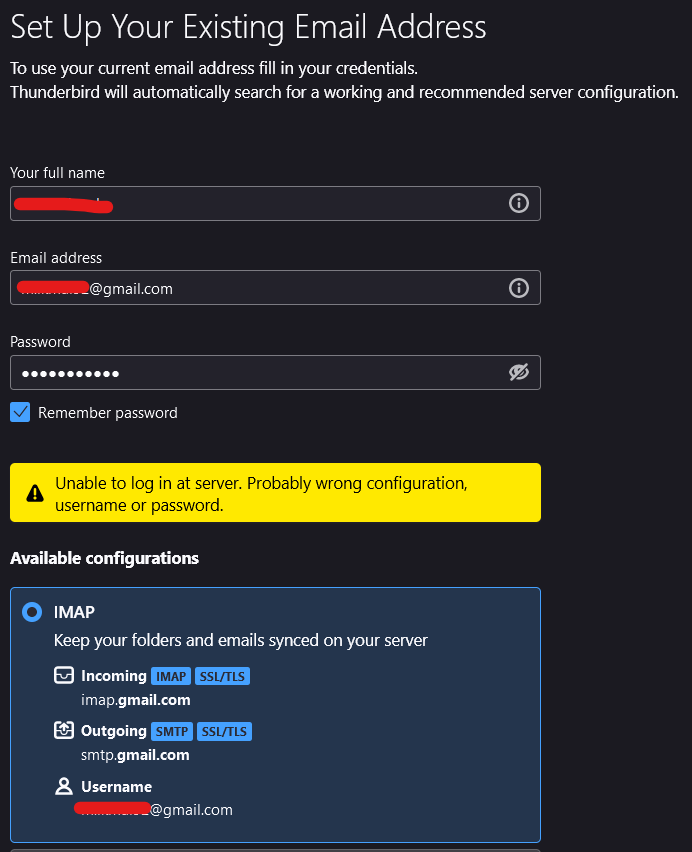
Hi, I just recently remember Thunderbird can be used as an email client. So, I've decided to use Thunderbird again after years of stop using it. I download the installer, install it, run it, and try to login to my Google account. But, I get an error (refer the image attached). I'm sure I already enable IMAP in my Gmail settings, and very sure that I enter the correct password.
Also, I already Google this problem. Some of the solutions offered was to change the Authentication Method to be OAuth2. When I check, by default, OAuth2 is selected as the Authentication Method.
How can I fix this?
Hi, I just recently remember Thunderbird can be used as an email client. So, I've decided to use Thunderbird again after years of stop using it. I download the installer, install it, run it, and try to login to my Google account. But, I get an error (refer the image attached). I'm sure I already enable IMAP in my Gmail settings, and very sure that I enter the correct password.
Also, I already Google this problem. Some of the solutions offered was to change the Authentication Method to be OAuth2. When I check, by default, OAuth2 is selected as the Authentication Method.
How can I fix this?
Todas las respuestas (1)
I have found it often successful to omit the password. This is because Google assigns a password after verification.