


One mailbox is ignored in the unified folders

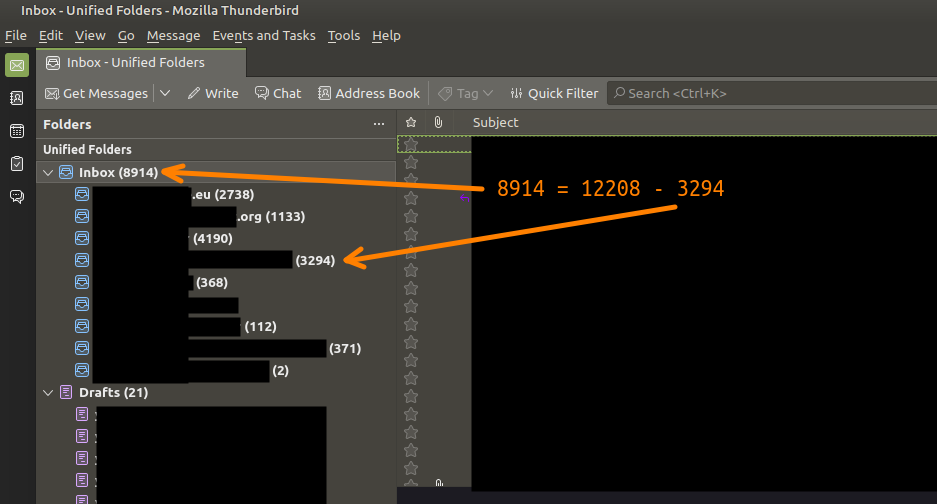
Since the last update of Thunderbird for Linux (upgraded to 102.2.2), my unified folder is now ignoring one of the mailboxes.
The corresponding mailbox still receives e-mails and I can consult them by clicking the mailbox itself, but its messages do not appear in the unified folder, they are not even counted (see attachment) and the quick filters does not return results from that mailbox either.
This is a company mailbox synced with IMAP/SMTP.
Solución elegida
I omitted a step. After right-click, select properties, and then choose.
Todas las respuestas (6)
Highlight the inbox, right-click and then click 'choose.' That should show you a list of folders in accounts to tick to include in the unified view. This sometimes gets unset on updates.
david said
Highlight the inbox, right-click and then click 'choose.' That should show you a list of folders in accounts to tick to include in the unified view. This sometimes gets unset on updates.
I can't find the "Choose" option. Would you mind showing a screenshot @david?
Solución elegida
I omitted a step. After right-click, select properties, and then choose.
It solved the issue, thank you @david <3
Thanks a lot from my side too, David, I had the same problem and now it's solved.
You're most welcome.