


Accessing gmail with Thunderbird Ver 91.4.0 (64-bit)

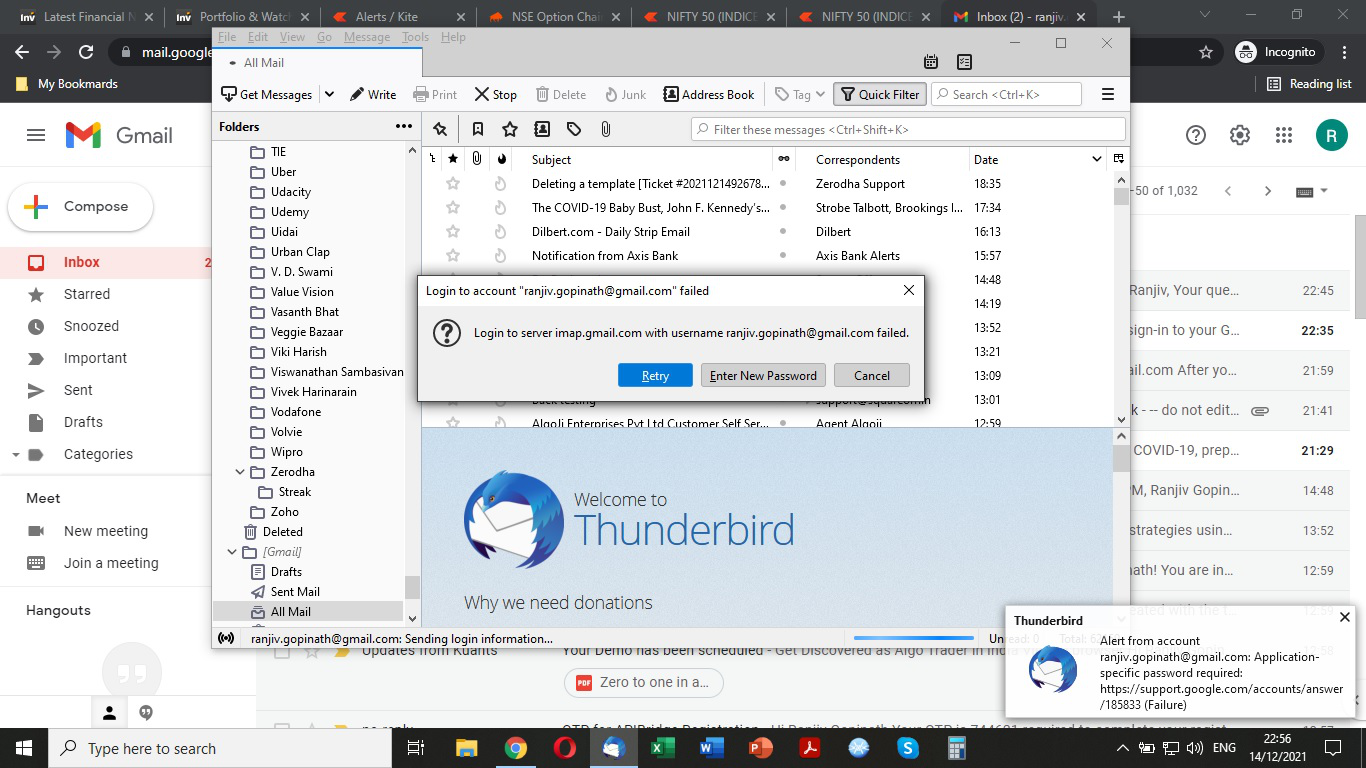
Today Google started 2-step verification to access gmail. Now I cannot sign into my gmail account using Thunderbird which I have been using for over 15 years.
Attached is the error message I get.
Has Google blocked access from other apps or do I need to do something to reactivate access?
Solución elegida
The error indicates the authentication method in TB is set to 'normal password', which is why it asks for an 'app password'. Change the authentication to OAuth2, for both incoming and outgoing, remove passwords from Saved Passwords in Preferences, and in the same section accept cookies. Then, restart TB and enter the account (not app) password in the OAuth window to allow TB access.
Leer esta respuesta en su contexto 👍 1Todas las respuestas (3)
Solución elegida
The error indicates the authentication method in TB is set to 'normal password', which is why it asks for an 'app password'. Change the authentication to OAuth2, for both incoming and outgoing, remove passwords from Saved Passwords in Preferences, and in the same section accept cookies. Then, restart TB and enter the account (not app) password in the OAuth window to allow TB access.
Thank you. Problem solved.

I also had this problem. Your answer helped me solve it. Thanks so much.