


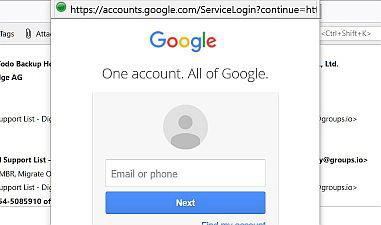
Persistant Google log in screen

Every time I now open Thunderbird to read my emails I now get the Google log-in screen over my in-box display. I have to close it and then Thunderbird gets my gmail and others as usual. I am logged into Google, I can access my Gmail from my browser with no further log-in. Filling in the nag screen doesn't prevent it from popping up the next time I reload Thunderbird. How does one politely tell the old nag to go away?
Todas las respuestas (5)
Have you selected the option for Thunderbird to allow cookies ? Maybe it allows cookies but then deletes them when you exit Thunderbird? Or maybe you have some software on your computer that is 'cleaning up' files like CCleaner ? If you use eg: CCleaner then make Thunderbird profile folders exempt from access.
Check Thunderbird has cookies enabled. In versions prior to 78*:
   Select 'Menu app icon' > 'Options/Preferences' > 'Options/Preferences'
   In 'Options/Preferences' left Pane select Privacy
   Select checkbox 'Accept cookies from sites'
In versions 78* or later:
   Select 'Menu app icon' > 'Options/Preferences'
   In 'Options/Preferences' left Pane select Privacy & Security
   Select checkbox 'Accept cookies from sites'
Thanks, but it wasn't that. This copy of Thunderbird has come from my backup on a now-dead desk top. Always kept up to date. I've granted Google all the usual access that it has asked for since doing the restore.
This problem is caused by Lightning. I selected to remove the connection and all runs well. It also disappeared when I ran in safe mode.
dogcatcher said
This problem is caused by Lightning. I selected to remove the connection and all runs well. It also disappeared when I ran in safe mode.
Lightning is no more... it was replaced with a built in calendar in 78. So if you are not using the latest version, you probably should say what version you are using in future. Sort of takes the guess work out of it.
Whatever it's called it just proves that I don't use it :-) I didn't realise that Mozilla was around in '78 I think that was about the time we welcomed Compuserve. Be that as it may, I got the big Windows update chucked at me last night and one result of that is the return of the original problem of the Google sign in overlay and I can't get rid of it. Thunderbird says that it is version 78.4.2 (32-bit)