


My send tab disappeared & I can no longer send e mails. Cannot locate composition folder which was a suggestion in your help section.
Please advise how to get send tab back so I can send emails.
Solución elegida
First you need to get the 'Menu Bar' toolbar visible again.
- Open a new Write message window
- Press the 'Alt' key on your keyboard.
This will show the 'Menu Bar', but now you have to make it permanent.
- 'View' > 'Toolbars' > select 'Menu bar'
This will now allow you to use the instructions I stated in first comment to get the 'Composition Toolbar' enabled again.
Leer esta respuesta en su contexto 👍 0Todas las respuestas (3)
re :Cannot locate composition folder
It's not a folder. It's a toolbar called 'Composition Toolbar'.
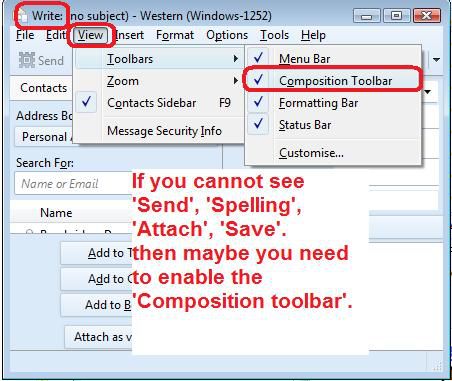
In Write window where you compose an email: Can you see the top Menu Bar that has 'File', 'Edit', 'View'...etc ? If yes: 'View' > 'Toolbars' > select 'Composition Toolbar' See image below
In where I compose emails there is no menu at all. Just who you are sending to subject & my email address. No place at all I can click for anything except body text & width what ever they are for.
Solución elegida
First you need to get the 'Menu Bar' toolbar visible again.
- Open a new Write message window
- Press the 'Alt' key on your keyboard.
This will show the 'Menu Bar', but now you have to make it permanent.
- 'View' > 'Toolbars' > select 'Menu bar'
This will now allow you to use the instructions I stated in first comment to get the 'Composition Toolbar' enabled again.