


My emails have ?? where blank spaces should be. What do I do? REDUX

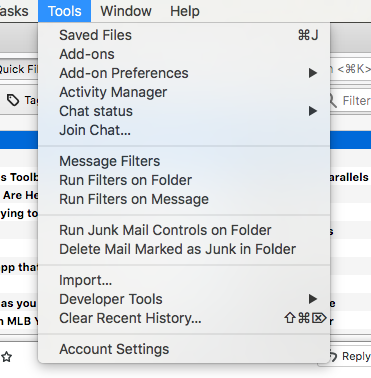
Thunderbird 60.9.1 in Mac: I cannot find Options under Tools to use this fix for multiple question marks replacing spaces:
"Go to the Configuration Editor (Tools, Options, Advanced, General, Config Editor). Scroll down to mail.strictly_mime
"Click on it and change it from "false" to true."
Thank you
NOTE: I modified this question to include a screenshot of the Tools menu, but I do not see it posted here.
Modificadas por michaellax el
Solución elegida
Thank you: I changed "mail.strictly.mine" from FALSE to TRUE.
Does "TB 60, 68" mean Versions 60 and 68 on TB Mac?
Leer esta respuesta en su contexto 👍 0Todas las respuestas (3)
On Mac, the route is Preferences/Advanced/General/Config. editor on TB 60, 68.
Solución elegida
Thank you: I changed "mail.strictly.mine" from FALSE to TRUE.
Does "TB 60, 68" mean Versions 60 and 68 on TB Mac?
Modificadas por michaellax el
Ah, yes, I notice that the next update is to version 68 on TB and this change seems to have fixed the problem: THANK YOU!