


PDF icon Firefox in the explorer
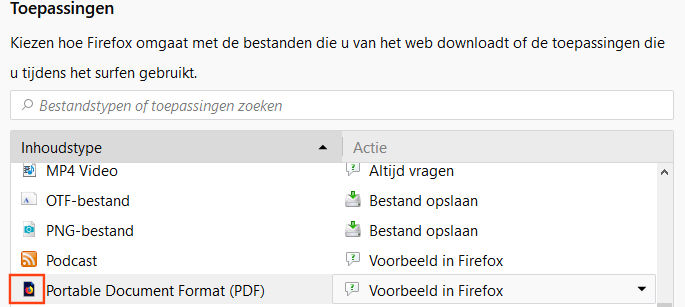
why I get a black background + logo Firefox concerning a PDF file in the Windows explorer and in the Firefox Applications - see the first and the second image - iso a standard white background + logo Firefox - see the third image.
Thanks a lot in advance for you reply. SpeedyKepke


Solución elegida
Please check that your PDF program is set up properly and updated. Update Video Card Drivers
uninstall Firefox. Then Delete the Mozilla Firefox Folders in C:\Program Files and C:\Program Files(x86) Then restart system. Then run Windows Disk Cleanup. (Note: This should be Pinned and run Weekly, If never done below expect 10's of gig's) Then run it again and click the button that says Cleanup System Files. Note: your Firefox Profile is saved. But you should make a back up before you do :
- https://support.mozilla.org/en-US/kb/back-and-restore-information-firefox-profiles
- https://support.mozilla.org/en-US/kb/export-firefox-bookmarks-to-backup-or-transfer
Reinstall with Current Release Firefox 57.0.3 with a Full Version Installer
Please let us know if this solved your issue or if need further assistance.
Leer esta respuesta en su contexto 👍 1Todas las respuestas (2)
Solución elegida
Please check that your PDF program is set up properly and updated. Update Video Card Drivers
uninstall Firefox. Then Delete the Mozilla Firefox Folders in C:\Program Files and C:\Program Files(x86) Then restart system. Then run Windows Disk Cleanup. (Note: This should be Pinned and run Weekly, If never done below expect 10's of gig's) Then run it again and click the button that says Cleanup System Files. Note: your Firefox Profile is saved. But you should make a back up before you do :
- https://support.mozilla.org/en-US/kb/back-and-restore-information-firefox-profiles
- https://support.mozilla.org/en-US/kb/export-firefox-bookmarks-to-backup-or-transfer
Reinstall with Current Release Firefox 57.0.3 with a Full Version Installer
Please let us know if this solved your issue or if need further assistance.
this problem is solved - thanks a lot Speedy