


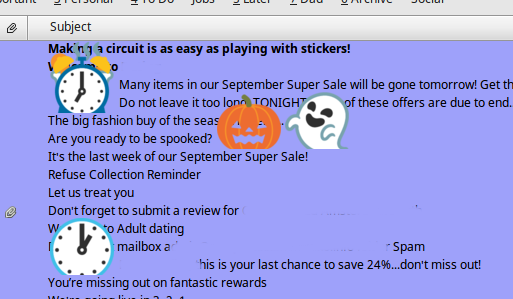
Subject line Emoji (UTF8) character too large

Subject line Emoji (UTF8) character too large, so they take more than one line, see screen shot
Started TB in safe mode, no difference
Modificadas por PXFX2 el
Todas las respuestas (2)
Solución elegida
OK, solve it. Well maybe a bug in TB, using Googles notoColorEmoji.ttf (https://github.com/googlei18n/noto-emoji) installed in .font folder (linux here) and having no other emoji style font files installed, notoEmoji-Regular.ttf or Symbola-emoji.tff causes this issue. installing one of the standard non-colour emoji fonts and the problem goes away, and so does your coloured emojis. TB seems to use the standard version in perference to the color version font file
I hope this help someone else
This work for me thanks. I had to place the file notoColorEmoji.ttf into the directory /usr/share/fonts/truetype/noto though. I'm running Ubuntu Linux 18.04 (dev) with Thunderbird 52.6.0 .