


How do I Set up the "Write" tab so that it reads "To, CC, & Bcc" in that order. at present it is set up as " Bcc,To" ?

The question above summarises the problem when I click the "write" Tab Current order is : Bcc: To:
I would like it to read: To; CC: Bcc.
The question above summarises the problem when I click the "write" Tab Current order is :
Bcc:
To:
I would like it to read:
To;
CC:
Bcc.
Todas las respuestas (3)
Please provide a screenshot.
Copy below. Regards
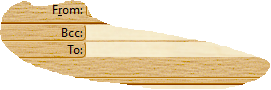
I don't know what you have done to make it appear like that. Mine have always started with a single box labelled "To:".
Check in Account Settings. There is an option under Composition to always include specific addresses for Cc and Bcc. Maybe the Bcc box is selected even though not filled in.