Windows 10 reached EOS (end of support) on October 14, 2025. If you are on Windows 10, see this article.

Buscar en Ayuda

Avoid support scams. We will never ask you to call or text a phone number or share personal information. Please report suspicious activity using the “Report Abuse” option.

Learn More
Este tema ha sido archivado. Haz una nueva pregunta si necesitas ayuda.
Solved Archivado

win 10, firefox 46.0, java plugin doesn't work

the-edmeister replied
majimomi

Hi,

just upgraded from win 8.1 to win 10 and mozilla firefox Java plugin doesn't work.

I have installed the latest jre:

java version "1.8.0_91" Java(TM) SE Runtime Environment (build 1.8.0_91-b14) Java HotSpot(TM) 64-Bit Server VM (build 25.91-b14, mixed mode)

Mozilla Firefox is the latest and 64 bit:

User Agent Mozilla/5.0 (Windows NT 10.0; Win64; x64; rv:46.0) Gecko/20100101 Firefox/46.0

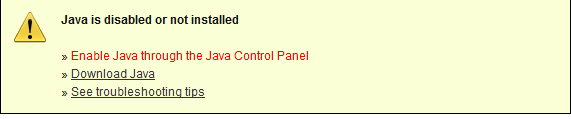
And still I get this message when I try to test java in browser (https://www.java.com/en/download/installed.jsp):

Image

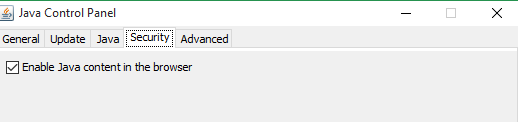
Java is enabled in Java Control Panel:

Image

Hi, just upgraded from win 8.1 to win 10 and mozilla firefox Java plugin doesn't work. I have installed the latest jre: java version "1.8.0_91" Java(TM) SE Runtime Environment (build 1.8.0_91-b14) Java HotSpot(TM) 64-Bit Server VM (build 25.91-b14, mixed mode) Mozilla Firefox is the latest and 64 bit: User Agent Mozilla/5.0 (Windows NT 10.0; Win64; x64; rv:46.0) Gecko/20100101 Firefox/46.0 And still I get this message when I try to test java in browser (https://www.java.com/en/download/installed.jsp): Image Java is enabled in Java Control Panel: Image

Todas las respuestas (2)

These are the images
Solución elegida

The Windows 64-bit version of Firefox only has the Flash and Silverlight Plugins whitelisted. If you need Java (or any other Plugins) you'll need to use the Windows 32-bit version of Firefox.