


Buttons revert to "Use My Current Browser" after being set as described in "Making Firefox your default Browser". IE 8 then used when Email links clicked on

Firefox was set as the default browser on Win XP when installed. This works most of the time. However on some Email links IE 8 opens. This of course is too old to work in many cases causing much frustration. Having read the article on making Firefox the default via Add/Remove programs I find it reverts back to "Use My Current Browser"
Interestingly I find a couple of similar questions on your Forum but both unanswered. Is there an answer?
Todas las respuestas (2)
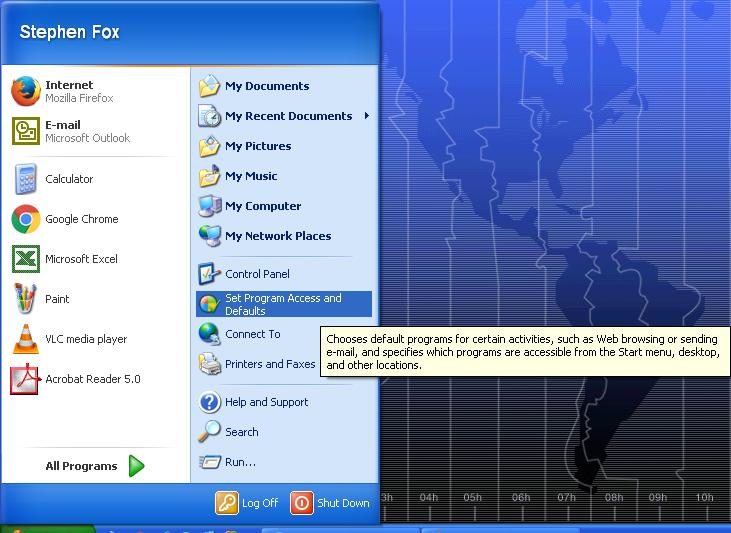
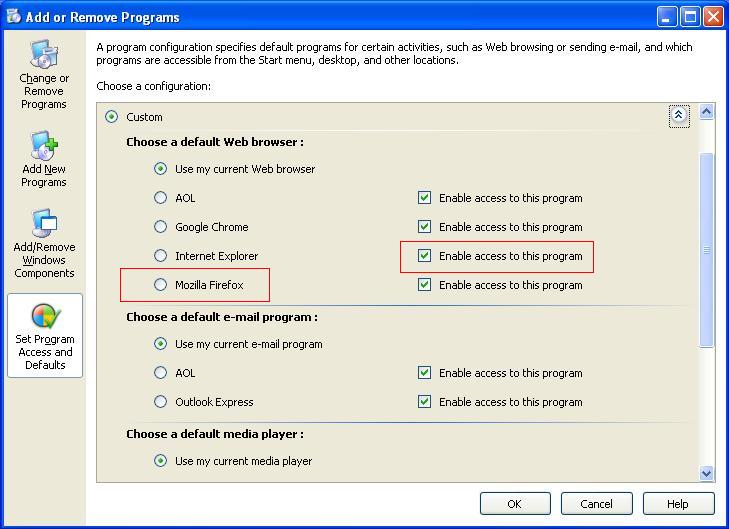
Click Start --> Set Program Access and Defaults --> Select Firefox as default browser --> For Internet Explorer uncheck Enable Access To This Program.
That should force Windows to use Firefox. Post back and let us know if this solved your problem!
(Note, on my system, I leave Internet Explorer accessible for some legacy programs and websites)
Modificadas por Stephen Fox el
Thanks for your suggestion. I have tried this already as you can see from my original post above. So still have the problem.