


GMX problem: "Favorites" folder doesn't synchronize with Thunderbird 31.6.0

GMX.com default "Favorites" folder does not show up under my account in the Thunderbird 31.6.0.
How can I make Thunderbird to synchronize fully with my gmx.com e-mail account? I'm using IMAP protocol.
Thank you.
GMX.com default "Favorites" folder does not show up under my account in the Thunderbird 31.6.0.
How can I make Thunderbird to synchronize fully with my gmx.com e-mail account? I'm using IMAP protocol.
Thank you.
Todas las respuestas (2)
Hmm the GMX favorites is not a folder, just stared email displayed on a web page.
So to do the same thing in Thunderbird
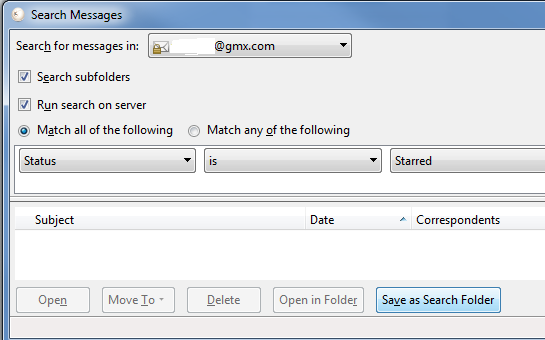
Press Ctrl + shift + F to do a saved search
 once you have your search as shown above, click the save as search folder
Name it “Favorites”
Set “Create as a subfolder of:” to your GMX account.
once you have your search as shown above, click the save as search folder
Name it “Favorites”
Set “Create as a subfolder of:” to your GMX account.
Modificadas por Matt el
if you got the original unedited message by email, go to the forum for the image etc. I hit post my accident.