nggm507How do you block Adobe Flash from running after you have allowed it to on a website?

After logging onto Ebay the Adobe Flash "allow now or always allow" popped up. Not thinking it would allow all these adds to pop out from the side and bottom, I allowed. Not a good idea. How do I deactivate Adobe from allowing this to go on? Thanks
After logging onto Ebay the Adobe Flash "allow now or always allow" popped up. Not thinking it would allow all these adds to pop out from the side and bottom, I allowed. Not a good idea. How do I deactivate Adobe from allowing this to go on?
Thanks
Todas las respuestas (1)
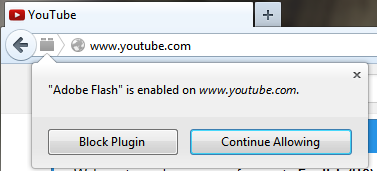
hello JT, there is a plugin icon at the left of the address bar that allows you to change these permissions. if you want a more fine-tuned control and only allow single plugin elements on a page to run, then you could use an addon like this one: https://addons.mozilla.org/firefox/addon/click-to-play-per-element/