


Εμφάνιση ερωτήσεων για το θέμα:

I have payed for and tryed to install VPN, It does NOT work. The Icon is on the bar but I get a drop down which does not work.

I payed for Mozilla VPN. I downloaded and installed MozillaVPN.msi It does not work. The icon is on the right tool bar but I get a drop down that indicates that i need an… (διαβάστε περισσότερα)

I payed for Mozilla VPN. I downloaded and installed MozillaVPN.msi It does not work. The icon is on the right tool bar but I get a drop down that indicates that i need an app I thought I downloaded the app. Here is the message: "Open Mozilla VPN

To use the Mozilla VPN Firefox extension, please open the Mozilla VPN app first. Open Mozilla VPN Get help The is no Mozilla VPN in my program files(?) Please help. Is there two programs that I must install? [redacted email]

Ανοικτό 1 1
Mozilla VPN does not install on Win10 and Firefox; It only installs the ICON on Firefox. help?

The VPN installation does NOT work. I get the drop down with the icon and "To use the Mozilla VPN Firefox extension, please open the Mozilla VPN app first." There is NO … (διαβάστε περισσότερα)

The VPN installation does NOT work. I get the drop down with the icon and "To use the Mozilla VPN Firefox extension, please open the Mozilla VPN app first." There is NO Mozilla VPN app on my computer. It is not on desktop, menu, or app list (?).

Thank you in advance for your support. Dale Warnke [redacted email]

iphone:  [redacted phone#]

Working on passkey, back and forth, meanwhile, retyping the above several times. I decided to copy it and save it so I won't have to type it again. we are going aroung in circles too many passwords, passcodes; I have 4 windows open and fell I am not getting anywhere(?)

All I want to know is how to get VPN that I paid for finally installed? There is too much confusion on getting this answered. All I want to do is to download(paid for) VPN and install it on FireFox and make

Have I been hacked, or something else?

Thank you in advance for your support. Dale Warnke [redacted email]

iphone:  [redacted phone#]

Have I been hacked?

Ανοικτό 1

Mozilla VPN Release 2.40.0 - Bad Image Error

Hello Community and/or Support, After installing the latest "Mozilla VPN Release 2.40.0" upon Windows 11 Version 26H2 OS Build 26300.9711, I received the follow error mes… (διαβάστε περισσότερα)

Hello Community and/or Support,

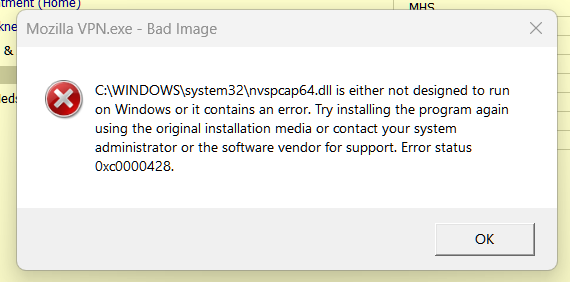
After installing the latest "Mozilla VPN Release 2.40.0" upon Windows 11 Version 26H2 OS Build 26300.9711, I received the follow error message 3 to 4 times in a row. after acknowledging the error (pressed "OK").

(See attached image) Mozilla VPN.exe - Bad Image is either not designed to run on Windows or It contains an error. Try installing the program again using the original installation media or contact your system administrator or the software vendor for support. Error status OxcOOON28.

Prior to installation, I just booted my computer and observed that my VPN App needed to be updated. I did not open any other app or perform any other work.

The VPN update informed me that it needed to close my current VPN connection to continue with the installation Update, which I allowed the update to manage.

In my troubleshooting efforts, reviewing other forums, and ask Google Gemini, I have performed the following. 1). Rebooted the computer after install. (Same Error Message) 2). Uninstall and reinstall Mozilla VPN. (Same Error Message) 3). Updated my NVIDIA GeForce GTX 1660 Ti driver to the latest release. (Same Error Message) 4). Ran "sfc /scannow" as administrator within the Command Prompt (Same Error Message). 5). Ran "dissm /online /cleanup-image /restorehealth" (Same Error Message).

Is there a method to correct the "Bad Image" error from popping up after restarting my computer? Also, would someone be so kind to inform the Mozilla VPN software team of this error?

Thank you all for your time!

Ανοικτό 6 1 41

Mozilla VPN 2.40 Update results in Windows bad image report

I just updated my Mozilla VPN to version 2.40. Now, whenever the vpn is started, Windows reports that nvspcap64.dll is not designed to run on Windows or it contains an er… (διαβάστε περισσότερα)

I just updated my Mozilla VPN to version 2.40. Now, whenever the vpn is started, Windows reports that nvspcap64.dll is not designed to run on Windows or it contains an error. Error status 0xc0000428. I have tried uninstalling and reinstalling to no avail. I restored the nvspcap64.dll from a backup which didn't work either. I have attached a screenshot of the message.

Repeated clicking of the "OK" button on the message will eventually allow the vpn to open, but I'm not sure if it is working correctly.

Can this be fixed?

https://assets-prod.sumo.prod.webservices.mozgcp.net/media/uploads/images/2026-10-21-07-04-39-25a98d.png

Ανοικτό 1 1 51

"already a subscriber?" does not work

This is a new install of debian 13 trixie. I have a subscription to mozillavpn. It was working on a previous install of debian. I use synaptic to install flatpak. I use f… (διαβάστε περισσότερα)

This is a new install of debian 13 trixie. I have a subscription to mozillavpn. It was working on a previous install of debian. I use synaptic to install flatpak. I use flatpak to install warehouse. I use warehouse to install mozillavpn. Once installed I highlight the package mozilla vpn in warehouse then click open. A mozillavpn icon appears in the taskbar. Also a window that is shaped like a cell phone open up. This window has a button to "sign up", also it has a link to "already a subscriber?". I click the "already a subscriber" link. It changes to a page that says "waiting for sign in and subscription confirmation..." with a rotating circle and a button to cancel. It also opens a separate browser to a start page. I wait awhile but nothing happens. I change the browser page to my mozilla account page at "https://accounts.firefox.com/settings" Nothing happens. There's a button on the account page to "connect a device" but I don't know what to do with it. Under the heading "Everything you are using and signed into." it has 2 entries: "Firefox 153, Linux" and "Mozilla Support". Both entries have a "sign out" button. Back at the mozilla vpn cell phone shaped window the spinner just spins and nothing else. So I'm stuck. I click cancel and it goes back to the "sign up' / "already a subscriber?" page. From the icon in the taskbar I click quit and both the window and the icon go away. Everything seems to working but I am not registering as a subscriber. I've tried this several times over the course of 2 days. It's always the same.

Ανοικτό 1

After new update, a multiple popups for Mcafee & Mozilla keep appearing over & over and I can't get rid of them

When the new update arrived yesterday, I started getting multiple popups from McAfee & Mozilla. Three stay on the screen at once, and when I X one, another appears i… (διαβάστε περισσότερα)

When the new update arrived yesterday, I started getting multiple popups from McAfee & Mozilla. Three stay on the screen at once, and when I X one, another appears instantly. This appears to be a scam trojan, but 3 different excellent anti-virus programs have not found anything. This never happened until the latest update. What do you know about this? I don't want to uninstall & start over, but what other suggestion do you have? p.s Usually when I right click on one of them, it takes me to a McAfee ad. I just clicked on one that gave me the option to turn off notifications. That seemed to stop it, at least for now. Am I the only one with this problem? [redacted email from community support forum]

Ανοικτό 1 10

How can I gc bsck to an earlier version of Firefox?

The current version of Firefox is very frustrating to use. It often will not let me enter a password but will send me to the saved passwords. I do not want to put all m… (διαβάστε περισσότερα)

The current version of Firefox is very frustrating to use. It often will not let me enter a password but will send me to the saved passwords. I do not want to put all my passwords on the computer. I have 2 U tube accounts, and the new Firefox will not let me enter the account info directly, but sends me to Google. I have had to resort to using Microsoft Edge out of sheer frustration with Firefox. Previous versions of Firefox did not have these problems

Ανοικτό 1 10

I'm an 61 year old man , and I don't like the thunderbird system, I will lke to continue with only Firefox.

I.m an 81 year old man , and It is very difficult for me to use the computer, and now you make it more difficult for me with this new addition of Thunderbird that makes … (διαβάστε περισσότερα)

I.m an 81 year old man , and It is very difficult for me to use the computer, and now you make it more difficult for me with this new addition of Thunderbird that makes it more complicated for me,My question is: can I continue using Firefox with out Thunderbird ( that I don't like it ) ?

Ανοικτό 5 30

I bought Mozilla vpn and it won't install, keeps telling me, needs elevated?

I purchased Mozilla VPN weeks ago and having problems installing it. Request requires elevation. Seems I wasted my money if I can't install it Barry Drinkwater [redacted … (διαβάστε περισσότερα)

I purchased Mozilla VPN weeks ago and having problems installing it. Request requires elevation.

Seems I wasted my money if I can't install it

Barry Drinkwater [redacted phone# from community support forum]

Ανοικτό 3 100

i want to know how to schedule firefox updates when i want them to happen?

updates are happening at random times even when I am on line in the middle of important things. i want to schedule updates for 12 am midnight for any updates that may ar… (διαβάστε περισσότερα)

updates are happening at random times even when I am on line in the middle of important things. i want to schedule updates for 12 am midnight for any updates that may arise. please email me a detailed message on how to accomplish this as i am not a computer whiz kid. thank you for your time and expertise

Ανοικτό 3 20