Ανοικτό
UserFolder_27 Autocreates on Startup

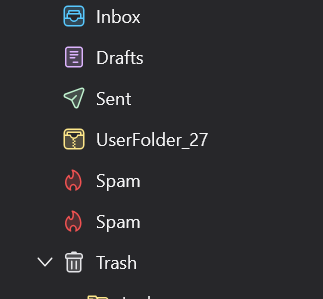
Hi, I've been using Thunderbird for years. It's been a great utility. However, today when I started it up, there was a random folder (UserFolder_27) created in the system folders. There was no right click option to delete it. Here are the remedial steps I took to remove it.
- Exited Thunderbird, removed the Userfolder_27.msf file from directory, restarted. No change.
- Right clicked the main account and Unsubscribed from UserFolder_27. Exited Thunderbird, removed the Userfolder_27.msf file from directory, restarted. No change.
- In Account Settings>Copies&Folders>Message Archive the UserFolder_27 was checked (no idea why). Unchecked the main "Keep message archives in" box. Exited Thunderbird, removed the Userfolder_27.msf file from directory, restarted. No change.
- Rechecked "Keep message archives in" and selected another personal folder. Exited Thunderbird, removed the Userfolder_27.msf file from directory, restarted. No change.
Somewhere in the troubleshooting steps, it created a second Spam folder.
Any ideas on how to fix this?
Hi,
I've been using Thunderbird for years. It's been a great utility. However, today when I started it up, there was a random folder (UserFolder_27) created in the system folders. There was no right click option to delete it. Here are the remedial steps I took to remove it.
* Exited Thunderbird, removed the Userfolder_27.msf file from directory, restarted. No change.
* Right clicked the main account and Unsubscribed from UserFolder_27. Exited Thunderbird, removed the Userfolder_27.msf file from directory, restarted. No change.
* In Account Settings>Copies&Folders>Message Archive the UserFolder_27 was checked (no idea why). Unchecked the main "Keep message archives in" box. Exited Thunderbird, removed the Userfolder_27.msf file from directory, restarted. No change.
* Rechecked "Keep message archives in" and selected another personal folder. Exited Thunderbird, removed the Userfolder_27.msf file from directory, restarted. No change.
Somewhere in the troubleshooting steps, it created a second Spam folder.
Any ideas on how to fix this?