

Avoid support scams. We will never ask you to call or text a phone number or share personal information. Please report suspicious activity using the “Report Abuse” option.

Learn More
Open

Firefox's built-in VPN stopped working without an external VPN connection, despite previously working with my regular Iranian internet connection.

kimia81ce

Hi tHello Mozilla Support Team,

I am a user from Iran, and I have been using Firefox's built-in VPN (the 50 GB monthly VPN included with a Mozilla account).

Previously, I was able to use the built-in VPN directly with my Iranian internet connection, without needing any external VPN or proxy.

However, after connecting to an external VPN configuration while using Firefox, the built-in VPN stopped working independently.

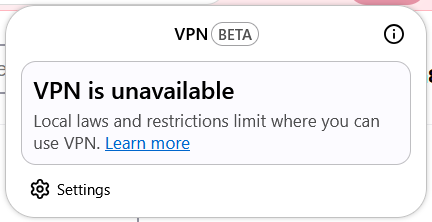
Now, whenever I disconnect my external VPN and try to enable Firefox's built-in VPN, I receive the following error message:

"VPN is unavailable due to local laws and restrictions."

Interestingly, the built-in VPN works again whenever my external VPN is connected.

I have already tried restarting Firefox, testing a different internet connection (mobile hotspot), and checking my browser's connection settings. Unfortunately, none of these steps resolved the issue.

I would like to emphasize that I was previously able to use this feature from Iran without an external VPN connection.

Could you please investigate why my access has changed and let me know whether there is a way to restore the previous functionality?

I would really appreciate your help, as I rely on this service and would like to continue using it.

Thank you for your time and support.

Best regards
Hi tHello Mozilla Support Team, I am a user from Iran, and I have been using Firefox's built-in VPN (the 50 GB monthly VPN included with a Mozilla account). Previously, I was able to use the built-in VPN directly with my Iranian internet connection, without needing any external VPN or proxy. However, after connecting to an external VPN configuration while using Firefox, the built-in VPN stopped working independently. Now, whenever I disconnect my external VPN and try to enable Firefox's built-in VPN, I receive the following error message: "VPN is unavailable due to local laws and restrictions." Interestingly, the built-in VPN works again whenever my external VPN is connected. I have already tried restarting Firefox, testing a different internet connection (mobile hotspot), and checking my browser's connection settings. Unfortunately, none of these steps resolved the issue. I would like to emphasize that I was previously able to use this feature from Iran without an external VPN connection. Could you please investigate why my access has changed and let me know whether there is a way to restore the previous functionality? I would really appreciate your help, as I rely on this service and would like to continue using it. Thank you for your time and support. Best regards
Screen ƒe photowo kpe ɖe eŋu

You must log in to your account to reply to posts. Please start a new question, if you do not have an account yet.