


I want my imported IE Favorites folders directly under Bookmarks, not via "From Internet Explorer"

I have imported my Internet Explorer Favorites OK. They sit under the Firefox bookmark folder "From Internet Explorer". Double movement needed. I don't want to have to go via this folder. I want to put my IE Favorites folder DIRECTLY under Bookmarks.
Zvolené řešení
IE Favorites that are imported when you first install Firefox or when you use the Library Import menu item they end up in their own separate folder named From Internet Explorer. You can delete that folder before proceeding.
When you export the IE Favorites in bookmarks.htm format from the IE File > Import & Export menu item, and then import that file into Firefox thru the Library window (from the Show All Bookmarks menu item) > Import and Backup -> Import HTML --> from HTML file - those bookmarks are merged with the existing Firefox bookmarks, they're not in that separate folder.
Všechny odpovědi (4)

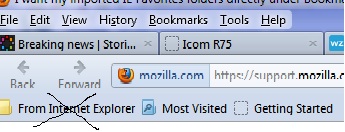
No. I said that I had already imported my IE Favorites successfully. I want those favorites DIRECTLY UNDER Bookmarks. I want to get rid of that "From Internet Explorer" folder. See the attached image with the X over that folder
Zvolené řešení
IE Favorites that are imported when you first install Firefox or when you use the Library Import menu item they end up in their own separate folder named From Internet Explorer. You can delete that folder before proceeding.
When you export the IE Favorites in bookmarks.htm format from the IE File > Import & Export menu item, and then import that file into Firefox thru the Library window (from the Show All Bookmarks menu item) > Import and Backup -> Import HTML --> from HTML file - those bookmarks are merged with the existing Firefox bookmarks, they're not in that separate folder.
Many thanks, the-edmeister. This really beeds to be shown as a standard option.