


How do I stop original emails in my inbox from duplicating to other folders?

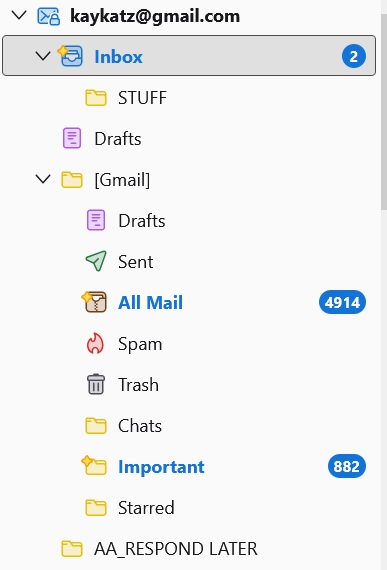
I have 13 email accounts in Thunderbird. Most of the emails work flawlessly. However, in some accounts , before I read them, the original emails are "automatically" duplicated in other folders (for instance, "important", and or "save" folders). After reading the emails in my inbox, I have to open each folder where the duplicates are and wait for the emails to disappear "automatically". It's a pain b/c the folders are hi-lighted and therefore I can't tell if I received a new email in my inbox or is it an old one I just forgot to delete in another folder. How can I stop this from happening?
Steps:
1. Email received in inbox; inbox high-lighted in blue 2. Open inbox in order to see emails, some folders (on the right-hand side) are also high-lighted in blue. The contain duplicates of emails in the inbox. 3. Deal with emails in inbox (open, read, keep, file, delete) 4. Some folders are still high-lighted in blue ( for instance, in uploaded image "all mail" and important") 5. Open high-lighted folders which deletes folders that were deleted in the inbox or if not deleted in the inbox, emails remain in the folder but the boldness turns off and the folder is no longer highlighted in blue. How do I stop the original emails from duplicating to other folders?
Všechny odpovědi (2)

I will try to help and hope that people who know more about gmail will contribute.
The messages don’t seem to be duplicated. Each one has only one instance, but is set to appear in multiple folders or labels. So deleting it from one location removes it everywhere.
Does the same thing happen in webmail?
What causes messages to be replicated in gmail? Is there an automatic process on the server that categorizes new messages as “important”?
Are you using message filters in Thunderbird?
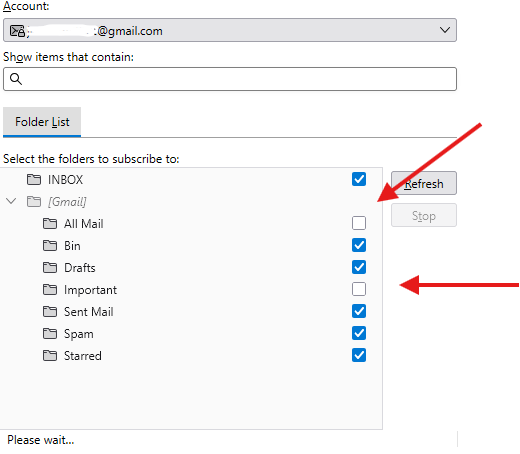
The allmail issue is easy to resolve. A common recommendation on this forum is to unsubscribe from that folder. People say that it is not useful, increases storage requirements, and causes confusion.

You can unsubscribe from those folder : Important, All Mail : these folders are Gmail functionality and Thunderbird downloads them as they are.
Right click on the target Account and then click on subscribe and then untick Important and All mail folder
Upravil uživatel Michel T dne