


Turn enhanced tracking protection totally off still does not work, you still have to manually turn off in URL area

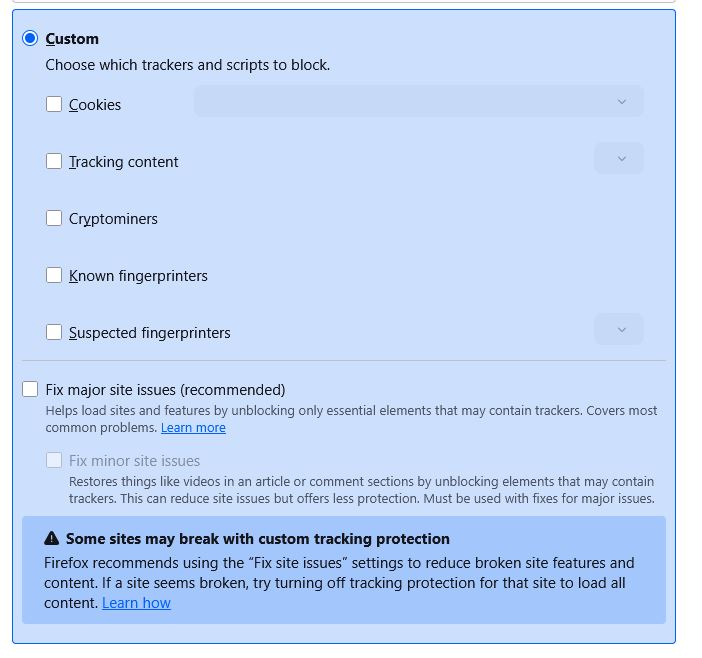
I have been reading about turning off enhanced tracking protection permanently; HOWEVER, the solution does not work. Going to privacy and security, clicking custom and turning everything off still does not shut the thing off fully. The shield in the browser is still active and I constantly have to still turn it off I even had to turn it off to get on this site. That is pretty sad when the makers of the browser block their own site using enhanced tracking protection. Is this another case ( i've seen thousands) where some sortware nerd is trying to show how clever he /she is at coding and in fact messes everything up? WHY DO YOU SIMPLY REMOVE THE TRACKING PROTECTION ENTIRELY... IT'S SO ANNOYING.
btw: none of the enhancements like Bold or Italic work on this site either.. great job..../s
Všechny odpovědi (6)
Hi,
What you see if rather a UI inconsistency than an actual bug. We have a suggestion on improving that, but I don't think it's currently on the roadmap.
Please note that even standard ETP shouldn't break most of the websites (including this one). Could you please tell more about what issues you experience?
Finally, formatting seems to work fine here. Please see Markup cheat sheet for more details on how to use it. While that table targets support articles, the majority of the markup syntax is supported in questions and posts as well.
Firefox would normally see what content suitable for blocking is detected in the panel that opens when you click the shield and if data is blocked then disabling ETP would allow this content. Did you check what the drop-down panel shows if you click the shield?
If you use extensions ("3-bar" menu button or Tools -> Add-ons -> Extensions) that can block content (Adblock,NoScript,DuckDuckGo PE,Disconnect,Ghostery,uBlock Origin,Malwarebytes), always make sure such extensions do not block content.
- make sure your extensions and filters are updated to the latest version
- https://support.mozilla.org/en-US/kb/troubleshoot-extensions-themes-to-fix-problems
You can check for issues with Enhanced Tracking Protection and Total Cookie Protection. Firefox shows a purple shield instead of a gray shield at the left end of the location/address bar in case Enhanced Tracking Protection is blocking content.
- click the shield icon for more detail and possibly disable the protection
You can check the Web Console for relevant-looking messages like about blocked content.
Denys said
Hi, What you see if rather a UI inconsistency than an actual bug. We have a suggestion on improving that, but I don't think it's currently on the roadmap. Please note that even standard ETP shouldn't break most of the websites (including this one). Could you please tell more about what issues you experience? Finally, formatting seems to work fine here. Please see Markup cheat sheet for more details on how to use it. While that table targets support articles, the majority of the markup syntax is supported in questions and posts as well.
What I see when I try load a page is simply the page staying blank until I click the enhanced protection off..
I have tried turning all the ads off ( ghostery, no scripts etc. ) and it still doesn't work.
Upravil uživatel bob ross dne
Looks like it may be the DNS resolver....use default and suddenly sites aren't blocked and I don't have to turn off the enhanced protection manually.... not sure how the two are related but that may be the issue.
Nope that was not it ... still does it
Upravil uživatel bob ross dne