extra sidebar, how to remove it?
I have a problem with an extra sidebar showing up on my home page and I want to remove it. So How Do I do It????
I have a problem with an extra sidebar showing up on my home page and I want to remove it. So How Do I do It????

Všechny odpovědi (2)
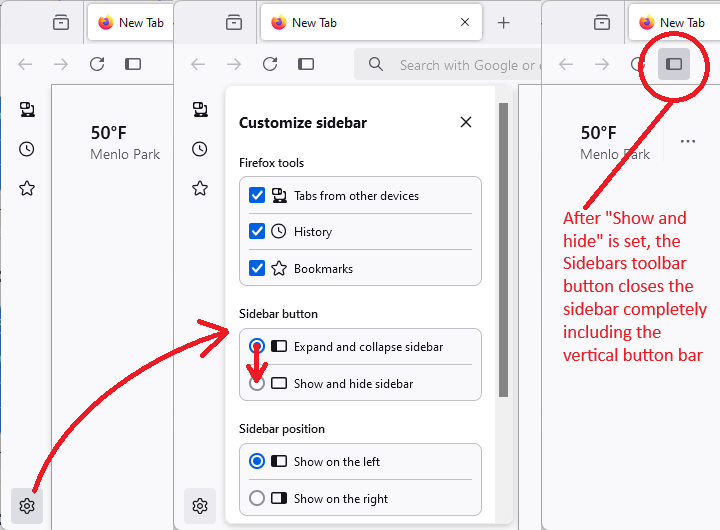
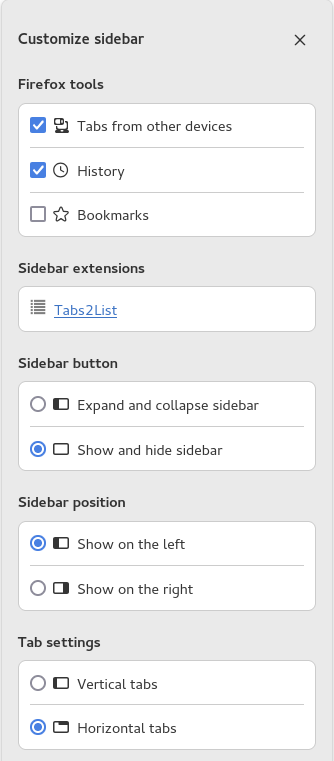
You can click the gear icon at the bottom of the sidebar to access the Settings for the new sidebar panel, select what items you wish to see. You can scroll down to see more settings like the sidebar position and the vertical tab setting.
You can hide the sidebar by selecting "Show and hide sidebar" for the Sidebar toolbar button. With this choice selected, you can click the Sidebar button on the toolbar to open and close the sidebar. You may have to re-add to Sidebar button to the toolbar.
Upravil uživatel cor-el dne
How about this. see screenshot