


Update Thunderbird yesterday latest version
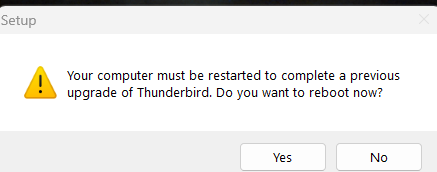
My desktop asked for a reboot after installing update Thunderbird. After 4 reboots, it still won't start. I wanted to uninstall it so I would be able to reinstall, but keeps asking for reboot. GRRRRRRR. I can't start my mailprogram anymore, can't uninstall it.. luckily I have a webbrowser.. What can I do to repair it?
Všechny odpovědi (3)
Remove the thunderbird program (not profile) files, and reinstall.
I can't uninstall.... because he keeps asking for a reboot. I installed now the beta version, which works (hopefully)
The following has worked for other people who find the computer has a need to update and is stuck. What is odd is that the computer does not need to be rebooted just to install or upgrade a program like Thunderbird. So something really has got it's wires crossed.
In this instance, delete Thunderbird ('Mozilla Thunderbird' folder) directly from the following location.
On a Windows OS 64bit computer: A win32 version of Thunderbird will be here:
- C:\Program Files (86) \Mozilla Thunderbird\
A win64 version of Thunderbird will be here:
- C:\Program Files \Mozilla Thunderbird\
- Delete the 'Mozilla Thunderbird' folder.
- check both locations just in case there are two versions.
- Then empty the 'Recycle bin' on computer.
Then get a fresh download from here and install.