


Displaying hieroglyphs

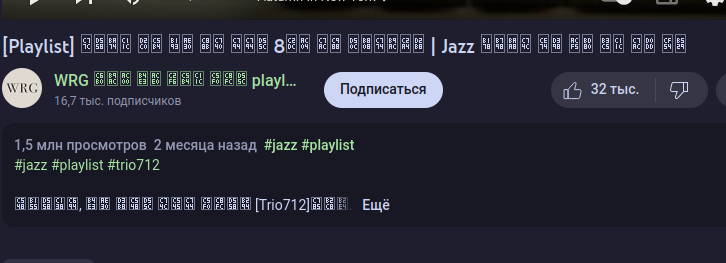
In YouTube have some videos, which name seems not correct.
In Firefox settings -> allow sites use their own fonts = enabled uBlock Origin -> no-remote-fonts = disabled gfx.down -> gfx.downloadable_fonts.enabled = true/false (doesn't matter, nothing changes) Stylus -> enabled/disabled (doesn't matter, nothing changes) To Google Translate -> enabled/disabled (doesn't matter, nothing changes)
With Alt -> Page Style -> Without style hieroglyphs still don't show correct
OS: arch Firefox: 108.0.2 64
Upravil uživatel egorport48 dne
Všechny odpovědi (3)
egorport48 said
In YouTube have some videos, which name seems not correct. video url: https://www.youtube.com/watch?v=HfaIcB4Ogxk
Upravil uživatel egorport48 dne
Zvolené řešení
You may see text labels or little boxes with the hex code of the character if you do not have a font installed or the font that is used doesn't cover this Unicode range or block downloadable fonts or if you do not allow pages to choose their own fonts.
You can right-click and select "Inspect" to open the built-in Inspector with this element selected.
You can check in the Rules tab in the right panel in the Inspector what font-family is used for selected text. You can check in the Fonts tab in the right panel in the Inspector what font is actually used because Firefox might be using a different font than specified by the website.

Thanks, that works for me.