Can't send mails, no further error message or information

Hello,
since yesterday morning we can't send, only receive mails with TB. I followed the steps in the help and forum without success:
- Deactivate Firewall and anti virus - Delete Password - Credentials are correct and didn't change - Try to send from different smtp server - Ping smtp server -> success - Start TB without add-ons
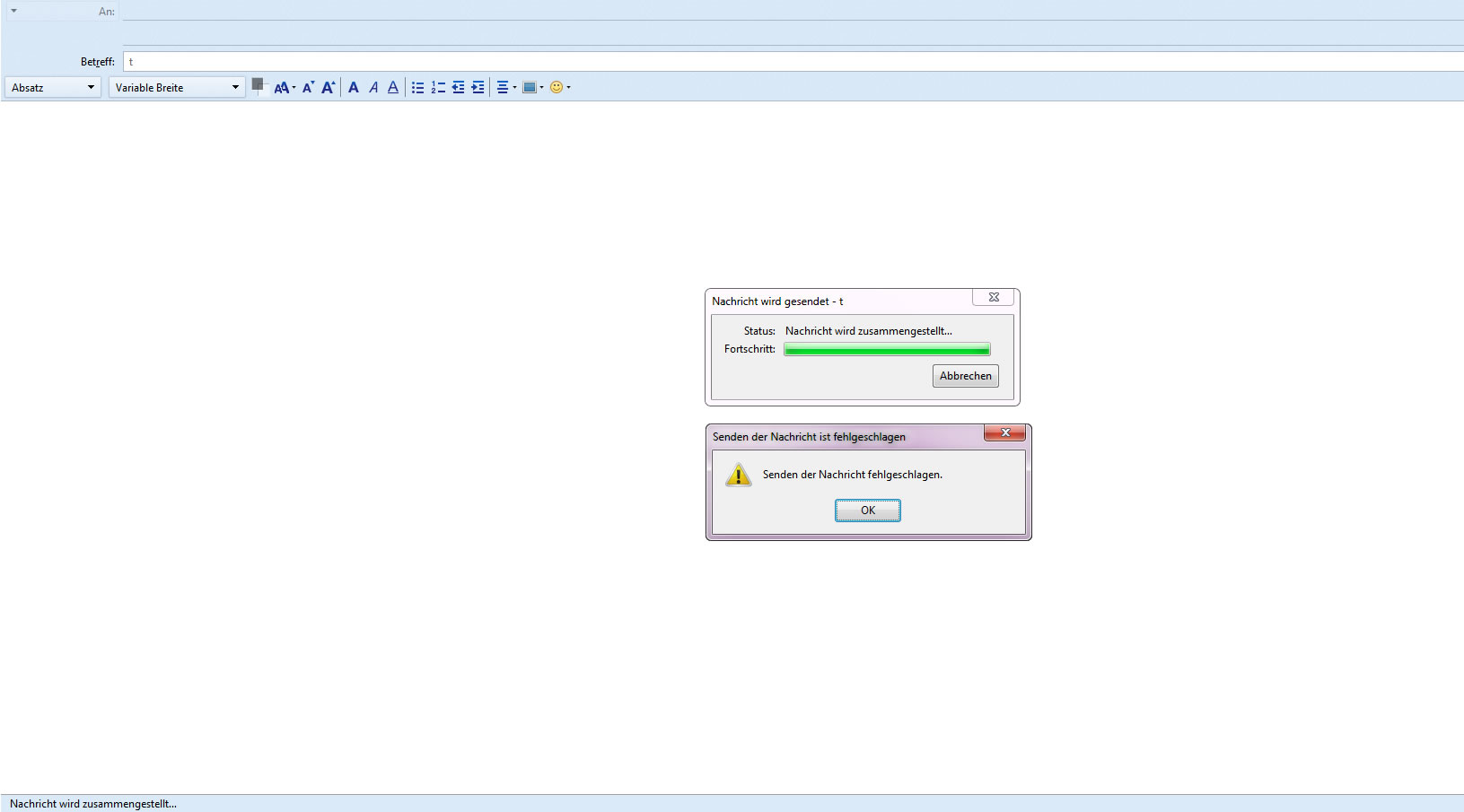
When making an atempt to send a mail, there is just a message popping up, saying "can't send message" (see screenshot). No further error message available. Looks like something is broken or it's a bug?
Any ideas? Need to reinstall?
Thank you D.
Všechny odpovědi (4)

Please post your Troubleshooting Information.
At the top right of the Thunderbird window, click the menu button  , then select Help > Troubleshooting Information.
Press the "Copy text to clipboard button" and paste the information into your reply.
, then select Help > Troubleshooting Information.
Press the "Copy text to clipboard button" and paste the information into your reply.
Sorry for the late replay:
Allgemeine Informationen
   Name: Thunderbird
   Version: 52.4.0
   User-Agent: Mozilla/5.0 (Windows NT 6.1; WOW64; rv:52.0) Gecko/20100101 Thunderbird/52.4.0
   Profilordner: Ordner öffnen
             (Lokaler Datenträger)
   Build-ID der Anwendung: 20171004092449
   Aktivierte Plugins: about:plugins
   Build-Konfiguration: about:buildconfig
   Speicherverwendung: about:memory
   Profile: about:profiles
 E-Mail- und Newsgruppen-Konten
   account1:
     INCOMING: account1, , (pop3) --removed--:110, alwaysSTARTTLS, passwordCleartext
     OUTGOING: , --removed--:587, alwaysSTARTTLS, passwordCleartext, true
   account2:
     INCOMING: account2, , (none) Local Folders, plain, passwordCleartext
   account3:
     INCOMING: account3, , (pop3) pop3.web.de:995, SSL, passwordCleartext
     OUTGOING: , smtp.web.de:587, alwaysSTARTTLS, passwordCleartext, true
   account4:
     INCOMING: account4, , (pop3) pop3.web.de:995, SSL, passwordCleartext
     OUTGOING: , smtp.web.de:587, alwaysSTARTTLS, passwordCleartext, true
   account5:
     INCOMING: account5, , (pop3) pop3.web.de:995, SSL, passwordCleartext
     OUTGOING: , smtp.web.de:587, alwaysSTARTTLS, passwordCleartext, true
   account6:
     INCOMING: account6, , (pop3) pop3.web.de:995, SSL, passwordCleartext
     OUTGOING: , smtp.web.de:587, alwaysSTARTTLS, passwordCleartext, true
   account7:
     INCOMING: account7, , (imap) --removed--:143, alwaysSTARTTLS, passwordCleartext
     OUTGOING: , --removed--:587, alwaysSTARTTLS, passwordCleartext, true
   account8:
     INCOMING: account8, , (imap) --removed--:143, alwaysSTARTTLS, passwordCleartext
     OUTGOING: , --removed--:587, alwaysSTARTTLS, passwordCleartext, true
   account9:
     INCOMING: account9, , (imap) --removed--:143, alwaysSTARTTLS, passwordCleartext
     OUTGOING: , --removed--:587, alwaysSTARTTLS, passwordCleartext, true
 Absturzberichte
   https://crash-stats.mozilla.com/report/index/bp-e7726b7a-51a3-457f-b0be-c0d9a0171109 (09.11.2017)
 Erweiterungen
   ImportExportTools, 3.2.4.1, true, {3ed8cc52-86fc-4613-9026-c1ef969da4c3}
   Lightning, 5.4.4, true, {e2fda1a4-762b-4020-b5ad-a41df1933103}
   Manually Sort Folders, 1.1.1, true, tbsortfolders@xulforum.org
   PrintingTools, 1.2.5, true, {5e9999c2-ba1d-44b6-bcee-5b30ce37d3b0}
   SlideShow, 1.4.8, true, slideshowski@totic.org
Wichtige modifizierte Einstellungen
Name: Wert
     browser.cache.disk.capacity: 358400
     browser.cache.disk.filesystem_reported: 1
     browser.cache.disk.smart_size_cached_value: 358400
     browser.cache.disk.smart_size.first_run: false
     browser.cache.disk.smart_size.use_old_max: false
     dom.apps.reset-permissions: true
     dom.max_chrome_script_run_time: 0
     extensions.lastAppVersion: 52.4.0
     font.internaluseonly.changed: true
     font.minimum-size.x-western: 12
     font.name.monospace.el: Consolas
     font.name.monospace.x-cyrillic: Consolas
     font.name.monospace.x-unicode: Consolas
     font.name.monospace.x-western: Consolas
     font.name.sans-serif.el: Calibri
     font.name.sans-serif.x-cyrillic: Calibri
     font.name.sans-serif.x-unicode: Calibri
     font.name.sans-serif.x-western: Calibri
     font.name.serif.el: Cambria
     font.name.serif.x-cyrillic: Cambria
     font.name.serif.x-unicode: Cambria
     font.name.serif.x-western: Cambria
     font.size.fixed.el: 14
     font.size.fixed.x-cyrillic: 14
     font.size.fixed.x-unicode: 14
     font.size.fixed.x-western: 14
     font.size.variable.el: 17
     font.size.variable.x-cyrillic: 17
     font.size.variable.x-unicode: 17
     font.size.variable.x-western: 17
     mail.openMessageBehavior.version: 1
     mail.winsearch.firstRunDone: true
     mailnews.database.global.datastore.id: 8ac9c823-00d6-47c1-96cd-95407aa2b65
     mailnews.database.global.views.conversation.columns: {"threadCol":{"visible":true,"ordinal":"1"},"flaggedCol":{"visible":true,"ordinal":"3"},"attachmentCol":{"visible":false…
     media.gmp.storage.version.observed: 1
     network.cookie.prefsMigrated: true
     network.predictor.cleaned-up: true
     places.database.lastMaintenance: 1510120682
     places.history.expiration.transient_current_max_pages: 122334
     plugin.importedState: true
     print.always_print_silent: false
     print.printer_Brother_MFC-7225N_USB_Printer.print_bgcolor: false
     print.printer_Brother_MFC-7225N_USB_Printer.print_bgimages: false
     print.printer_Brother_MFC-7225N_USB_Printer.print_duplex: -437918235
     print.printer_Brother_MFC-7225N_USB_Printer.print_edge_bottom: 0
     print.printer_Brother_MFC-7225N_USB_Printer.print_edge_left: 0
     print.printer_Brother_MFC-7225N_USB_Printer.print_edge_right: 0
     print.printer_Brother_MFC-7225N_USB_Printer.print_edge_top: 0
     print.printer_Brother_MFC-7225N_USB_Printer.print_evenpages: true
     print.printer_Brother_MFC-7225N_USB_Printer.print_footercenter:
     print.printer_Brother_MFC-7225N_USB_Printer.print_footerleft: &PT
     print.printer_Brother_MFC-7225N_USB_Printer.print_footerright: &D
     print.printer_Brother_MFC-7225N_USB_Printer.print_headercenter:
     print.printer_Brother_MFC-7225N_USB_Printer.print_headerleft: &T
     print.printer_Brother_MFC-7225N_USB_Printer.print_headerright: &U
     print.printer_Brother_MFC-7225N_USB_Printer.print_in_color: true
     print.printer_Brother_MFC-7225N_USB_Printer.print_margin_bottom: 0.5
     print.printer_Brother_MFC-7225N_USB_Printer.print_margin_left: 0.5
     print.printer_Brother_MFC-7225N_USB_Printer.print_margin_right: 0.5
     print.printer_Brother_MFC-7225N_USB_Printer.print_margin_top: 0.5
     print.printer_Brother_MFC-7225N_USB_Printer.print_oddpages: true
     print.printer_Brother_MFC-7225N_USB_Printer.print_orientation: 0
     print.printer_Brother_MFC-7225N_USB_Printer.print_page_delay: 50
     print.printer_Brother_MFC-7225N_USB_Printer.print_paper_data: 9
     print.printer_Brother_MFC-7225N_USB_Printer.print_paper_height: 11,00
     print.printer_Brother_MFC-7225N_USB_Printer.print_paper_name:
     print.printer_Brother_MFC-7225N_USB_Printer.print_paper_size_type: 0
     print.printer_Brother_MFC-7225N_USB_Printer.print_paper_size_unit: 1
     print.printer_Brother_MFC-7225N_USB_Printer.print_paper_width: 8,50
     print.printer_Brother_MFC-7225N_USB_Printer.print_resolution: -437918235
     print.printer_Brother_MFC-7225N_USB_Printer.print_reversed: false
     print.printer_Brother_MFC-7225N_USB_Printer.print_scaling: 1,00
     print.printer_Brother_MFC-7225N_USB_Printer.print_shrink_to_fit: true
     print.printer_Brother_MFC-7225N_USB_Printer.print_to_file: false
     print.printer_Brother_MFC-7225N_USB_Printer.print_unwriteable_margin_bottom: 0
     print.printer_Brother_MFC-7225N_USB_Printer.print_unwriteable_margin_left: 0
     print.printer_Brother_MFC-7225N_USB_Printer.print_unwriteable_margin_right: 0
     print.printer_Brother_MFC-7225N_USB_Printer.print_unwriteable_margin_top: 0
     security.sandbox.content.tempDirSuffix: {89f989d1-9f24-44dd-b676-7d7f4af592d3}
Grafik
     GPU #1
     Beschreibung: Intel(R) HD Graphics 4600
     Herstellerkennung: 0x8086
     Gerätekennung: 0x0412
     RAM: Unknown
     Treiber: igdumdim64 igd10iumd64 igd10iumd64 igdumdim32 igd10iumd32 igd10iumd32
     Treiber-Version: 10.18.14.4264
     Treiber-Datum: 8-4-2015
     Features
     Direct2D: false
     DirectWrite: true (6.2.9200.22164)
     WebGL-Renderer: Google Inc. -- ANGLE (Intel(R) HD Graphics 4600 Direct3D9Ex vs_3_0 ps_3_0) -- OpenGL ES 2.0 (ANGLE 2.1.0.2a250c8a0e15)
     AzureCanvasBackend: skia
     AzureCanvasAccelerated: 0
     AzureFallbackCanvasBackend: cairo
     AzureContentBackend: skia
JavaScript
Inkrementelle GC: 1
Barrierefreiheit
   Aktiviert: 0
   Barrierefreiheit verhindern: 0
Bibliotheken-Versionen
     Minimal vorausgesetzte Version
     Verwendete Version
     NSPR
     4.13.1
     4.13.1
     NSS
     3.28.6
     3.28.6
     NSS Util
     3.28.6
     3.28.6
     NSS SSL
     3.28.6
     3.28.6
     NSS S/MIME
     3.28.6
     3.28.6
Presuming the sending issue is with account numbers 3,4,5 and 6 which are POP mail accounts.
First make sure each pop mail account is actually using the correct smtp server. You have four email addresses/mail accounts using same server settings, so would expect you to have four smtp outgoing servers, one for each.
In Thunderbird right click on pop mail account name in the Folder Pane and select 'Settings'.
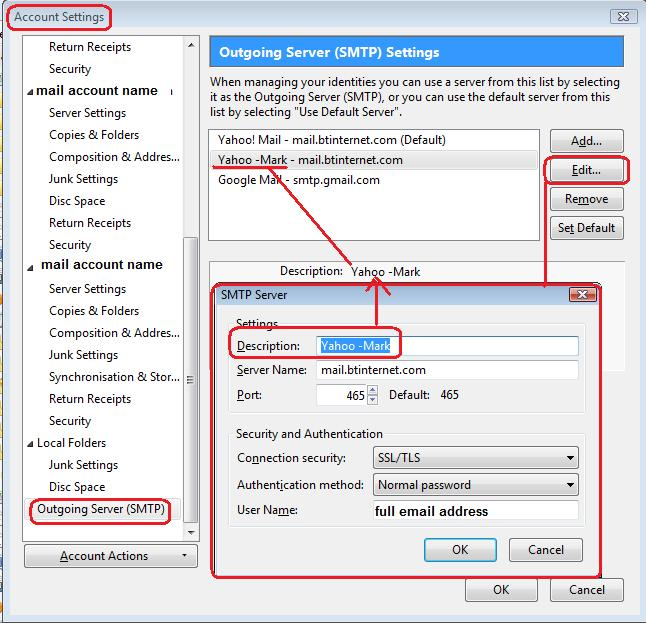
Bottom left click on 'Outgoing server (SMTP)' In 'Outgoing Server (SMTP) Settings': You should have 4 Outgoing servers listed; one for each web.de mail account. Q: How many outgoing servers are listed?
Check each outgoing server:
'Description' field - this can be anything you choose to help identify which account is using this server. It can be used to help differentiate betweem servers when they look similiar. Use the 'Edit' button to modify the 'Description'. Type something useful and unique eg: Personal, Business, Work etc
Each outgoing server should have a 'UserName' = usually full email address of mail account that is using that server. Whilst some server settings are the same, the username and password are different. click on OK
Repeat the above on all four of your web.de outgoing servers.
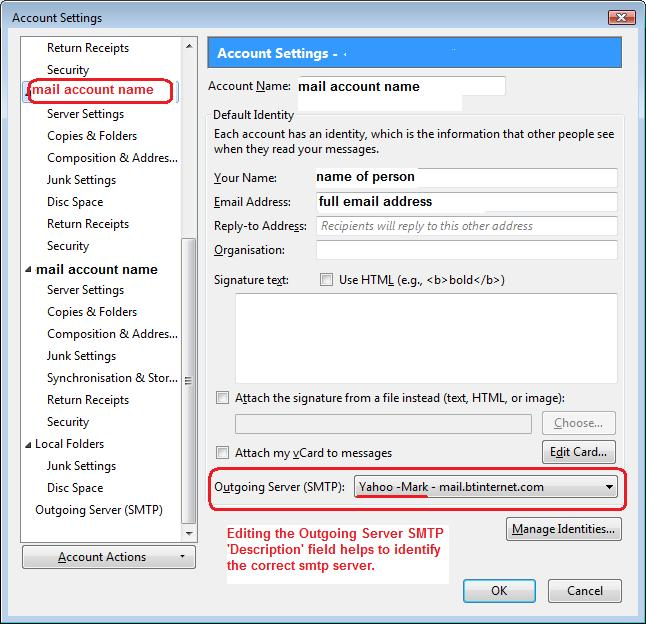
Then check that each pop web.de mail account is using the correct outgoing server. select the first pop web.de mail account name in the left Account Settings pane. look on the right side near the bottom for the 'Outgoing server' it is using. click on drop down to see list and make sure you select the correct one for that email address. The 'Description' will be visible.
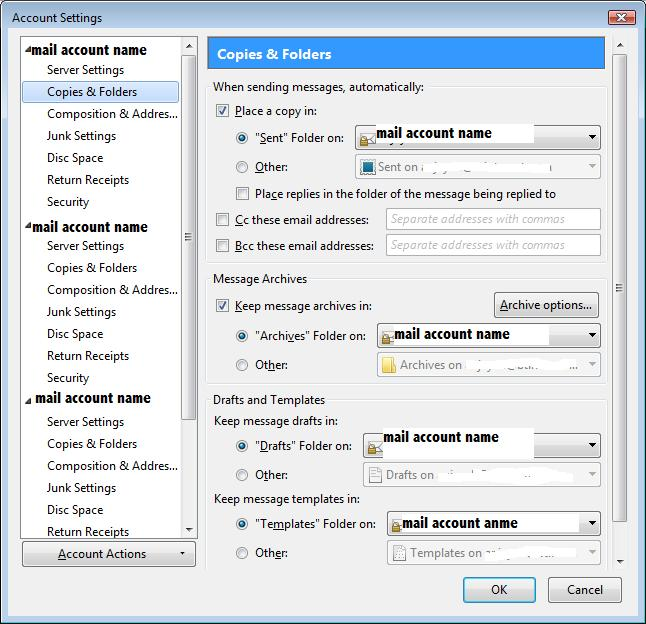
Images below are a guide, so you can see what I'm talking about.
then check each pop web.de 'Copies & Folders' to ensure it is as follows. Select 'Place a copy in' select: 'Sent folder on:' and choose 'Sent' on that account name.
When all is done click on OK to close and save Account Settings.
restart Thunderbird. Report back on results for sending.
Apologies....forgot to add images :)