


Windows 10 reached EOS (end of support) on October 14, 2025. If you are on Windows 10, see this article.

Prohledat stránky podpory

Vyhněte se podvodům. Za účelem poskytnutí podpory vás nikdy nežádáme, abyste zavolali nebo poslali SMS na nějaké telefonní číslo nebo abyste sdělili své osobní údaje. Jakékoliv podezřelé chování nám prosím nahlaste pomocí odkazu „Nahlásit zneužití“.

Zjistit více

Calendar error after Lightning update

  • 4 odpovědi
  • 3 mají tento problém
  • 86 zobrazení
  • Poslední odpověď od YReginster
  • Archivováno

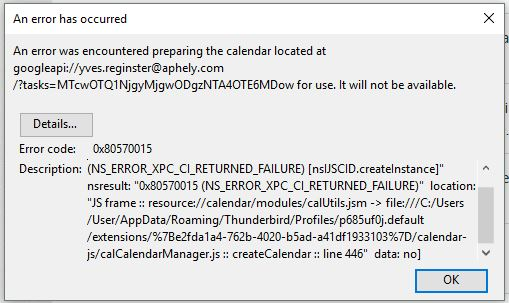
TB 54.1.1 on Linux after last update (22 May 17?) An error was encountered preparing the calendar located at googleapi://xxxx@gmail.com/?calendar=yyyygmail.com for use. It will not be available. [Exception... "Component returned failure code: 0x80570015 (NS_ERROR_XPC_CI_RETURNED_FAILURE) [nsIJSCID.createInstance]" nsresult: "0x80570015 (NS_ERROR_XPC_CI_RETURNED_FAILURE)" location: "JS frame :: resource://calendar/modules/calUtils.jsm -> file:///zzzz.default/extensions/%7Be2fda1a4-762b-4020-b5ad-a41df1933103%7D/calendar-js/calCalendarManager.js :: calCalendarManager.prototype.createCalendar :: line 446" data: no] Any ideas?

TB 54.1.1 on Linux after last update (22 May 17?) An error was encountered preparing the calendar located at googleapi://xxxx@gmail.com/?calendar=yyyygmail.com for use. It will not be available. [Exception... "Component returned failure code: 0x80570015 (NS_ERROR_XPC_CI_RETURNED_FAILURE) [nsIJSCID.createInstance]" nsresult: "0x80570015 (NS_ERROR_XPC_CI_RETURNED_FAILURE)" location: "JS frame :: resource://calendar/modules/calUtils.jsm -> file:///zzzz.default/extensions/%7Be2fda1a4-762b-4020-b5ad-a41df1933103%7D/calendar-js/calCalendarManager.js :: calCalendarManager.prototype.createCalendar :: line 446" data: no] Any ideas?

Všechny odpovědi (4)

Edit Lightning 5.4 update 24 May 17

I have the problem too.
I did solve it but I cannot be sure how. I think it was as simple as updating gContactSync in Extensions.

I simply went back to previous version of Thunderbird. de-install Thunderbird, re-install and install again Provider for Google Calendar.

My issue is now solved.