


my ISP uses STARTSSL on port 465 but thunderbird wont let me add these settings?

Hi there my ISP's SMTP uses STARTSSL on port 465 but i cant add these settings if i add the smtp server as startssl it forces me to use port 587, and when i go back to set it to port 465 the authentication method changes from STARTSSL to SSL/TLS :(
Which means i can not send mail anymore, can anyone offer any help?
Zvolené řešení
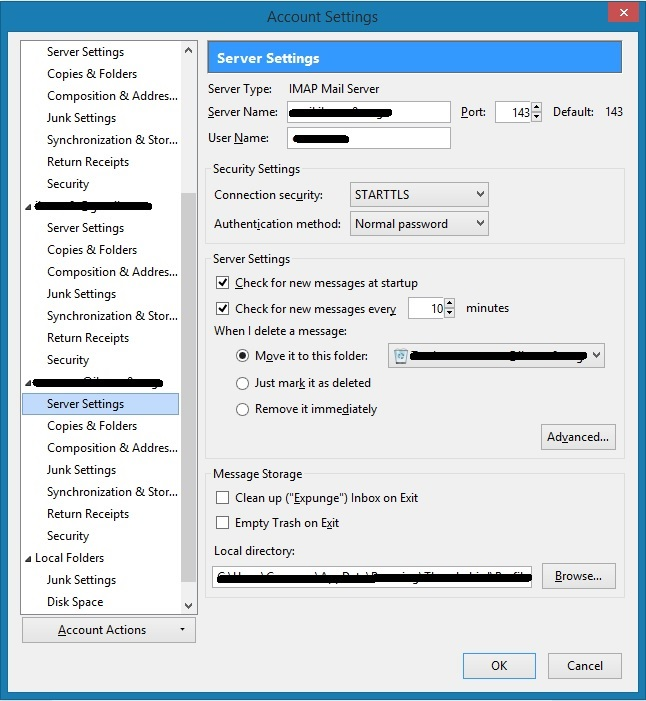
Scroll to the bottom of the account listing and select Outgoing Server(SMTP) It is just out of view on the screenshot you posted.
Přečíst dotaz v kontextu 👍 0Všechny odpovědi (6)
I assume your in the new account wizard... let it set up with the wrong settings.
Goto Tools menu (alt+T) > accounts settings > outgoing server (SMTP) and edit it to the correct values.
thanks Matt, much appreciated!
hrmm, i must be blind, i cant see how to modify the SMTP settings once the account has been added?
Upravil uživatel ibanez0r dne
i can see incoming settings only, do i need to click something?
Zvolené řešení
Scroll to the bottom of the account listing and select Outgoing Server(SMTP) It is just out of view on the screenshot you posted.
ahhh! thanks brother :)