


Is there a way to export bookmarks from an old iphone?

(Was hoping to just talk to mozilla support direct but i guess a forum works too lol)
Hi, I have an old broken iphone that I just fixed and I was hoping that I could recover some now deleted desktop bookmarks from it. The phone hasn't been connected to the internet since before the bookmarks were deleted, and I've checked that they're still there as the sync hasn't updated in years now. I understand that I could painstakingly copy these one by one, but there are likely over a thousand that i'd be interested in getting a copy of exported to my desktop.
I considered maybe disabling sync the phone and syncing with a new firefox profile to get them on my pc, but i'm too worried that i'll 1. lose the bookmarks if i disable sync, or 2. that a new profile would just overwrite the bookmarks on the phone & wipe them completely.
I have a full backup of the phone n tried getting into the files but i don't see any clear bookmark data from the extracted firefox data. If it's there, I have no idea what to look for.
I would like to connect this phone to the internet soon, so the sooner I can get this resolved the better.. Any help or ideas would be greatly appreciated. As of right now, the iphone hasn't been connected since 2024. So if there's a new export feature i'm unaware of, know that my version may not have it.
Thank you ♥
Chosen Solution
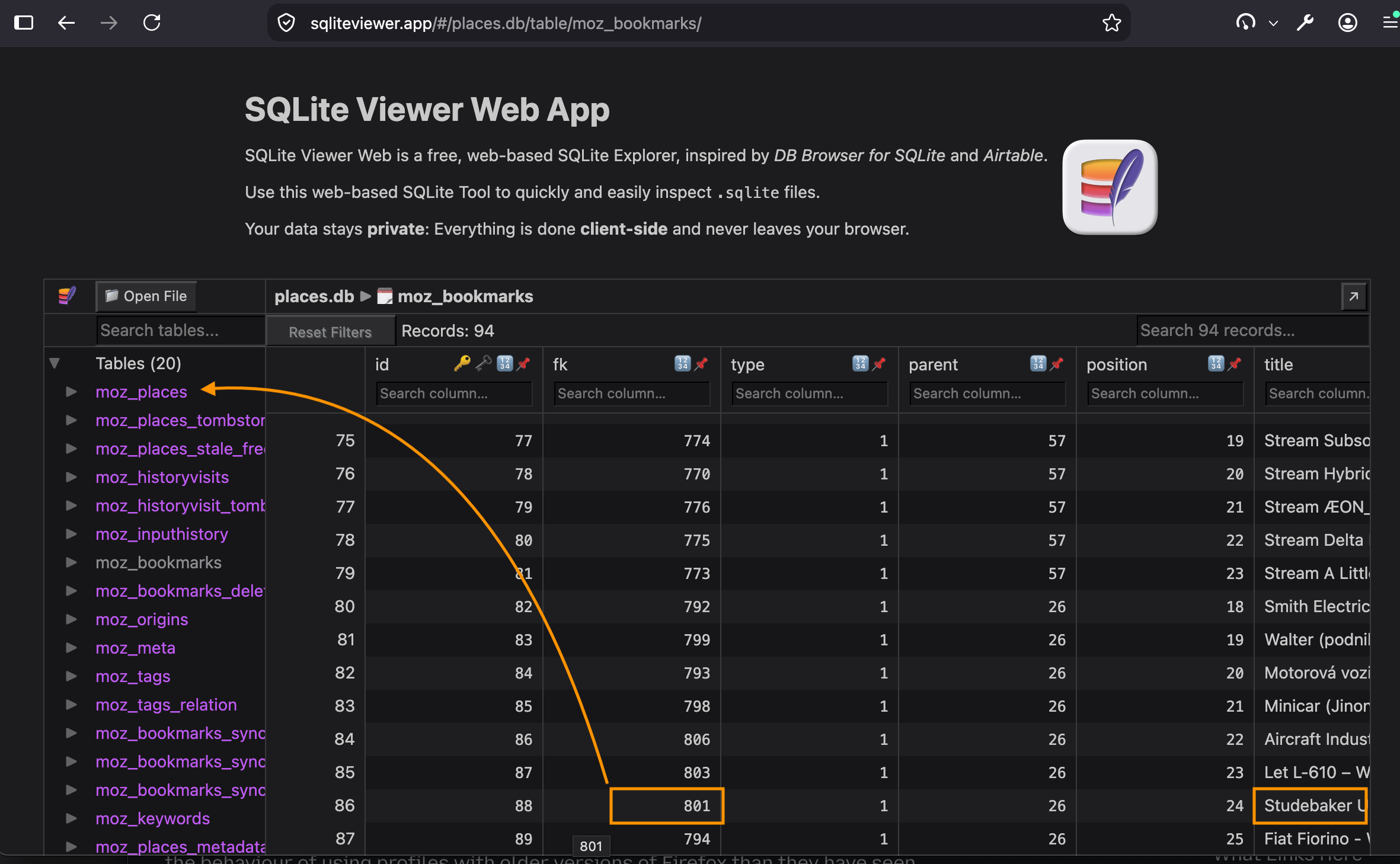
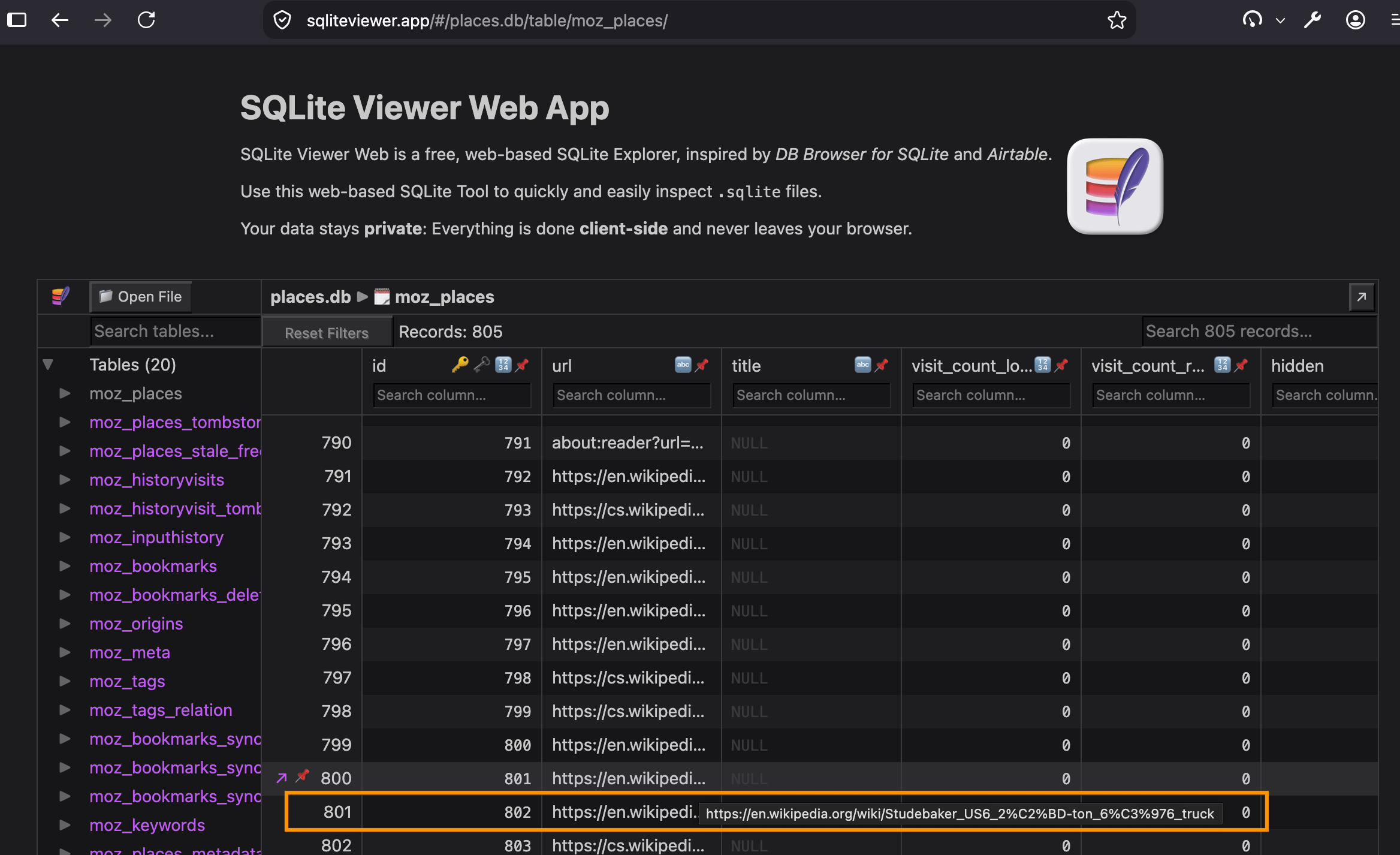
update: i actually found tens of thousands of url's in moz_places, which im assuming is my old history or something? anyways, i was using chatgpt to kinda figure this out because i was getting bored.
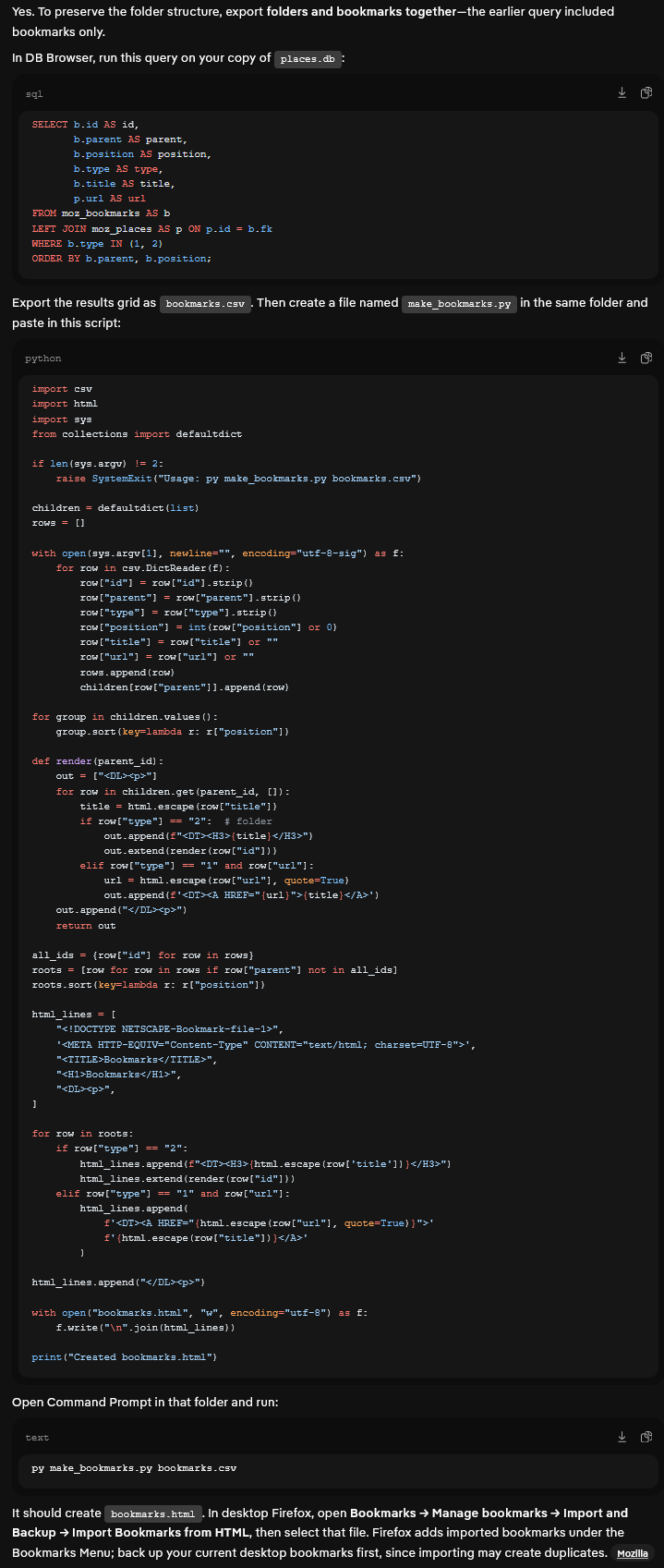
it helped me to combine my data from moz_bookmarks and moz_places to give me a functional list of bookmarks with the proper urls (i genuinely dont know how lol). it then told me how to export the data & gave me a python script to turn it into an html that i could import directly to a new firefox profile.
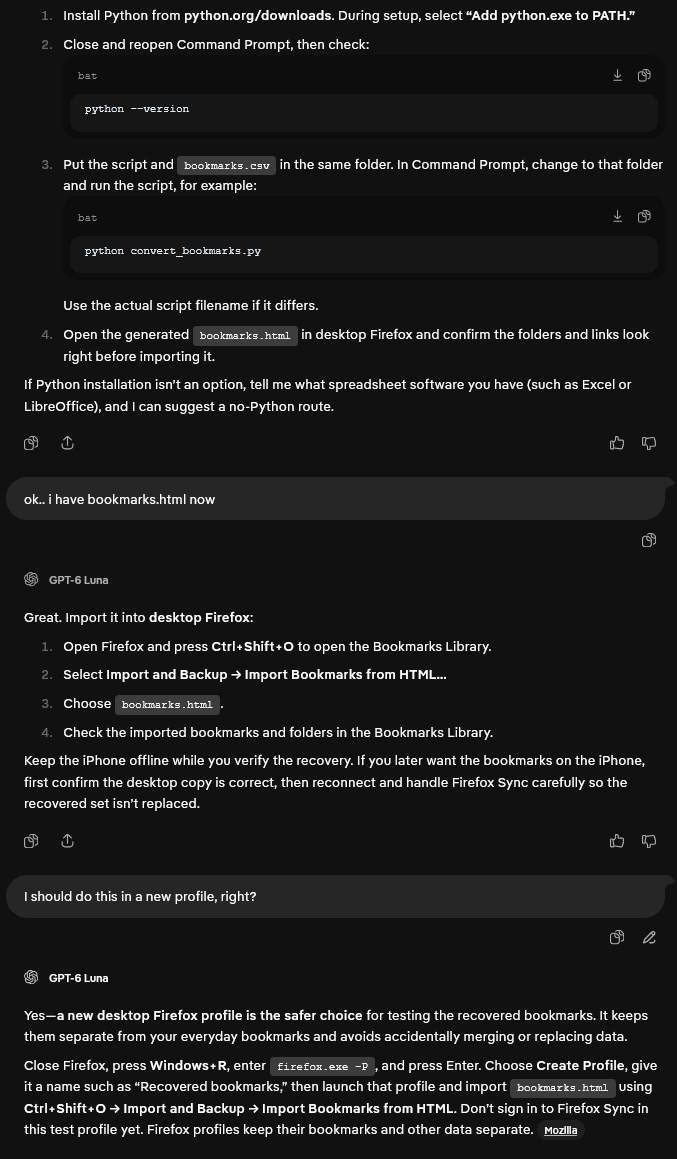
it worked *perfectly*. i have all of my old bookmarks that i was wanting, atleast from the respective timeframe, and it's even formatted like it was back then with the proper folders and everything.
though, as i didn't want to overwrite my current bookmarks, i imported them into a new profile and then manually copied the desired bookmarks over (as i still retained some of them on my current profile). but for some reason you can't copy the folder structure and everything, so i had to make the folder trees myself. it wasnt that bad since you can copy all of the bookmarks per folder, but keep in mind it will take some time.
will add images and the scripts it gave me if anyone else ever wants to do this. i do appreciate the help though, the lead you gave me is why i was able to get this to work! shoutout to you man <3
sql
SELECT b.id AS id,
      b.parent AS parent,
      b.position AS position,
      b.type AS type,
      b.title AS title,
      p.url AS url
FROM moz_bookmarks AS b LEFT JOIN moz_places AS p ON p.id = b.fk WHERE b.type IN (1, 2) ORDER BY b.parent, b.position;
python (I think the forum might lowkey break how this is supposed to be formatted, sorry!!)
import csv import html import sys from collections import defaultdict
if len(sys.argv) != 2:
raise SystemExit("Usage: py make_bookmarks.py bookmarks.csv")
children = defaultdict(list) rows = []
with open(sys.argv[1], newline="", encoding="utf-8-sig") as f:
   for row in csv.DictReader(f):
       row["id"] = row["id"].strip()
       row["parent"] = row["parent"].strip()
       row["type"] = row["type"].strip()
       row["position"] = int(row["position"] or 0)
       row["title"] = row["title"] or ""
       row["url"] = row["url"] or ""
       rows.append(row)
       children[row["parent"]].append(row)
for group in children.values():
group.sort(key=lambda r: r["position"])
def render(parent_id):
out = ["{title}
")out.extend(render(row["id"])) elif row["type"] == "1" and row["url"]: url = html.escape(row["url"], quote=True) out.append(f'<DT><A HREF="{url}">{title}</A>') out.append("
"] for row in children.get(parent_id, []): title = html.escape(row["title"]) if row["type"] == "2": # folder out.append(f"
all_ids = {row["id"] for row in rows} roots = [row for row in rows if row["parent"] not in all_ids] roots.sort(key=lambda r: r["position"])
html_lines = [
   "",
   '<META HTTP-EQUIV="Content-Type" CONTENT="text/html; charset=UTF-8">',
   "<TITLE>Bookmarks</TITLE>",
"
Bookmarks
","
- <p>",
]
for row in roots:
if row["type"] == "2":html_lines.append(f"<DT>
{html.escape(row['title'])}
") html_lines.extend(render(row["id"]))
elif row["type"] == "1" and row["url"]:
html_lines.append(
f'<DT><A HREF="{html.escape(row["url"], quote=True)}">'
f'{html.escape(row["title"])}</A>'
)
html_lines.append("<p>")
with open("bookmarks.html", "w", encoding="utf-8") as f:
f.write("\n".join(html_lines))
print("Created bookmarks.html")
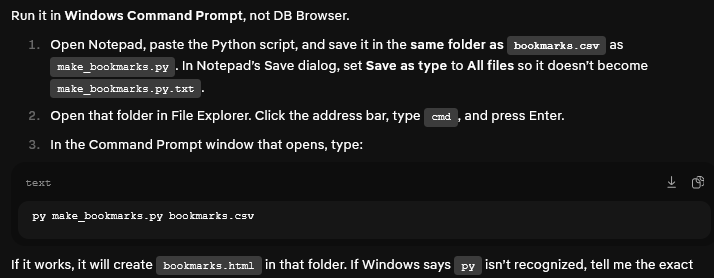
cmd
py make_bookmarks.py bookmarks.csv
i think it would probably be helpful if firefox just added an export bookmarks option though lol
thanks anyways haha. happy holidays :-)
All Replies (5)
Do you have a backup of the phone (incl. app data) that you think you'd be able to restore back onto the device if need be?
That'd be the ideal insurance in case syncing to a new account does something weird and the local data is erased. So you can wipe, restore from backup, and try again, differently.
Because in that case I'd recommend signing out of the original sync account, and create a new one just for this purpose — and sync the device bookmarks to this fresh account, that you can then connect a desktop profile to, and grab the bookmark export from there.
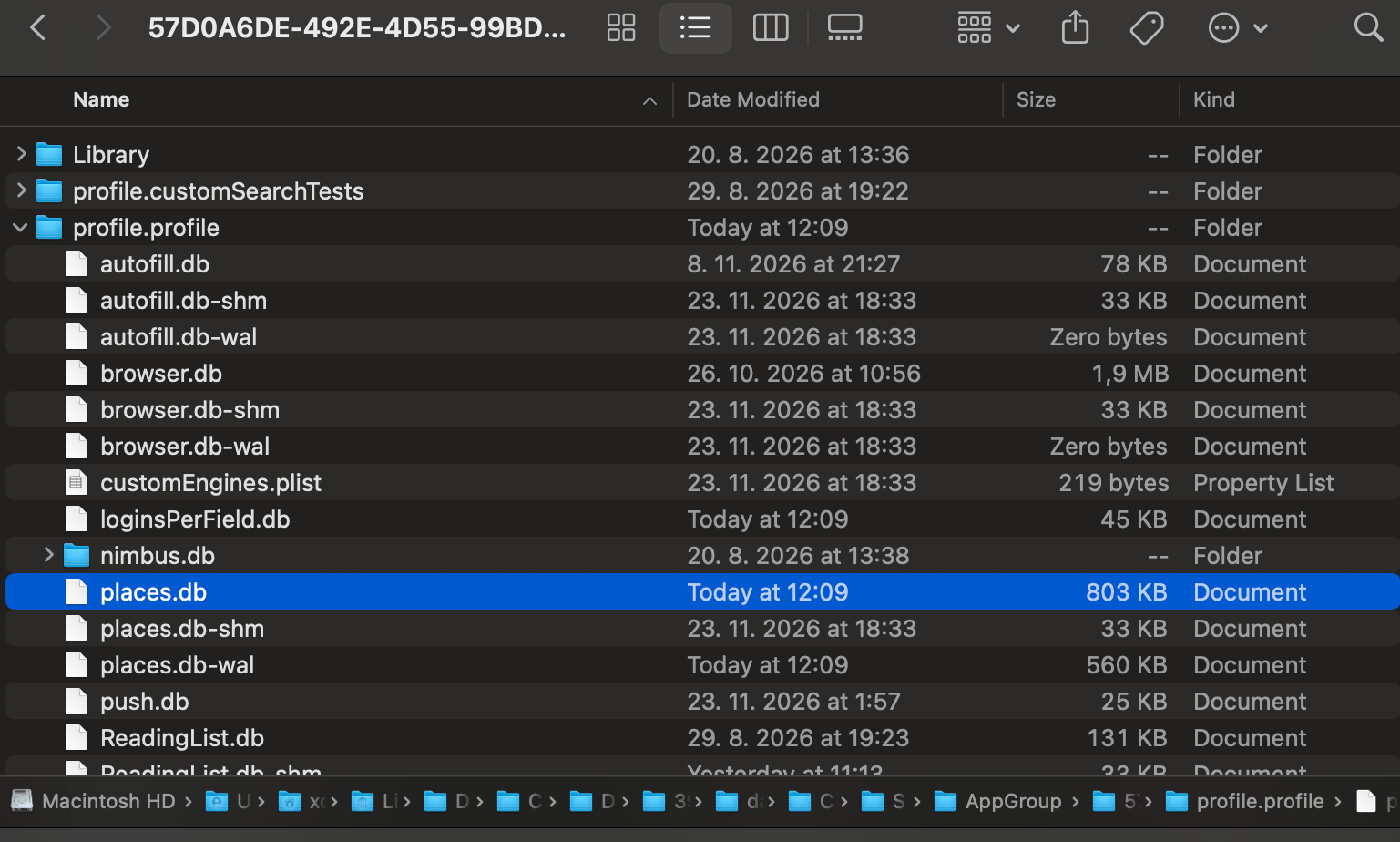
(I tried looking for the sqlite storage in the raw phone file system but wasn't able to pinpoint where exactly in the quagmire of random IDs that lives — you can search for "places.db" in "profile.profile" folder, but that will be somewhere under Containers/Shared/AppGroup/UUID if you have the backup archive to tinker with manually.)
I already had done a full enycrpyted backup thru itunes right after fixing the phone. If there is a better way to do a full backup, 'incl app data', please lmk and i'll take a look at it.
It turns out I was looking in the wrong firefox directory initially. I was looking in appdomain-org.mozilla.ios.firefox, but i found what i believe i was looking for in appdomaingroup-group.org.mozilla.ios.firefox>profile.profile.
There I found places.db as you were referring to, & I actually found my bookmark data, but I think the url's are unfortunately hashed(?). I can see the title, dateadded, lastmodified and guid. I'm assuming that the guid is the hashed url. If it's not, then I have no idea where the url would be stored and why it wouldn't be a part of this data.
So you think the best course of action would be syncing to a new account? My main worry was that since they're the *desktop* bookmarks that have been synced onto the phone, they'd be lost once disabling sync. Perhaps i'm incorrect though. I was considering that if I couldn't find any better options. (It would undoubtedly be way easier than manually sifting through and entering (over a) thousand(s of) bookmarks lol)
I suppose since I have the backup, it would be worth trying. Let me know what you think
Modified by codilla02
Chosen Solution
update: i actually found tens of thousands of url's in moz_places, which im assuming is my old history or something? anyways, i was using chatgpt to kinda figure this out because i was getting bored.
it helped me to combine my data from moz_bookmarks and moz_places to give me a functional list of bookmarks with the proper urls (i genuinely dont know how lol). it then told me how to export the data & gave me a python script to turn it into an html that i could import directly to a new firefox profile.
it worked *perfectly*. i have all of my old bookmarks that i was wanting, atleast from the respective timeframe, and it's even formatted like it was back then with the proper folders and everything.
though, as i didn't want to overwrite my current bookmarks, i imported them into a new profile and then manually copied the desired bookmarks over (as i still retained some of them on my current profile). but for some reason you can't copy the folder structure and everything, so i had to make the folder trees myself. it wasnt that bad since you can copy all of the bookmarks per folder, but keep in mind it will take some time.
will add images and the scripts it gave me if anyone else ever wants to do this. i do appreciate the help though, the lead you gave me is why i was able to get this to work! shoutout to you man <3
sql
SELECT b.id AS id,
      b.parent AS parent,
      b.position AS position,
      b.type AS type,
      b.title AS title,
      p.url AS url
FROM moz_bookmarks AS b LEFT JOIN moz_places AS p ON p.id = b.fk WHERE b.type IN (1, 2) ORDER BY b.parent, b.position;
python (I think the forum might lowkey break how this is supposed to be formatted, sorry!!)
import csv import html import sys from collections import defaultdict
if len(sys.argv) != 2:
raise SystemExit("Usage: py make_bookmarks.py bookmarks.csv")
children = defaultdict(list) rows = []
with open(sys.argv[1], newline="", encoding="utf-8-sig") as f:
   for row in csv.DictReader(f):
       row["id"] = row["id"].strip()
       row["parent"] = row["parent"].strip()
       row["type"] = row["type"].strip()
       row["position"] = int(row["position"] or 0)
       row["title"] = row["title"] or ""
       row["url"] = row["url"] or ""
       rows.append(row)
       children[row["parent"]].append(row)
for group in children.values():
group.sort(key=lambda r: r["position"])
def render(parent_id):
out = ["{title}
")out.extend(render(row["id"])) elif row["type"] == "1" and row["url"]: url = html.escape(row["url"], quote=True) out.append(f'<DT><A HREF="{url}">{title}</A>') out.append("
"] for row in children.get(parent_id, []): title = html.escape(row["title"]) if row["type"] == "2": # folder out.append(f"
all_ids = {row["id"] for row in rows} roots = [row for row in rows if row["parent"] not in all_ids] roots.sort(key=lambda r: r["position"])
html_lines = [
   "",
   '<META HTTP-EQUIV="Content-Type" CONTENT="text/html; charset=UTF-8">',
   "<TITLE>Bookmarks</TITLE>",
"
Bookmarks
","
- <p>",
]
for row in roots:
if row["type"] == "2":html_lines.append(f"<DT>
{html.escape(row['title'])}
") html_lines.extend(render(row["id"]))
elif row["type"] == "1" and row["url"]:
html_lines.append(
f'<DT><A HREF="{html.escape(row["url"], quote=True)}">'
f'{html.escape(row["title"])}</A>'
)
html_lines.append("<p>")
with open("bookmarks.html", "w", encoding="utf-8") as f:
f.write("\n".join(html_lines))
print("Created bookmarks.html")
cmd
py make_bookmarks.py bookmarks.csv
i think it would probably be helpful if firefox just added an export bookmarks option though lol
thanks anyways haha. happy holidays :-)
Ah, so you're actually not looking for the iPhone bookmarks, but a potential synced snapshot of your desktop bookmarks as the phone saw them at that point (which are presumably no longer available in your account). That might indeed be forgotten when disconnected from the original account.
I think the "guid" values are pointers, the .db contains several tables, if you're looking at moz_bookmarks* these won't contain the URLs, there are guid and fk references back to moz_places — which are the individual location items — however the places proper will contain both history and bookmarks, so you'd want to untangle that only based on the bookmarks entries.
Do you have some AI coding agent available to you to throw this task at, to help you select the data across tables via foreign keys and IDs, reconstruct the URLs, and potentially export the bookmark data in the generic JSON or HTML format for easy desktop import?
Jinx! Slow typist here. Glad the scenario was exactly that and it worked out for you. 💪