


Need to archive thousands of emails

When I send emails from this account they often stall. I get a message saying your email was sent but a copy could not be saved. One time, the message elaborated "You may not have enough storage space." I checked my Sent folder and there were over 10 K emails in it, dating back to 2010. I've been trying to archive the older ones, but as far as I can see the only way to do this is to click on every single one of them and then hit the "Archive" button. Is there any way to make this task quicker and easier? I've been working on it for days and I'm only down to 9,000. I'm trying to use the filter function but you can only filter messages by sender, recipient, subject, and body--not by date. Can you help me?

Chosen Solution
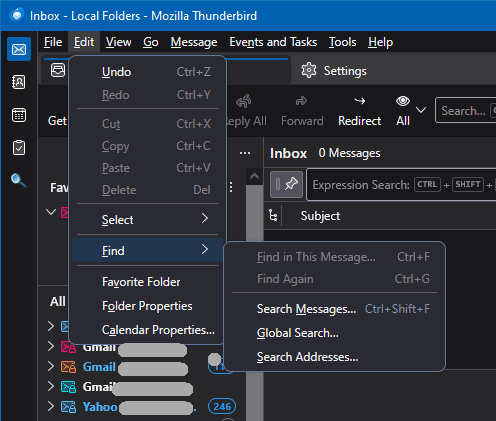
View is found on the Menu Bar. See the attached image. If the Menu Bar is hidden, press <Alt> or <F10> to reveal it.
You can select all messages with the near-universal keystroke <Ctrl+A> that works in almost every GUI program. You can select non-contiguous messages by clicking each while hold down <Ctrl>. You can select a range by clicking the first one, then clicking the last one while holding down <Shift>.
Modified by Lin
All Replies (4)
- What is your operating system?
- Who is your email provider? Do you know what their storage limit is?
- Is this an IMAP or POP3 account?
- Have you verified that you do, indeed, have plenty of local disk space?
- Are you trying to use Thunderbird's built-in Archive feature, or are you manually moving the messages to another folder?
By the way, Thunderbird's "Search Messages" search feature (see menu item <Edit | Find | Search Messages> or press <Ctrl+Shift+F>) can search a single folder by age or date.
Thanks for the prompt reply. OS is Windows 10. Email provider is AOL, and I have no idea what their storage limit is or if they even have one. It's an IMAP account. I don't know what "local disk space" means, but if it means space on my hard drive, yes, I have plenty. I am trying to use the built-in Archive feature. Thanks for the tip about the "Search Messages" feature. I could not find "Edit" on the menu, but the keyboard shortcut you provided worked well. However, *I still have to click manually on every single message*. There is no "Select All" option, which was what I was looking for. So now I have 2 questions. Where is this "Edit" feature? And how can I move 7,000 or so messages to "Archives" without giving myself carpal tunnel syndrome from clicking 7,000 times?
Chosen Solution
View is found on the Menu Bar. See the attached image. If the Menu Bar is hidden, press <Alt> or <F10> to reveal it.
You can select all messages with the near-universal keystroke <Ctrl+A> that works in almost every GUI program. You can select non-contiguous messages by clicking each while hold down <Ctrl>. You can select a range by clicking the first one, then clicking the last one while holding down <Shift>.
Modified by Lin
This is great! Thank you! I have been using a computer (self-taught) every day since 1997 and never knew about these features.