


Firefox Desktop Version 157 TLS key logging warning — Norton 360 Standard is suspected, but HTTPS scanning tests did not resolve it and so I need help with identifying the root casues and sepcifc steps to eliminate this warning

My system • Windows 11 on a Dell laptop. • Firefox Version 157, my default browser. • Norton 360 Standard. • Two Firefox profiles; the warning appears in both. • Firefox Troubleshooting Mode does not eliminate the warning https://support.mozilla.org/en-US/kb/sslkeylogfile-warning?utm_source=chatgpt.com
What I have observed
The warning appears on Firefox network-error pages, including when the internet is disconnected or I enter an incorrect URL.
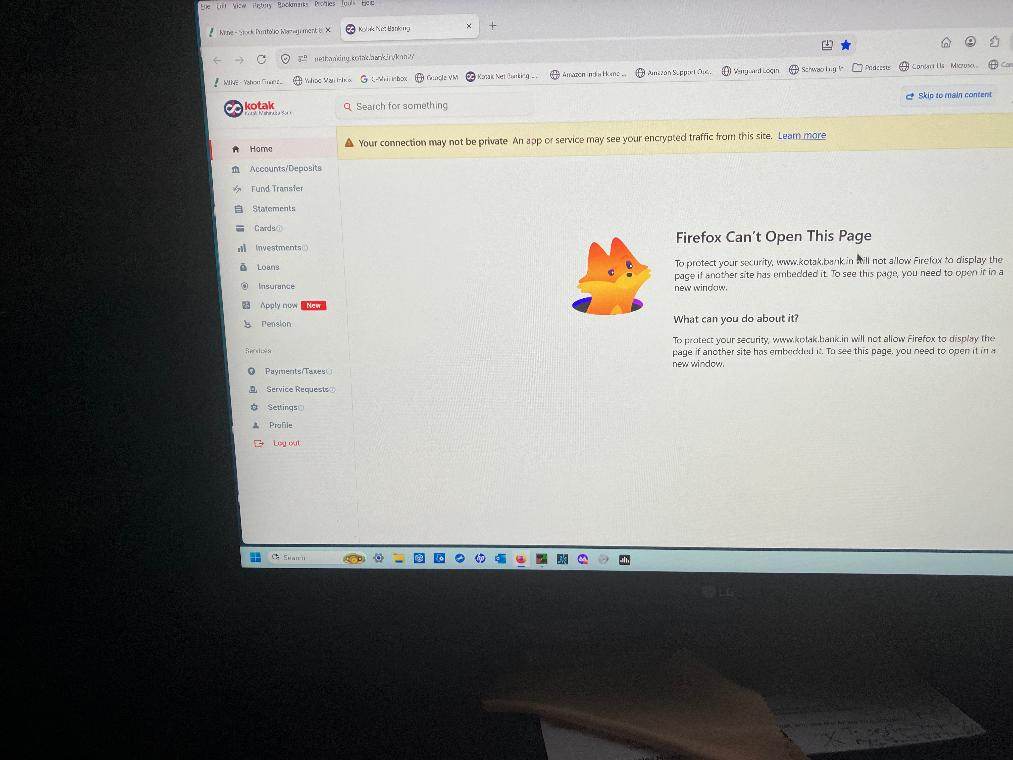
A particularly reproducible example occurs after I successfully log in to Kotak Net Banking and select Help → Raise a Query. Firefox then displays a connection/privacy warning associated with the embedded page. I do not see the same behaviour in Chrome or Firefox Private Browsing when performing the equivalent Kotak steps.
Troubleshooting already completed
1. Norton Safe Web HTTPS scanning was disabled and re-enabled without resolving the issue.
2. QUIC/HTTP3 scanning, WebSocket Protocol Scanning and DNS/DoH scanning were individually tested without resolving it.
3. Firefox Enterprise Policies are inactive.
4. I found no SSLKEYLOGFILE entry in either Windows User Variables or System Variables.
5. Norton and Dell malware scans found no malware.
6. The warning also occurs when I connect through a mobile phone hotspot rather than my usual BSNL connection.
Questions for Mozilla's technical contributors
1. Does this warning establish that Firefox detects SSLKEYLOGFILE, or could another mechanism produce the same message?
2. Can the variable be inherited by Firefox from a parent process or injected into its running process even when it is absent from the Windows User and System Variables?
3. What is the safest way to identify which process or security product is setting it on Windows 11?
4. Is there a known interaction between Firefox 157 and Norton 360 Standard that could explain this behaviour?
5. What evidence should I collect to distinguish a Norton issue from a Firefox issue without disabling security protections or modifying Windows settings?
I am not looking to disable security features indiscriminately. I want to identify the actual cause and, if Norton is responsible, determine the precise setting that needs attention.
I would particularly appreciate a response from a contributor with Windows networking, Firefox TLS or security-software diagnostic experience.
Thank you.
All Replies (19)
First things first. The error page is due to subresource or content framing security defined by either the inner or the outer document, most likely developer.mozilla.org/docs/Web/HTTP/Reference/Headers/Content-Security-Policy/frame-ancestors — so that's an authoring choice, and ultimately an error on their side in nesting things, so that's not influenced by the scanning.
The scanning banner in displayed on error pages, but is not necessarily related to the error shown, or the reason for it. So seeing this through will have no effect on resolving the error attached — that's unrelated security policy configuration the site operators need to figure out.
(I'll skip the rest for now, as it's not apparent whether you wanna address the error state shown, or the TLS logging per se, since this is two unrelated things at this point.)
Firefox can't tell who is setting the logging, so you might need to liaise with Norton about this.
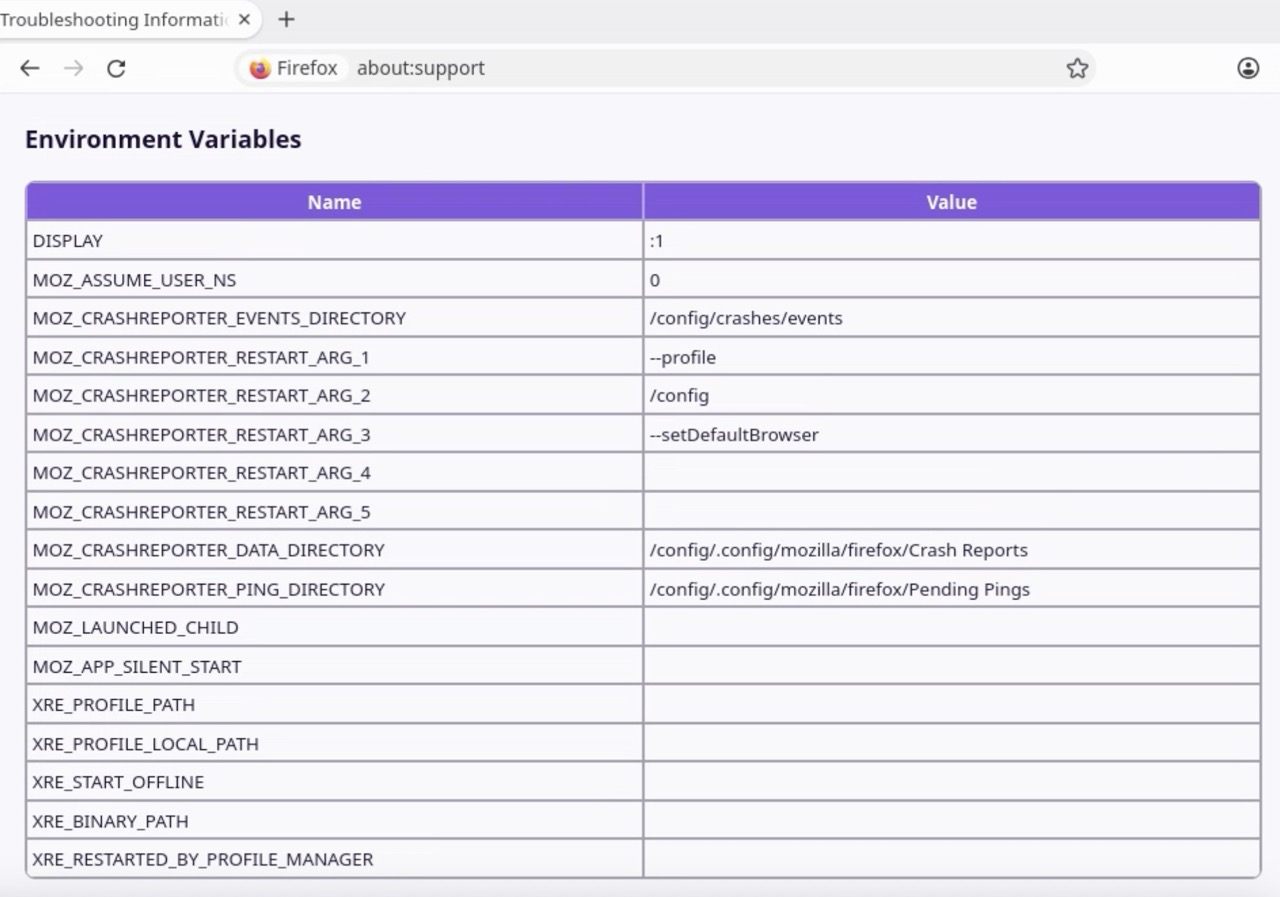
It's based on the env it's run with, I think it should be visible here: (potentially with a path that would shed some light on what tool set that based on the naming)
Is there any known Firefox 157 issue that could cause this warning to persist in these circumstances, or is the warning always evidence that TLS key logging is enabled in the Firefox process's environment?
I would appreciate a response based on Firefox's actual implementation rather than a general recommendation to check the Windows environment variables, as I have already done that.
Is there any known Firefox 157 issue that could cause this warning to persist
No.
in these circumstances
Which "these circumstances"?
is the warning always evidence that TLS key logging is enabled in the Firefox process's environment?
Yes.
I would appreciate a response based on Firefox's actual implementation rather than a general recommendation to check the Windows environment variables, as I have already done that.
Actual implementation: https://phabricator.services.mozilla.com/D308467 https://phabricator.services.mozilla.com/D301363 https://phabricator.services.mozilla.com/D222003 https://glam.telemetry.mozilla.org/fog/probe/sslkeylogging_enabled/explore?activeBuckets=%5B%22never%22%2C%22always%22%2C%22sometimes%22%5D&app_id=release&os=Windows
And your about:support Environment list above shows what exactly related to this?
Can someone in Mozilla from that thread (in the link you provided) explain what the observed path signifies and how its source can be identified reliably?
Valentin from Mozilla networking, author of most of the changes linked above, wrote the article Troubleshoot network errors when TLS key logging is enabled to answer these questions.
If that's not sufficient for you, consult the timeline of bugzilla.mozilla.org/1188660 and bugzilla.mozilla.org/1573172 where Daniel from Mozilla security starts the description with what the environment being set signifies and what risks are connected to it for mere consumers, not able to influence whether their security products restrict access to the resulting logs that are sensitive material.
If that's still not enough, please consult the general industry materials related to the functionality (it's for better part completely external to Firefox, besides its networking library NSS supporting the standard if directed so from the outside) as the actual capture you're apparently looking into is happening outside of Firefox:
https://wiki.wireshark.org/TLS https://everything.curl.dev/usingcurl/tls/sslkeylogfile.html https://www.ietf.org/archive/id/draft-thomson-tls-keylogfile-00.html
(Again, in the thread above I asked for the support profile that could include the path of the log file which could be telling to the actual party trying to decrypt it, but feel free to research that on your own; it will eventually just become off–topic here — you might wanna pursue that in Norton support forums though.)
I found this link while doing further research.
Can a senior tech expert at Mozilla explain how to establish whether Norton is in fact injecting the SSLKeyLogFile variable into Firefox at process launch.
Might there be any other apps which could be doing that from what you know from your customers? Does Mozilla have a solution to fix this problem and if so pls share that with me and us as customers? Thanks
And the value of the variable in about:support is…?
Before sharing the environment variable's value, could you please explain why you need it and whether you mean the value of SSLKEYLOGFILE itself or the contents of the file it points to? I would prefer not to disclose any potentially sensitive information "publicly". I can confirm that I previously checked the Windows User and System environment variables and did not find an SSLKEYLOGFILE entry. If as senior official Mozilla Tech Support Engineer can communicate with me directly by e-mail that would be helpful. thank you
There's no "Mozilla Tech Support Engineer" — if you're looking for paid support, you might want to reach out to Norton directly if you're a customer of theirs.
I already have as a customer but they are totally useless and non-responsive.
Then you've probably exhausted your options, unless you look to procure independent security services 🤷
Since you don't want to show your env value, I took an example of current release versions that log the env in troubleshooting info, and this is one of the entries by Norton/AVG/Avast pointing at a minifilter:
{"securitySoftware": {"registeredAntiVirus": "", "registeredAntiSpyware": "", "registeredFirewall": ""}, "environmentVariables": {"SSLKEYLOGFILE": "\\\\.\\nllMonFltProxy\\1a2b3c45678fed90",
… so you have something to compare with.
Thanks. GPT Chat brought that to my attention two weeks ago. The problem that no one has provided specifics on how this issue can be resolved and I haven't received specific answers to the specific questions I've asked in my thread.
There's nothing more Mozilla would know beyond what's linked from this thread.
The rest is to look into with your operating system support or security vendor helpdesk (to primarily confirm the path to the key log file is theirs, what their products use; and potentially assist you as a paying customer with uncovering any malicious sw if that's not them decrypting your connections).
It's hard for me to believe that I'm the only Mozilla customer who has this problem. Mozilla should be doing what it can to help all its customers instead of just sitting back and doing nothing. I've made my requests crystal clear and while I thank you for your response, it is very disappointing that Mozilla does nothing. The Norton 360 so-called customer support is totally useless. They were supposed to call me on two occasions and they were AWOL. So, I'm no longer wasting any more of my time with them. Mozilla's new releases should address this problem for the benefit of all its loyal users who have used Mozilla for 20 years.
jbr said
... this is one of the entries by Norton/AVG/Avast pointing at a minifilter: {"securitySoftware": {"registeredAntiVirus": "", "registeredAntiSpyware": "", "registeredFirewall": ""}, "environmentVariables": {"SSLKEYLOGFILE": "\\\\.\\nllMonFltProxy\\1a2b3c45678fed90", … so you have something to compare with.
That doesn't look much like a file name, but if it is, sometimes you can tell what program is using a particular file by checking handles in the Windows Resource Monitor. This article has the basic steps for that:
chopeevs said
Mozilla's new releases should address this problem for the benefit of all its loyal users who have used Mozilla for 20 years.
I'm not sure it's possible for Firefox to know who set the environment variables supplied by the OS. But if you meant that users should be able to opt out of this feature completely, a bug was filed in 2013: Bug 908046 - Turn off SSLKEYLOGFILE logging as default. I guess after all this time I'm not optimistic that it will be changed.
Thank you Sir for taking the time to respond which is appreciated. As I'm a non-technical person, I don't want to mess around with my laptop and the OS tools to figure out which program is using that file. For me, when I see the Mozilla Settings Page, it has this message a the top "An app or service may see your encrypted traffic". I'm wondering if Mozilla can do something about that. Thanks again.
According to Google, this is how all the major browsers behave:
If the SSLKEYLOGFILE environment variable is listed on your about:support page, that may provide a clue as to what program is intercepting your browsing so you know whether you can trust it. If the value of the variable is not useful information, you could consider posting on a site like Bleeping Computer where the malware sleuths hang out. Not that you necessarily have malware, but the tools and techniques to track down what is happening are beyond the scope of normal malware cleaners.
Thank you Sir. I interacted with ChatGPT some time ago and went thru their instructions regarding checking the file and value in the environment variables section in my laptop. It didn't appear there. So, it appears that Microsoft OS is not doing this auto scanning or injecting a variable which might be causing this issue. It is most likely Norton 360. Unfortunately, Norton 360 support is totally useless. I tried reaching out to them but was unable to get any specific resolution of this matter. So, I've just stopped bothering anymore. When my subscription expires, I'll just need to find another more responsive S/W vendor. From my personal experience stay far away from Norton. Their customer service sucks!