Gmail IMAP and Thunderbird - How to delete E-mails in Gmail's "All Mail"?

I use Thunderbird to access my Gmail accounts. Gmail is confirgured for IMAP and I am able to access all of my E-mail accounts ... so that is good.
However, I do have one issue: When I delete an E-mail in Thunderbird, it moves to the TRASH folder and I empty that daily. However, when I go to Gmail, I can see that they are STILL in "All Mail". If I access All Mail in Thunderbird and delete messages, they reappear.
The only way I am able to get rid of them for good is to access them in Gmail. If I don;t, the All MAil folders grow like crazy and messages thgat I deleted are still there .. some were several years old.
Question: Is there a way to set up Thunderbird so that when an E-mail is deleted in Thunderbird, that it takes it out of "All Mail"?
All Replies (5)

Best practice is to just unsubscribe from Gmail's "All Mail" pseudo folder. It's not relevant to a standards-based email agent like Thunderbird, and it just tends to confuse the user, as you discovered.
To Unsubscribe, right-click on the Gmail account name in the Folders List and choose "Subscribe" from the pop-up context menu. This will show all the available IMAP folders. Remove the check mark beside "All Mail" and the folder will no longer be visible in Thunderbird.
The above doesn't help as the "All Mail" folder continues to grow in Gmail.
How can I configure Thunderbird so that when I delete a message, it moves to trash and doesn't stay in All Mail?
I know that the message I delete is a label, but I want to know how to trash the message without having to do it in Gmail/All Mail
Also, if I delete a message in Thunderbird All Mail, the message reappears.
There must be a simple way to do this. ChatGPT and CoPilot have been running me in circles trying all sorts of stuff the "apologizing" when I said it didn't work and shared what was happening (so much for AI help LOL)
Flashfox said
Question: Is there a way to set up Thunderbird so that when an E-mail is deleted in Thunderbird, that it takes it out of "All Mail"?
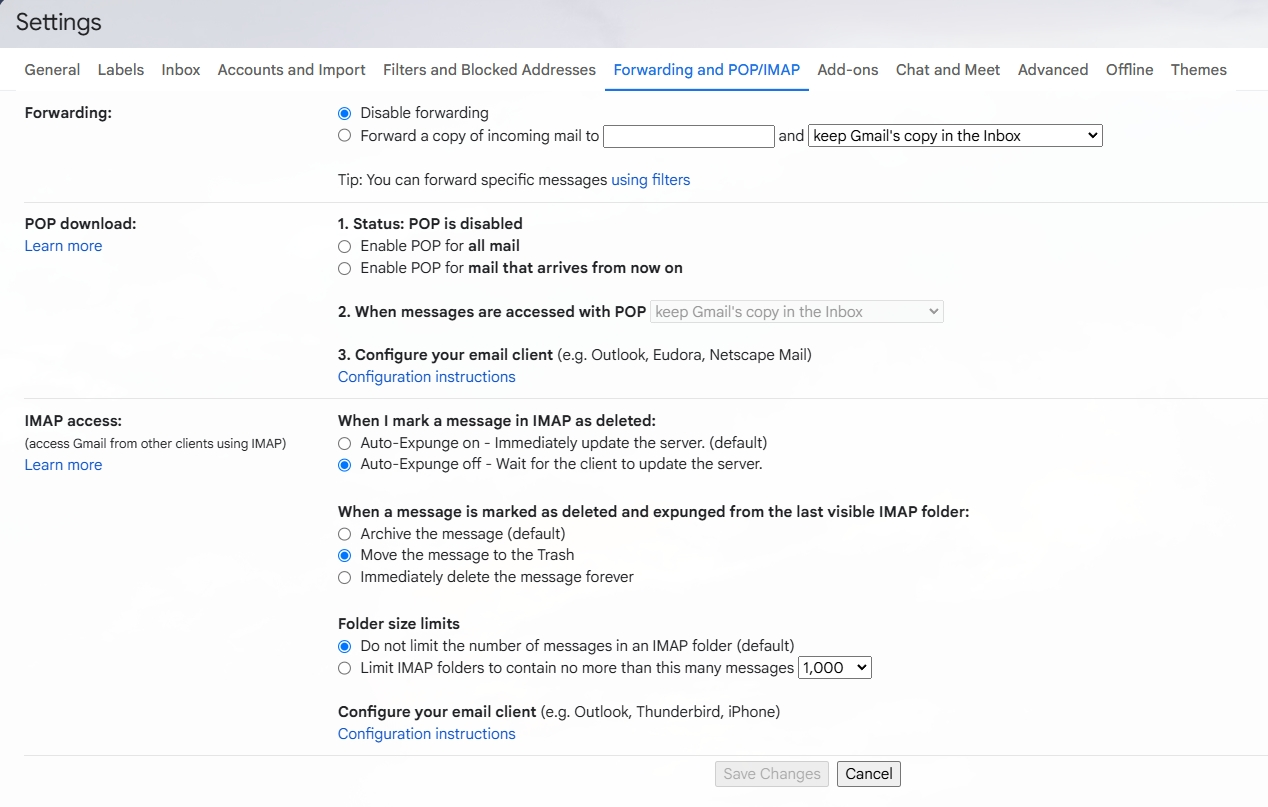
Go to this link in your Gmail settings https://mail.google.com/mail/u/0/#settings/fwdandpop Change what google do when you delete an email to your chosen action.
Just to be 100% clear the default of archive leaves the copy in the All Mail folder.
You probably should also hold the shift key while deleting mail as delete makes a copy in the trash. When you delete from all mail you simplicity make a new copy in all mail for the copy that goes in the trash folder. To prevent that you press the shift key to bypass the trash folder in the delete processing. note there is no undo for shift+Delete, the mail is gone right now forever.
Flashfox said
There must be a simple way to do this. ChatGPT and CoPilot have been running me in circles trying all sorts of stuff the "apologizing" when I said it didn't work and shared what was happening (so much for AI help LOL) </blockquote>
I think I already did that, but the heart of the problem is you think your issue is in Thunderbird and it is not. So your questions to the AI are biased towards changing Thunderbird in the first instance, That would be fine, except Google has a non standard IMAP implementation that requires navigating before you even consider Thunderbird.
When you find an AI that can do more than summarize data from a link or collection of links without evaluating it for veracity or relevance you will be on a winner. AI are very good at providing a synopsis of complex tasks with a large body of relevant information, but they have no real understanding of the subject matter so will regurgitate obsolete rubbish if that is all they have to work with.
By the way, Google permanently removes messages in its Trash and Spam folders that are more than 30 days old. I don't find a Gmail setting that can change this behavior.
Matt ... Please see the attached as this is how Gmail has been configured