• OS Version: Microsoft Windows 10 Professional (x64) Version 22H2 (build 19045.6466)
• Firefox 149.0 (64-bit)
• Thunderbird 140.8.1esr (64-bit)
I guess now a Firefox “update” includes making bookmarks to disappear from the toolbar . . . go figure.
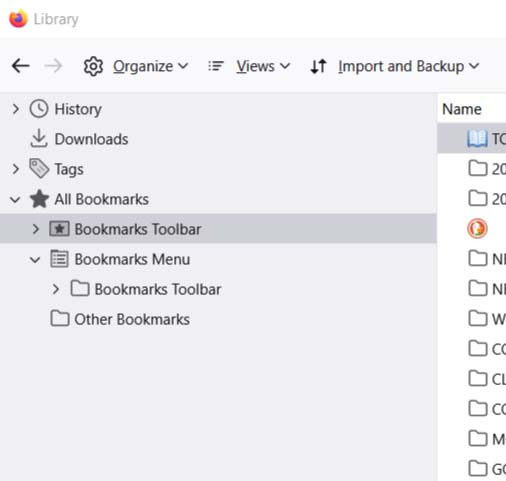
Have mucked around in their “go to about:profiles” routine and have found my bookmark library still exists; however . . .
1. The BOOKMARKS drop-down MANAGE BOOKMARKS shows all is in order, so apparently I don’t need to “import” anything from anywhere;
2. The bookmarks do not appear in the BOOKMARKS TOOLBAR;
3. VIEW drop-down ➜ TOOLBARS ➜ BOOKMARKS TOOLBAR ➜ ALWAYS SHOW is all as it should be;
4. BUT: No bookmarks appear in the TOOLBAR where they’ve resided comfortably for years . . .
SO: how does one magically make them reappear in the TOOLBAR where they belong?
Many thanks. Appreciated.
• OS Version: Microsoft Windows 10 Professional (x64) Version 22H2 (build 19045.6466)
• Firefox 149.0 (64-bit)
• Thunderbird 140.8.1esr (64-bit)
----------------------------------------------------------------------------------------------------
I guess now a Firefox “update” includes making bookmarks to disappear from the toolbar . . . go figure.
Have mucked around in their “go to about:profiles” routine and have found my bookmark library still exists; however . . .
1. The BOOKMARKS drop-down MANAGE BOOKMARKS shows all is in order, so apparently I don’t need to “import” anything from anywhere;
2. The bookmarks do not appear in the BOOKMARKS TOOLBAR;
3. VIEW drop-down ➜ TOOLBARS ➜ BOOKMARKS TOOLBAR ➜ ALWAYS SHOW is all as it should be;
4. BUT: No bookmarks appear in the TOOLBAR where they’ve resided comfortably for years . . .
SO: how does one magically make them reappear in the TOOLBAR where they belong?
Many thanks. Appreciated.