


how do I stop these annoying pop ups?

Often and every day I get these annoying pop-ups? How do i stop these from occuring?
All Replies (3)
It would be helpful if you can post an image of the 'annoying pop up'.
What are you doing when you get the pop up? What is pop up about ?
here is an attached file with the pop up
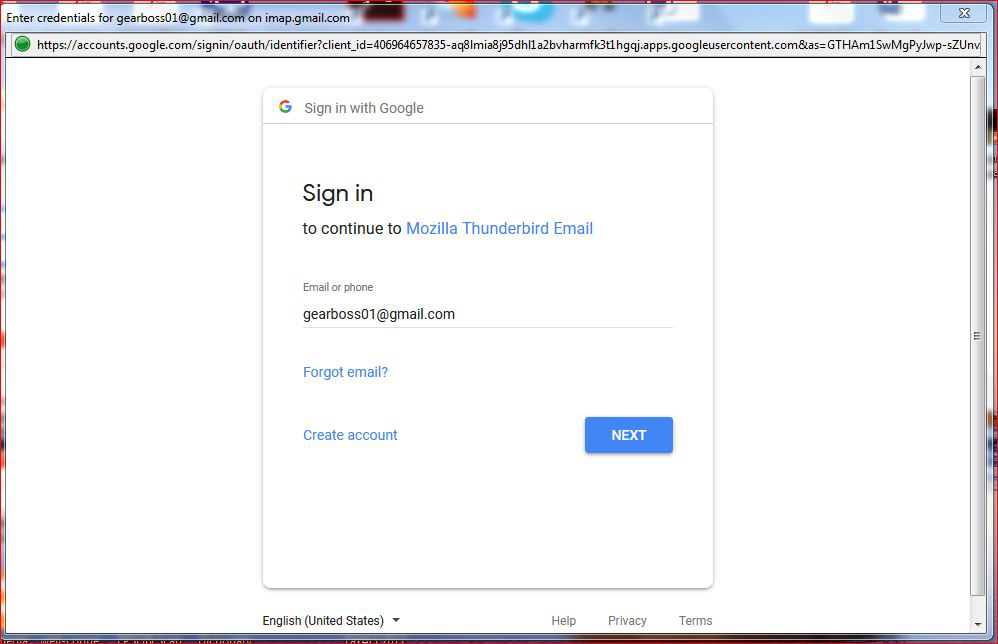
You must have created an imap gmail mail account in Thunderbird which uses OAuth2 as the Connection Security option.
When you created the account, initially you would have entered your password, the same one you use to see gmail webmail account. Then gmail will want you to to use the pop up to sign in and this will create the OAuth2 password that will get saved in Thunderbird and used each time you auto logon to see imap gmail folders and emails in Thunderbird.
Did you choose the option to save password in Thunderbird? Have you followed the pop up link instructions and logged into gmail so gmail know it really is you and create the OAuth2 password?