


Odd characters are invading my Thunderbird screen

Windows 7, Thunderbird 38.5.1
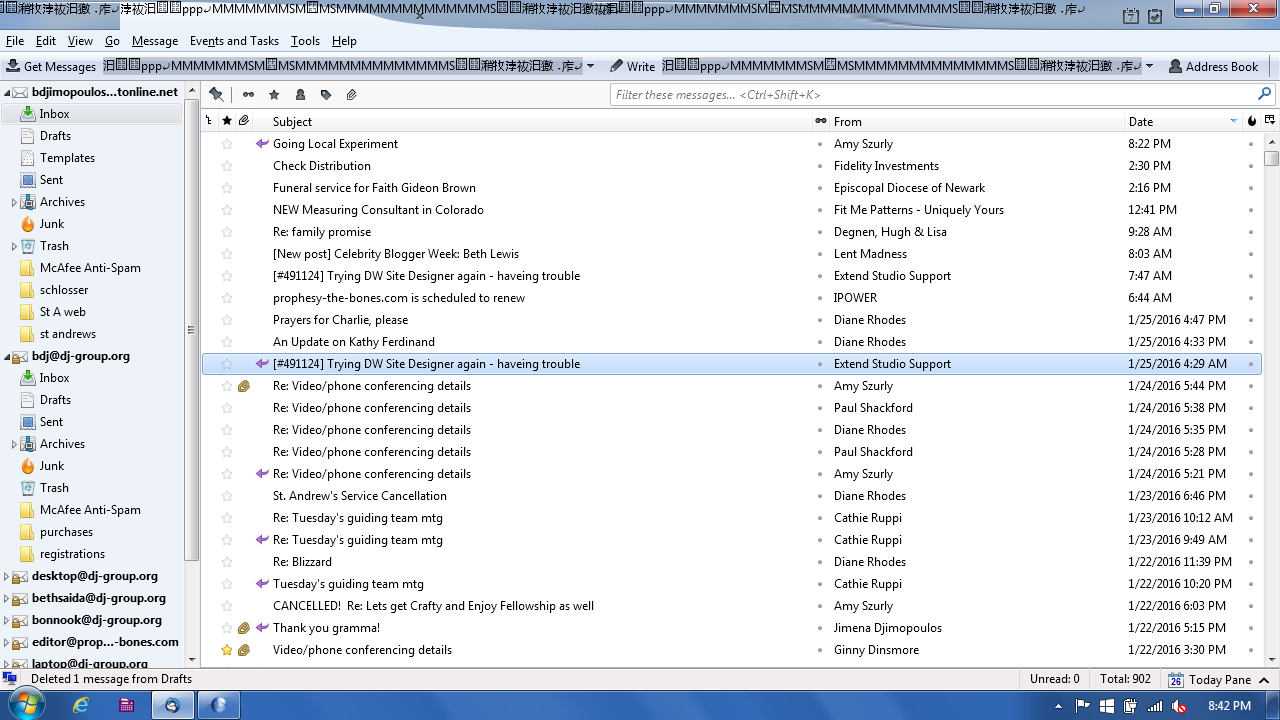
The top of my screen gets filled is random characters, obscuring the email options bar and the top of the screen. Picture attached.
Chosen Solution
Profile folders contain all the data and are located in a different place to the actual program and therefore should not be effected by an uninstall/reinstall.
However, I would suggest you perform a backup of your profile - just in case as a sensible precaution. Regular periodic backups are highly recommended as a good general practise.
You can use a program called 'Mozbackup' or install an addon extension called 'Importexporttool' which offers backing up folders as mbox files and also backing up a profile. It is also very quick and easy to perform a manual backup. If you have imap mail accounts, I would recommend you sychronise folders for offline use before backup.
Backup Info:
MozBackup info:
Importexporttools addon:
All Replies (3)
It looks like you have more than one language version trying to operate simultaneously - weird.
Suggest you uninstall Thunderbird via Control Panel > Programs and Features.
select Mozilla Thunderbird and click on uninstall.
Then download a fresh version from here:
choosing the prefered language and Windows OS download.
Question: what happens to my achived and active emails, and my calendar when I uninstall.
Thanks.
Chosen Solution
Profile folders contain all the data and are located in a different place to the actual program and therefore should not be effected by an uninstall/reinstall.
However, I would suggest you perform a backup of your profile - just in case as a sensible precaution. Regular periodic backups are highly recommended as a good general practise.
You can use a program called 'Mozbackup' or install an addon extension called 'Importexporttool' which offers backing up folders as mbox files and also backing up a profile. It is also very quick and easy to perform a manual backup. If you have imap mail accounts, I would recommend you sychronise folders for offline use before backup.
Backup Info:
MozBackup info:
Importexporttools addon: