


Fingerprint/password required to access saved passwords

I've just transitioned over from Google Chrome. There, any time I tried to access a saved password, it asked me for my fingerprint (I'm on a Mac). It "cached" my print for a five minute window, so if I access saved passwords during that window, I didn't have to do it again. But after five minutes, I had to do it again.
Although it's annoying, it's my preference because it's a business laptop that I travel with frequently.
Firefox doesn't seem to have the same feature? Some websites says it DOES have the five minute window, but I've tried every combination I can figure out in passwords and can't get that to happen. I tried the primary password, but that only asks for it when I start up Firefox. I want the five minute window.
I searched the forum and seem to be the only person in the world who wants this level of security?!?!
All Replies (5)

You're not imagining it. Firefox does have the 5-minute timeout, but it applies to its device sign-in protection, not the Primary Password feature. Mozilla's current documentation says that after authenticating, Firefox won't ask again until the page is reloaded or five minutes have passed. On macOS, this can use Touch ID.
Go to:
Firefox → Settings → Privacy & Security → Passwords
Then enable:
“Require device sign in to fill and manage passwords”
After that, try viewing/copying a saved password. You should get the macOS Touch ID prompt, and after 5 minutes Firefox should ask again.
Don't use Primary Password for what you want. Firefox's Primary Password is session-based and isn't designed to give you that Chrome-style 5-minute re-authentication.
So basically: your exact security preference is supported in current Firefox — you were just using the wrong setting.
Thanks, Jack. As I mentioned, I've tried every combination I can figure out.
The first thing I did was turn on "Require device sign in to fill and manage passwords"
Guess what it doesn't do. Require my fingerprint for saved passwords.
So then I tried primary password, and it only asked for it when I started a session. I turned off the primary password, quit and force quit Firefox, and when I restarted it, not only did it not ask for my password, it went ahead and just reloaded the credit card website I was on, logged in already.
I'm not sure what else to try, but it's going to be a major barrier for me, and I really want to use Firefox for all it's anti-AI properties.
And did the initial system prompt to add the authentication succeed? It's otherwise supposed to work like it says on the tin:
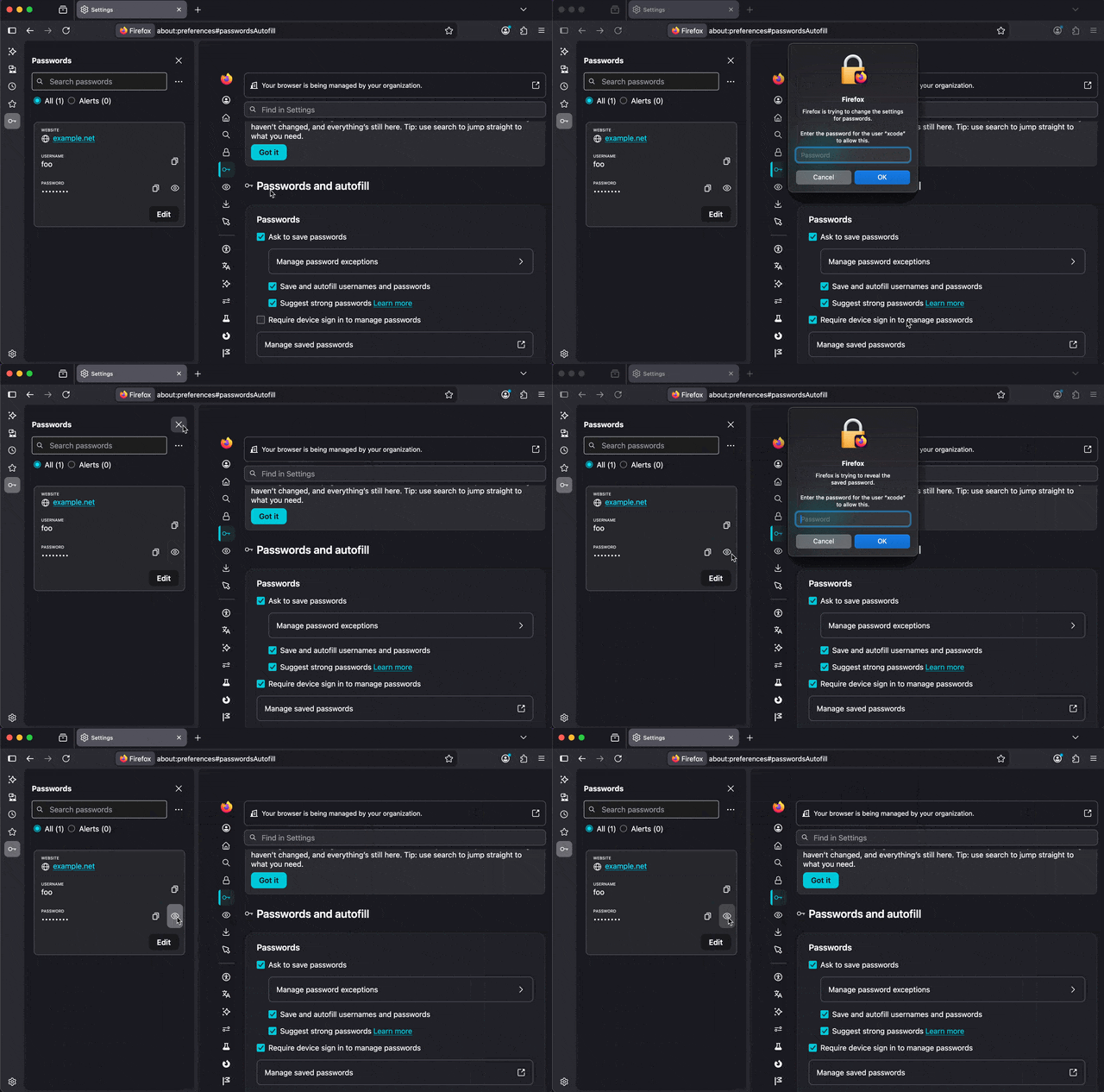
Yes. When I toggle that box on and off, it requests my fingerprint.
When I go to a website and click inside the username box, it just shows me the whole list of saved usernames, and then when I choose one, it just goes ahead and populates the password.
No sign in required.
Right, it seems the "fill in" part was removed, and only the actual credential management is protected by the system unlock currently, which is a letdown:(