


How can I stop the bookmarks sidebar from popping up in every new window/tab?

I CAN close it, by clicking on the X, or ctrl-B, or going to View... but it keeps coming back in every new window/tab, and that just annoys me. I'm used to having the bookmarks up in the Menu bar, out of the way, until I want them. The sidebar takes up a lot of space. And even though it's easily closed, I resent all these things that I didn't ask for, don't want, and can't control!
Всички отговори (2)
You can check for problems caused by a corrupted localstore.rdf file.
Usually the sidebar doesn't open by itself, but it is shared by all the tabs in a window.
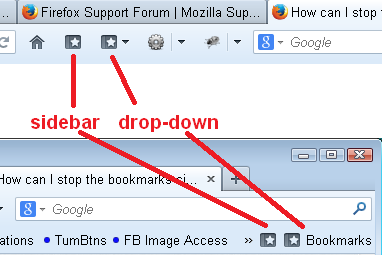
If you are using a toolbar button for the Bookmarks menu (instead of the classic menu bar), you might have the sidebar open/close button instead of the drop-down button. They have nearly identical icons, but the menu has either a little triangle or the word Bookmarks to the right of it, depending on which bar it's on. (Screen shot attached, from Firefox 24.)
To change out your button, you can try the Customize feature. See: Customize Firefox controls, buttons and toolbars.
Променено на от jscher2000 - Support Volunteer