


Why Firefox 4.0 does not save the passwords even the box is tigged?

I installed the Firefox 4.0 yesterday for the first time. It did not transfer the passwords from IE, only bookmarks. Icuold save yesterday one password, but it did not work anymore today. When I want save the password, Firefox don't even ask about it. The box in Tools/ Options is tigged. I have even tried to take the tigg away and swichts off the Firefox and after starting placing the tigg again in the box, but it did not help. What shall I do?
Избрано решение
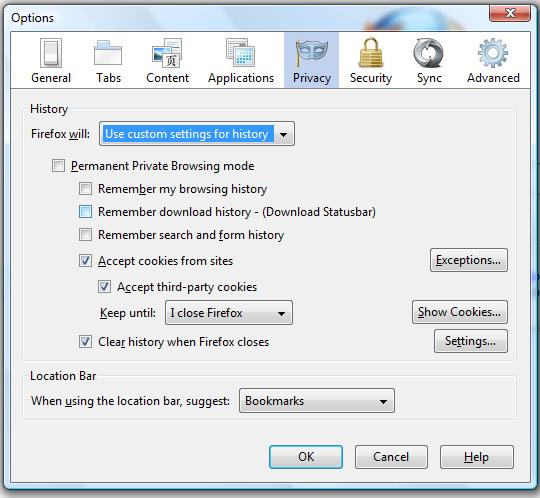
- Have a look at your Options > Privacy > History
- Make sure you do not choose 'Never remember history'.
- If you choose 'Use custom settings for history', make sure 'Permanent Private Browsing Mode' is unchecked.
Всички отговори (4)
Избрано решение
- Have a look at your Options > Privacy > History
- Make sure you do not choose 'Never remember history'.
- If you choose 'Use custom settings for history', make sure 'Permanent Private Browsing Mode' is unchecked.
It helped, thank you.
Have a nice day
azizy.aris.....I have done EXACTLY what you have said and perhaps it has helped others but it has NOT helped me. Could you perhaps think of anything else that may be causing this??? I was saving them for awhile but all of a sudden it stopped. Do you think it's because I have the Firefox v. 4 Optimized for Yahoo!? I don't remember if it worked prior to me updating to the version for Yahoo or not. Any help you can give me would be GREATLY appreciated!!!
Thank you in advance for all your and anyone else's help.
Christine ♥
Start Firefox in Use Troubleshoot Mode in Firefox to check if one of the add-ons is causing the problem (switch to the DEFAULT theme: Tools > Add-ons > Appearance/Themes).
- Don't make any changes on the Safe mode start window.
See: